SPAM insanity

<p>I don’t see much point in complaining about SPAM, but it’s slowly but surely reaching complete insanity…</p>

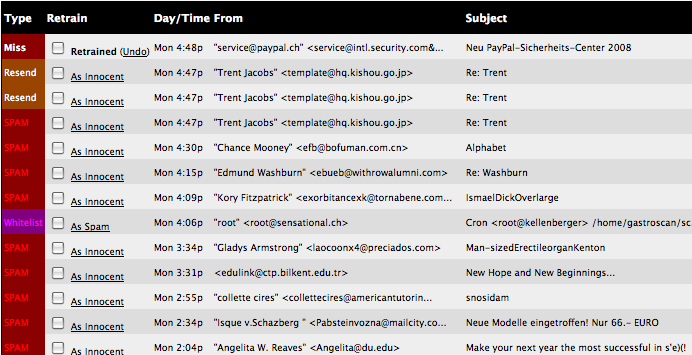
What you see here is the recent history view of my DSPAM – our second line of defense against SPAM.

Red means SPAM. (the latest of the messages was a quite clever phishing attempt which I had to manually reclassify)

To give even more perspective to this: The last genuine Email I received was this morning at 7:54 (it’s now 10 hours later) and even that was just an automatically generated mail from Skype.

To put it into even more perspective: My DSPAM reports that since december 22th, I got 897 SPAM messages and – brace yourself – 170 non-spam messages of which 100 were subversion commit emails and 60 other emails sent from automated cron-jobs.

What I’m asking myself now is: Do these spammers still get anything out of their work? The signal-to-noise ratio has gone down the drain in a manner which can only mean that no person on earth would actually still read through all this spam and even be stupid enough to actually fall for it.

How bad does it have to get before it gets better?

Oh and don’t think that DSPAM is all I’m doing… No… these 897 mails were the messages that passed through both the ix DNSBL and SpamAssassin.

Oh and: Kudos to the DSPAM team. A recognition rate of 99.957% is really, really good

The IE rendering dilemma

There’s a new release of Internet Explorer, aptly named IE8, pending and a whole lot of web developers are in fear of new bugs and no fixes to existing ones. Like the problems we had with IE7.

A couple of really nasty bugs where fixed, but there wasn’t any significant progress in matters of extended support for web standards or even a really significant amount of bugfixes.

And now, so fear the web developers, history is going to repeat itself. Why, are people asking, aren’t they just throwing away the currently existing code-base, replacing it with something more reasonable? Or if licensing or political issues prevent using something not developed in-house, why not rewrite IE’s rendering engine from scratch?

Backwards compatibility. While the web itself has more or less stopped using IE-only-isms and began embracing the way of the web standards (and thus began cursing on IE’s bugs), corporate intranets, the websites accessed by Microsoft’s main customer base, certainly have not.

ActiveX, <FONT>-Tags, VBScript – the list is endless and companies don’t have the time or resources to remedy that. Remember. Rewriting for no real purpose than “being modern” is a real waste of time and certainly not worth the effort. Sure. New Applications can be developped in a standards compliant way. But think about the legacy! Why throw all that away when it works so well in the currently installed base of IE6?

This is why Microsoft can’t just throw away what they have.

The only option I see, aside of trying to patch up what’s badly broken, is to integrated another rendering engine into IE. One that’s standards compliant and one that can be selected by some means – maybe a HTML comment (the DOCTYPE specification is already taken).

But then, think of the amount of work this creates in the backend. Now you have to maintain two completely different engines with completely different bugs at different places. Think of security problems. And think of what happens if one of these buggers is detected in a third party engine a hypothetical IE may be using. Is MS willing to take responsibility of third-party bugs? Is it reasonable to ask them to do this?

To me it looks like we are now paying the price for mistakes MS did a long time ago and for quick technological innovation happening at the wrong time on the wrong platform (imagine the intranet revolution happening now). And personally, I don’t see an easy way out.

I’m very interested in seeing how Microsoft solves this problem. Ignore the standards-crowd? Ignore the corporate customers? Add the immense burden of another rendering engine? FIx the current engine (impossible, IMHO)? We’ll know once IE8 is out I guess.

VMWare Server 2.0

Now that the time has come to upgrade shion‘s hardware, and now that I’m running a x86 based platform (well, it’s the 64 bit server install of Ubuntu Gutsy), I guessed it was time to have a look at my current bittorrent solution.

Of all the torrent clients out there, so far, I had the most painless experience with uTorrent: Acceptable download speeds, a very nice web interface and a nice looking user interface. The only drawback is that it requires Windows to run and I had no constant-running Windows-PC at home.

In fact, I didn’t even have a Windows-PC at all. VMWare Fusion came to the rescue as it allowed me to install Windows on a virtual machine and run that on my main mac at home. I chose fusion as opposed to parallels because I always knew that I was going to update shion sooner or later, so I wanted the portability of the VMWare virtual machines (they run everywhere VMWare runs on – no conversion, no nothing).

And now that I did replace shion, I’ve installed the latest beta version of VMWare Server 2.0 and moved the virtual machine over to the newly born shion 2.0 which means that I now have a constantly running “Windows-PC” at home.

The move was painless as expected, but the whole process of installing VMWare server or the web interface was not as painless. VMWare Server feels exactly like every other proprietary Unix application I ever had to deal with. Problems with shared libraries (PAM, Gentoo, 32bit emulation and vmware server 1.0 is pure hell), problems with init-scripts not working, problems with incomprehensible error messages, you name it.

And once I actually got the thing to run, the first thing I had to do was to configure a whole bunch of iptables-rules because it seems impossible to bind all the 7 ports the web interface opens to localhost only (shion also is my access router, so I certainly don’t want the vmware-stuff exposed on eth1).

And actually using the web interface means forwarding all the 7 ports. In VMWare Server 1, it sufficed to forward the one port the console application used.

All this to finally end up without a working console access – the browser plugin they use for this seems not to work with Mac OS X and adding all the 7 ports to putty in my client windows VM, frankly, was more complicated than what I could get out of it.

Before this goes final with the expectation of being as useful as version 1 was, they need to give us back a native client and a smaller number of ports to forward.

shion died

After so many years of continued usage, shion (not the character from Xenosaga, my Mac Mini) died.

The few times it’s actually capable of detecting its hard-drive at boot-time, it loses contact to it shortly after loading the kernel. And the hard drive makes an awful kind of noise which is a very good pointer at what’s wrong.

Now, I could probably just replace the hard drive, but that old G4 processor, the 512 Megs of RAM and the two single USB-ports forcing me to cascade hub after hub all are good reasons to upgrade the hardware itself.

And thus, Shion 2.0 was born.

I grabbed an unused Mac Mini from the office and tried installing Ubuntu Gutsy on it, which worked well, but Leopard’s “Startup Disk” preference pane didn’t list the partition I installed Ubuntu on as a bootable partition. Booting Linux via pressing alt during pre-boot worked, but, hey, it’s a server and I don’t have a keyboard ready where shion is going to stand.

So I did it the brute-force way and just installed Ubuntu using the whole drive. It takes a hell of a lot of time for the EFI firmware to start missing the original GUID partition scheme and the original EFI parition, but when it does, it starts GRUB in the MBR partition, so I’m fine.

This does mean that I will be unable to install later firmware upgrades (due to the lack of a working OS X), but at least it means that I can reboot shion when needed without having to grab a keyboard.

This, provided that Domi will be able to solder me a display adaptor making the EFI BIOS emulation think that a display is connected.

All in all, I’m not totally happy with the next generation of shion. Not booting without a display attached, long boot times, non-working bios updates and, especially, no eSATA, but it’s free, so I’ll take it. I guess the old shion just chose a terribly inconvenient time to die.

Closed Source on Linux

One of the developers behind the Linux port of the new Flex Builder for Linux has a blog post about how building closed source software for linux is hard

Mostly, all the problems boil down to the fact that Linux distributors keep patching the upstream source to fit their needs which clearly is a problem rooted in the fact that open source software is, well, open sourced.

Don’t get me wrong. I love the concepts behind free software and in fact, every piece of software I’ve written so far has been open source (aside of most of the code I’m doing for my eployer of course). I just don’t see why every distribution feels the urgue to patch around upstream code, especially as this issue applies to both open- and closed source software projects.

And worse yet: Every distribution adds their own bits and pieces – sometimes doing the same stuff in different ways and thus making it impossible or at least very hard for a third party to create add-ons for a certain package.

What good is a plugin system if the interface works slightly different on each and every distribution?

And think of the time you waste learning configuration files over and over again. To make an example: Some time ago, SuSE delivered an apache server that was using a completely customized configuration file layout, thereby breaking every tutorial and documentation written out there because none of the directives where in the files they are supposed to be.

Other packages are deliberately broken up. Bind for example often comes in two flavors: The server and the client, even though officially, you just get one package. Additionally, every library package these days is broken up in the real library and the development headers. Sometimes the source of these packages may even get patched to support such breaking up.

This creates an incredible mess for all involved parties:

  • The upstream developer gets blamed for bugs she didn’t cause because they were introduced by the packager.
  • Third party developers can’t rely on their plugins or whatever pluggable components to work across distributions if they work upstream
  • Distributions have to do the same work over and over again as new upstream versions are released, thus wasting time better used for other improvements.
  • End users suffer from the general disability of reliably installing precompiled third-party binaries (mysql recommends the use of their binaries, so this even affects open sourced software) and from the inability to follow online-tutorials not written for the particular distribution that’s in use.

This mess must come to an end.

Unfortunately, I don’t know how.

You see: Not all patches created by distributions get merged upstream. Sometimes, political issues prevent a cool feature from being merged, sometimes clear bugs are not recognized as such upstream and sometimes upstream is dead – you get the idea.

Solution like FHS and LSB tried to standardize many aspects of how linux distributions should work in the hope of solving this problem. Bureaucracy and idiotic ideas (german link, I’m sorry) are causing quite the bunch of problems lately, making it hard to impossible to implement the standards. And often the standards don’t specify the latest and greatest parts of current technology.

Personally, I’m hoping that we’ll either end up with one big distribution defining the “state of the art”, with the others being 100% compatible or with distributions switching to pure upstream releases with only their own tools custom-made.

What do you think? What has to change in your opinion?
C, C#, Java

Today, I was working on porting a EAN128-parser from Java to C#. The parser itself was initially written in C and porting it from there to Java was already quite easy – sure. It still looks like C, but it works nicely and thankfully, understanding the algorithm once and writing it was enough for me, so I can live with not-so-well looking Java code.

What made me write this entry though is the fact that porting the Java version over to C# involved three steps:

  1. Copy
  2. Paste
  3. Change byte barCode[] to byte[] barCode

It’s incredible how similar those two languages are – at least if what you are working with more or less uses the feature set C provided us with.

Recursive pottery

Yesterday evening, my girlfriend and I had an interesting discussion about pottery techniques. She’s studying archeology, so she has a real interest in pottery and techniques used. I in contrast have my interests in different subjects, but this method of potting we came up with was so funny that I thought I just had to post it.

Let’s say you want to create a vase.

Our method involves the following steps:

  1. Gather a vase that looks exactly like the one you want to build.
  2. Fill the vase with something that gets hard quickly, but crumples easily.
  3. Wait for that material to dry out, then destroy the original vase.
  4. Put clay around the hardened up filler material.
  5. Wait for the clay to dry up and burn the vase.
  6. Remove the filler material.
  7. Obviously this method will never allow you to produce more than one vase as in the process of creating one, you are destroying the other.

    We continued our discussion of how such a method of pottery could have interesting side effects. One is that the only way for a potter to generate revenue of his work is by renting out his current vase. And should the vase be returned defective, the whole business of the potter is over – until he receives another initial vase to continue working.

    Of course, getting hold of that would be quite interesting a job if every potter only used this method.

    And the question remains: Where do you take the initial vase from?

    Stupid. I know. But fun in its own way. Sometimes, I take great pleasure in inventing something totally stupid and then laugh at it. And believe me: We really had a good laugh about this.

The new iPods

<p>So we have new iPods.</p> <p>Richard sent me an email asking which model he should buy which made me begin thinking whether to upgrade myself. Especially the new touch screen model seemed compelling to me – at first.</p> <p>Still: I was unable to answer that email with a real recommendation (though honestly, I don’t think it was as much about getting a recommendation than about to letting me know that the models were released and to hear my comments about them) and still I don’t really know what to think.</p> <p>First off: This is a matter of taste, but I hate the new nano design: The screen still is too small to be useful for real video consumption, but it made the device very wide – too wide, I think, to be able to comfortably keep it in my trousers pockets while biking (I may be wrong though).</p> <p>Also, I don’t like the rounded corners very much and the new interface… really… why shrink the menu to half a screen and clutter the rest with some meaningless cover art which only the smallest minority of my files are tagged with.</p> <p>Coverflow feels tucked onto the great old interface and looses a lot of its coolness without the touch screen.</p> <p>They don’t provide any advantage in flash size compared to the older nano models and I think the scroll wheel is way too small compared to the large middle button.</p> <p>All in all, I would never ever upgrade my second generation nano to one of the third generation as they provide no advantage, look (much) worse (IMHO) and seem to have a usability problem (too small a scroll wheel)</p> <p>The iPod classic isn’t interesting for me: Old style hard drives are heavy and fragile and ever since I bought that 4GB nano a long while ago, I noticed that there is no real reason behind having all the music on the device.</p> <p>I’m using my nano way more often than I ever used my old iPod: The nano is lighter and I began listening to podcasts. Still: While I lost HD-based iPods around every year and a half due to faulty hard drives or hard drive connectors, my nano still works as well as it did on the first day.</p> <p>Additionally, the iPod classic shares the strange half-full-screen menu and it’s only available in black or white. Nope. Not interesting. At least for me.</p> <p>The iPod touch is interesting because it has a really interesting user interface. But even there I have my doubts: For one, it’s basically an iPhone without the phone. Will I buy an iPhone when (if) it becomes available in Switzerland? If yes, there’s no need to buy the iPod Touch. If no, there still remains that awful usability problem of touch-screen only devices:</p> <p>You can’t use them without taking them out of your pocket.</p> <p>On my nano, I can play and pause the music (or more often podcast) and I can adjust the volume and I can always see what’s on the screen.</p> <p>On the touch interface, I have to put the screen to standby mode, I can’t do anything without looking at the device and I think it may be a bit bulky all in all.</p> <p>The touch is the perfect bathtub surfing device. It’s the perfect device to surf the web right before or after going to sleep. But it’s not portable.</p> <p>Sure. I can take it with me, but it fails in all the aspects of portability. It’s bulky, it can’t be used without taking it out of your pocket and stopping whatever you are doing, it requires two hands to use (so no changing tracks on the bike any more) and it’s totally useless until you manually turn the display back on and unlock it (which also requires two hands to do).</p> <p>So: Which device should Richard buy? I still don’t know. What I know is that I will not be replacing my second generation Nano as long as it keeps working.</p> <p>The Nano looks awesome, works like a charm and is totally portable. Sure. It can’t play video, but next to none of my videos actually fits the requirement of the video functionality anyways and I don’t see myself recoding already compressed content. That just takes an awful lot of time, greatly degrades the quality and generally is not at all worth the effort.</p>

PHP 5.2.4

Today, the bugfix-release 5.2.4 of PHP has been released.

This is an interesting release, because it includes my fix for bug 42117 which I discovered and fixed a couple of weeks ago.

This means that with PHP 5.2.4 I will finally be able to bzip2-encode data as it is generated on the server and stream it out to the client, greatly speeding up our windows client.

Now I only need to wait for the updated gentoo package to update our servers.