Windows Installer – Worked around

I’ve talked about Windows Installer (the tool that parses these .MSI files) before and I’ve never really convinced that this technology really does its job. Just have a look at these previous articles: Why o why is my hard-drive so small?, A look at Windows Installer and The myth of XCOPY deployment

Yesterday I had a look at the Delphi 2007 installation process and it dawned me that I’m going to have to write yet another blog entry.

It’s my gut-feeling that 80% of all bigger software packages in Windows can’t live with MSIs default feature set and they have to work around inherent flaws in the design of that tool. Here’s what I found installers doing (in increasing order of stupidity):

  1. Use a .EXE-stub to install the MSI engine. These days this really doesn’t make sense any more as 99% of all windows installation already have MSI installed and the ones that don’t, you don’t want to support anyways (Windows Update requires MSI).
  2. Use a .EXE-stub that checks for availability and thereafter installs a bunch of prerequisites – sometimes even other MSI packages. This isn’t caused by MSI-files unable to detect the presence of prerequisites – it’s because MSI-files are unable to install other MSI files and the workaround (using merge packages) doesn’t work because most of the third party libraries to install don’t come as merge packages.
  3. Create a MSI-file which contains a traditional .EXE-Setup, unpack that to a temporary location and run it. This is what I call the “I want a Windows-Logo, but have no clue how to author MSI files”-type of installation (and I completely understand the motivation behind that) which just defeats all the purposes MSI files ever had. Still: Due to inherent limitations in the MSI engine, this is often times the only way to go.
  4. Create MSI-files that extract a vendor specific DLL, a setup script and all files to deploy (or even just an archive) and then use that vendor specific DLL to run the install script. This is what InstallShield does at least some of the time. This is another version of the “I have no clue how to author a MSI file”-installation with the additional “benefit” of being totally vendor-locked.
  5. Create a custom installer that installs all files and registry keys and then launch the windows installer with a temporary .MSI-file to register your installation work in the MSI-installer. This is what Delphi 2007 does. I feel this is another workaround for Microsoft’s policy that only MSI-driven software can get a windows-logo, but this time it’s vendor-locked and totally unnecessary and I’m not even sure if such a behavior is consistent with any kind of specification.

Only a small minority of installations really use pure MSI and these installations usually are installations of small software packages and as my previous articles show: The technology is far from fool-proof. While I see that Windows should provide a generalized means for driving software installations, MSI can’t be the solution as evidenced by the majority of packages using workarounds to get by the inherent flaws of the technology.

*sigh*
Software patents

Like most programmers, I too hate software patents. But until now, I’ve never had a fine example of how bad they really are (though I’ve written about intellectual property in general before).

But now I just found another granted patent application linked on reddit.

The patent covers… linked lists.

Granted. It’s linked lists with pointers to objects further down the list than the immediate neighbors, but it’s still a linked list.

I’ve first read about linked lists when I was 13 and I read my first book about C. This was 13 years ago – way before that patent application was originally filed.

So seeing a technology in use for at least 13 years being patented as «new invention», I’m asking myself two questions:

  1. How the hell could this patent application even be accepted seeing that it isn’t inventive at all?
  2. Why do companies file trivial patents for which prior art obviously exists and which are thus invalid to begin with?

And based on that I’m asking the world: Why don’t we stop the madness?

But let’s have a look at the above two points. Answering the first one is easy: The people checking these applications have no interest (and no obligation) to check the applied patents. In fact, these «experts» may even be paid per passed patent and thus are totally interested in letting as many patents pass as possible. Personally, I also doubt their technical knowledge in the fields they are reviewing patents in.

Even more so: Most of these applications are formulated in legal-speak which is targeted to be read by lawyers which usually have no clue about IT, whereas the IT people usually don’t understand the texts of the applications.

Patent law (as trademark law) basically allows you to submit anything and it’s the submitters responsibility to make sure that prior art doesn’t exist. The patent offices can’t be hold liable for wrongly issued patents.

And this leads us to question 2: Why submit an obviously invalid patent?

For one, patent applications make the scientific achievement of a company measurable for non-tech people.

Analysts compare the «inventiveness» of companies by comparing the sheer number of granted patents. A company with more granted patents has a better value in the market and it’s only about market-value these days. This is one big motivation for a company to try and have as many patents granted as possible.

The other issue is that once the patent is granted, you can use that (invalid) patent to sue as many competitors as possible. As you have the legally granted patent on your side, the sued party must prove that the patent is invalid. This means a long and very expensive trial with an uncertain outcome – you can never know if the jury/judge in question knows enough about technology to identify the patent as false or if they will just value the legally issued document higher than the possible doubts raised by the sued party.

This makes fighting an invalid patent a very risky adventure which many companies don’t want to invest money in.

So in many (if not most) cases, your invalid patent is as valuable as a valid one if you intend to use it to sue competitors to make them pay royalty fees or hinder them at ever selling a product competing to yours – even though your legal measure is invalid.

One more question to ask: Why does the Free Software community seem so incredibly concerned about software patents while vendors of commercial software usually keep quiet?

It’s all about the provability of infringing upon trivial patents.

Let’s take above linked-list patent: It’s virtually impossible to prove that any piece of compiled software is infringing on this (invalid) patent. In source form though, it’s trivially easy to prove the same thing.

So where this patent serves only one purpose in the closed source world (increased shareholder value due to higher amount of patents granted), it also begins to serve the other purpose (weapon against competitors) in a closed source world.

And. Yes. I’m asserting that Free as well as Non-Free software infringes upon countless of patents. Either willing or unwilling (I guess the former is limited to the non-free community). Just look at the sheer amount of software patents granted! I’m asserting that it’s plain impossible to write software today that doesn’t infringe upon any patent.

Please, stop that software patent nonsense. The current system criminalizes developers and serves no purpose that trademark and intellectual property laws couldn’t solve.

Debugging PocketPCs

Currently I’m working with Windows Mobile based barcode scanning devices. With .NET 2.0, actually developing real-world applications for the mobile devices using .NET has become a viable alternative.

.NET 2.0 combines sufficient speed at runtime (though you have to often test for possible performance regressions) with a very powerful development library (really usable – as compared to .NET 1.0 on smart devices) and unbeatable development time.

All in all, I’m quite happy with this.

There’s one problem though: The debugger.

When debugging, I have two alternatives and both suck:

  1. Use the debugger to connect to the real hardware. This is actually quite fast and works flawlessly, but whenever I need to forcibly terminate the application (for example when an exception happened or when I’m pressing the Stop-Button in the debugger), the hardware crashes somewhere in the driver for the barcode scanner.

    Parts of the application stay in memory and are completely unkillable. The screen freezes

    To get out of this, I have to soft-reset the machine and wait half a century for it to boot up again.

  2. Use the emulator. This has the advantage of not crashing, but it’s so slow.

    From the moment of starting the application in VS until the screen of the application is loaded in the emulator, nearly three minutes pass. That slow.

So programming for mobile devices mainly contains of waiting. Waiting for reboots or waiting for the emulator. This is wearing me down.

Usually, I change some 10 lines or so and then run the application to test what I’ve just written. That’s how I work and it works very well because I get immediate feedback and it helps me to write code what’s working in the first place.

Unfortunately, with these prohibitive long startup times, I’m forced to write more and more code in one batch which means even more time wasted with debugging.

*sigh*

XmlTextReader, UTF-8, Memory Corruption

XmlTextReader on the .NET CF doesn’t support anything but UTF-8 which can be a good thing as it can be a bad thing.

Good thing because UTF-8 is a very flexible character encoding giving access to the whole Unicode character range while still being compact and easy to handle.

Bad thing because PopScan doesn’t do UTF-8. It was just never needed as its primary market is countries well within the range of ISO-8859-1. This means that the protocol between server and client so far was XML encoded in ISO-8859-1.

To be able to speak with the Windows Mobile application, the server had to convert the data to UTF-8.

And this is where a small bug occurred: Part of the data wasn’t properly encoded and was transmitted as ISO-8859-1.

The correct thing a XML-Parser should do about obviously incorrect data is to bail out, which also is what the .NET CF DOM parser did.

XmlTextReader did something else though: It threw an uncatchable IndexOutOfRange exception either in Read() or ReadString(). And sometimes it miraculously changed its internal state – jumping from element to element even when just using ReadString().

To make things even worse, the exception happened at a location not even close to where the invalid character was in the stream.

In short, from what I have seen (undocumented and uncatchable exceptions being thrown at random places), it feels like the specific invalid character that was parsed in my particular situation caused memory corruption somewhere inside the parser.

Try to imagine how frustrating it was to find and fix this bug – it felt like the old days of manual memory allocation combined with stack corruption. And all because of one single bad byte in a stream of thousands of bytes.

The price of automatisms

Visual Studio 2005 and the .NET Framework 2.0 brought us the concept of table adapters and a nice visual designer for databases allowing you to quickly “write” (point and click) your data access layer.

Even when using the third party SQLite library, you can make use of this facility and it’s true: Doing basic stuff works awfully well and quickly.

The problems start when what you intend to do is more complex. Then the tool becomes braindead.

The worst thing about it is that it’s tailor-made for SQL-Server and that it insists on parsing your queries instead of letting the database or even the database driver do that.

If you add any feature to your query that is not supported by SQL-Server (keep in mind that I’m NOT working with SQL-Server – I don’t even have a SQL-Server installed), the tool will complain about not being able to parse the query.

The dialog provides an option to ignore the error but it doesn’t work like I would have hoped it should: “Ignore” doesn’t mean: “Keep the old configuration”. It means “work as if there wasn’t any query at all”.

This means that even when you want to do something simple as write “insert or replace” instead of “insert” (saves one query per batch item and I’m doing lots of batch items) or just add a limit clause “limit 20” will make the whole database designer unusable for you.

The ironic thing about the limit clause is that the designer certainly accepts “select top xxx from…” which will fail at run time due to SQLite not supporting that proprietary extension.

So in the end it’s back to doing it manually.

But wait a minute: Doing it manually is even harder that it should be because the help, tutorials, books and even google all only talk about the automatic way, either unaware or not caring that it just won’t work if you want to do more than example code.

SQLite, Windows Mobile 2005, Performance

As you know from previous posts, I’m working with SQLite on mobile devices which lately means Windows Mobile 2005 (there was a Linux device before that tough, but it was hit by the RoHS regulation of the European union).

In previous experiments with the older generation of devices (Windows CE 4.x / PocketPC 2003), I was surprised by the high performance SQLite is able to achieve, even in complex queries. But this time, something felt strange: Searching for a string in a table was very, very slow.

The problem is that CE5 (and with it Windows Mobile 2005) uses non-volatile flash for storage. This has the tremendous advantage that the devices don’t lose their data when the battery runs out.

But compared to DRAM, Flash is slow. Very slow. Totally slow.

SQLite doesn’t load the complete database into RAM, but only loads small chunks of the data. This in turn means that when you have to do a sequential table scan (which you have to do when you have a LIKE ‘%term%’ condition), you are more or less dependant on the speed of the storage device.

This what caused SQLite to be slow when searching. It also caused synchronizing data to be slow because SQLite writes data out into checkpoint files during transactions.

The fix was to trade off launch speed (the application is nearly never started fresh) for operating speed by loading the data into an in-memory table and using that for all operations.

attach ":memory:" as mem;

create table mem.prod as select * from prod;

Later on, the trick was to just refer to mem.prod instead of just prod.

Of course you’ll have to take extra precaution when you store the data back to the file, but as SQLite even supports transactions, most of the time, you get away with

begin work;

delete from prod;

insert into prod (select * from mem.prod);

commit;

So even if something goes wrong, you still have the state of the data of the time when it was loaded (which is perfectly fine for my usage scenario).

So in conclusion some hints about SQLite on a Windows Mobile 2005 device:

  • It works like a charm
  • It’s very fast if it can use indexes
  • It’s terribly slow if it has to scan a table
  • You can fix that limitation by loading the data into memory (you can even to it on a per-table basis)

lighttpd, .NET, HttpWebRequest

Yesterday, when I deployed the server for my PocketPC-Application to an environment running lighttpd and PHP with FastCGI SAPI, I found out that the communication between the device and the server didn’t work.

All I got on the client was an Exception because the server sent back error 417: Precondition failed.

Of course there was nothing in lighttpd’s error log, which made this a job for EtherealWireshark.

The response from the server had no body explaining what was going on, but in the request-header, something interesting was going on:

Expect: 100-continue

Additionally, the request body was empty.

It looks like HttpWebRequest, with the help of the compact framework’s ServicePointManager is doing something really intelligent which lighttpd doesn’t support:

By first sending the POST request with an empty body and that Expect: 100-continue-header, HttpWebRequest basically gives the server the chance to do some checks based on the request header (like: Is the client authorized to access the URL? Is there a resource available at that URL?) without the client having to transmit the whole request body first (which can be quite big).

The idea is that the server does the checks based on the header and then either sends a error response (like 401, 403 or 404) or it advises the client to go ahead and send the request body (code 100).

Lighttpd doesn’t support this, so it sends that 417 error back.

The fix is to set Expect100Continue of System.Net.ServicePointManager to false before getting a HttpWebRequest instance.

That way, the .NET Framework goes back to plain old POST and sends the complete request body.

In my case that’s no big disadvantage because if the server is actually reachable, the requested URL is guaranteed to be there and ready to accept the data on HTTP-level (of course there may be some errors on the application level, but there has to be a request body for them to be detected).

Profiling PHP with Xdebug and KCacheGrind

Profiling can provide real revelations.

Sometimes, you have that gut feeling that a certain code path is the performance bottleneck. Then you go ahead and fix that only to see, that the code is still slow.

This is when a profiler kicks in: It helps you determine the real bottlenecks, so you can start fixing them

The PHP IDE I’m currently using, Zend Studio (it’s the only PHP IDE filling my requirements on the Mac currently) does have a built-in profiler, but it’s a real bitch to set up.

You need to install some binary component into your web server. Then the IDE should be able to debug and profile your application.

Emphasis on “should”.

I got it to work once, but it broke soon after and I never really felt inclined to put more effort into this – even more so as I’m from time to time working with a snapshot version of PHP for which the provided binary component may not work at all.

There’s an open source solution that works much better both in terms of information you can get out of it and in terms of ease of setup and use.

It’s Xdebug.

On gentoo, installing is a matter of emerge dev-php5/xdebug and on other systems, pear install xdebug might do the trick.

Configuration is easy too.

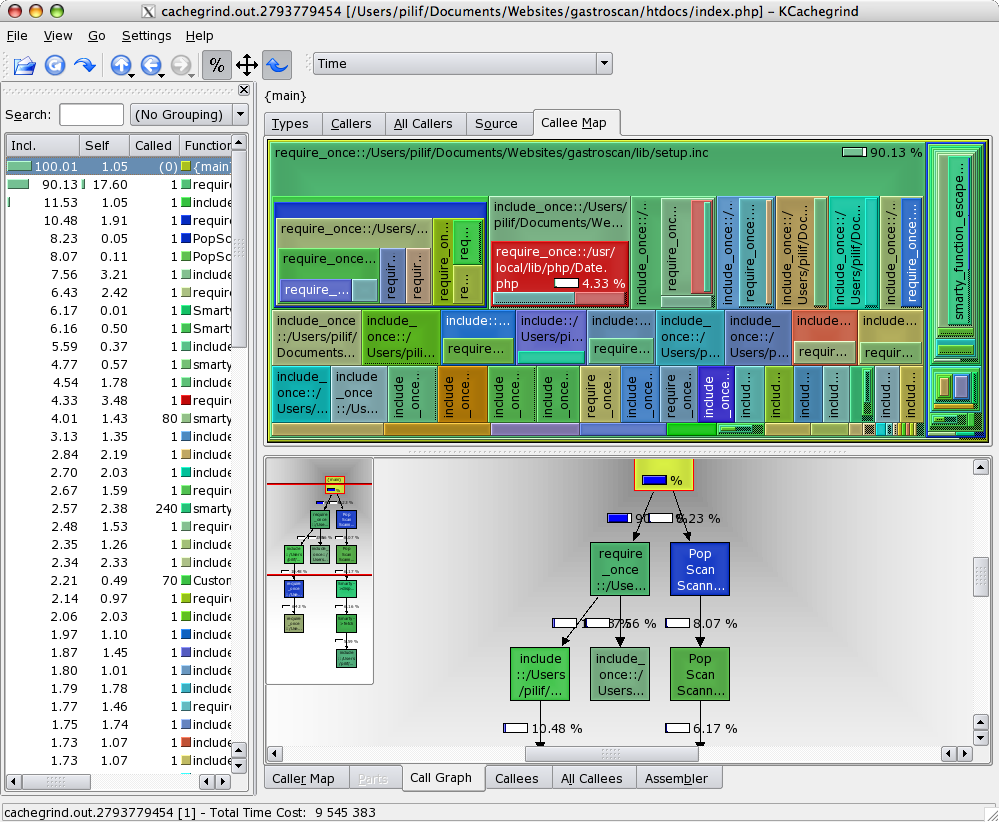
Xdebug generates profiling information in the same format as valgrind, the incredible debugger the KDE people created.

And once you have that profiling information, you can use a tool like KCacheGrind to evaluate the data you’ve collected.

The tool provides some incredibly useful views of your code, making finding performance problems a joyful experience.

Best of all though is that I was able to compile KCacheGrind along with its dependencies on my MacBook Pro – another big advantage of having a real UNIX backend on your desktop.

By the way: Xdebug also is a debugger for PHP, though I’ve never used it for that as I never felt the need to step through PHP code. Because you don’t have to compile it, you are often faster by instrumenting the code and just running the thing – especially once the code is spreading over a multitude of files.

Template engines complexity

The current edition of the german computer magazine iX has an article comparing different template engines for PHP.

When I read it, the old discussion about Smarty providing too many flow controlling options sprang to my mind again, even though that article itself doesn’t say anything about whether providing a rich template language is good or not.

Many purists out there keep telling us that no flow control what so ever should be allowed in a template. The only thing a template should allow is to replace certain marker by some text. Nothing more.

Some other people insist, that having blocks which are parsed in a loop is ok too. But all the options Smarty provides are out of the question as it begins intermixing logic and design again.

I somewhat agree on that argument. But the problem is that if you are limited to simple replacements and maybe blocks, you begin to create logic in PHP which serves no other purpose than filling that specially created block structure.

What happens is that you end up with a layer of PHP (or whatever other language) code that’s so closely tailored to the template (or even templates – the limitations of the block/replacement engines often require you to split a template into many partial file) that even the slightest changes in layout structure will require a rewrite in PHP.

Experience shows me that if you really intend to touch your templates to change the design, it won’t suffice to change the order of some replacements here and there. You will be moving parts around and more often than not the new layout will force changes in the different blocks / template files (imagine marker {mark} moving from block HEAD to block FOOT).

So if you want to work with the down-stripped template engines while still keeping the layout easily exchangeable, you’ll create layout-classes in PHP which get called from the core. These in turn use tightly coupled code to fill the templates.

When you change the layout, you’ll dissect the page layouts again, recreate the wealth of template files / blocks and then update your layout classes. This means that changing the layout does in-fact require your PHP backend coders to work with the designers yet again.

Take smarty.

Basically you can feed a template a defined representation of view data (or even better: Your model data) in unlimited complexity and in raw form. You want to have floating numbers on your template represented with four significant digits? Not your problem with smarty. The template guys can do the formatting. You just feed a float to the template.

In other engines, formatting numbers for example is considered backend logic and thus must be done in PHP.

This means that when the design requirement in my example changes and numbers must be formatted with 6 significant digits, the designer is stuck. He must refer back to you, the programmer.

Not with Smarty. Remember: You got the whole data in a raw representation. A Smarty template guy, knows how to format Numbers from within Smarty. He just makes the change (which is a presentation change only) right in the template. No need to bother the backend programmer.

Furthermore, look at complex structures. Let’s say a shopping cart. With Smarty, the backed can push the whole internal representation of that cart to the template (maybe after some cleaning up – I usually pass an associative array of data to the template to have a unified way of working with model data over all templates). Now it’s your Smarty guys responsibility (and possibility) to do whatever job he has to do to format your model (the cart) in a way the current layout specification asks him to.

If the presentation of the cart changes (maybe some additional text info must be displayed what the template was not designed for in the first place), the model and the whole backend logic can stay the same. The template just uses the model object it’s provided with to display that additional data.

Smarty is the template engine allowing to completely decouple the layout from the business logic.

And let’s face it: Layout DOES in-fact contain logic: Alternating row colors, formatting numbers, displaying different texts if no entries could be found,…

When you remove logic from the layout, you will have to move it to the backend where it immediately means that you will need a backend worker whenever the layout logic changes (which it always does on redesigns).

Granted. Smarty isn’t exactly easy to get used to for a HTML only guy.

But think of it: They managed to learn to replace <font> tags in their code with something more reasonable (CSS), that works completely differently and follows a completely different syntax.

What I want to say is that your layout guys are not stupid. They are well capable of learning the little bits of pieces of logic you’d want to have in your presentation layer. Let them have that responsibility means that you yourself can go back to the business logic once and for all. Your responsibility ends after pushing model objects to the view. The rest is the Smarty guys job.

Being in the process of redesigning a fully smarty-based application right now, I can tell you: It works. PHP does not need to get touched (mostly – design flaws exist everywhere). This is a BIG improvement over other stuff I’ve had to do before which was using the way everyone is calling clean: PHPLIB templates. I still remember fixing up tons and tons of PHP-code that was tightly coupled into the limited structure of the templates.

In my world, you can have one backend, no layout code in PHP and a unlimited amount of layout templates. Interchangable without changing anything in the PHP code. Without adding any PHP code when creating a new template.

Smarty is the only PHP template engine I know of that makes that dream come true.

Oh and btw, Smarty won the performance contest in that article with a lot of distance to the second fastest entry. So bloat can’t be used as argument against smarty. Even if it IS bloated, it’s not slower than non-bloated engines. It’s faster.

SQLite on .NET CF – Revisited

Another year, another posting.

Back in 2004, I blogged about Finisar.SQLitem which at the time was the way to go.

Today, I am in quite the same situation as I was back then, with the difference that this time, it’s not about experimenting. It’s a real-world will-go-life-thing. I’m quite excited to finally have a chance at doing some PocketPC / Windows Mobile stuff that will actually be seen by someone else than myself.

Anyways: The project I blogged about is quite dead now and does not even support the latest versions of SQLite (3.2 is the newest supported file format). Additionally, it’s a ADO.NET 1.0 library and thus does not provide the latest bells and whistles.

Fortunately, someone stepped up and provided the world with
ADO.NET SQLite, which is what I’m currently trying out. The project is alive and kicking, supporting the latest versions of SQLite.

So, if you, like me, need a fast and small database engine for your PocketPC application, this project is the place to look I guess.