.NET CF, Windows CE and Fullscreen

.NET CF, Windows CE and Fullscreen

Assuming you are creating an application for the .NET compact framework and further assuming that the application is designed to be the only one running on the target device because the whole device is defined by your application.

Also, you don’t want the end-users to tamper with the device.

This is why you sometimes want to put your application in a full-screen mode, hiding all other UI elements on the screen. Of course, to prevent tampering, you’d have to take additional measures, but that’s another topic.

The application I’m currently working on is written for the .NET compact framework, so the explanations are made for that environment.

Putting your application to full screen on the PocketPC is easy: Set your form’s FormBorderStyle to None and set WindowState to Maximized. That will do the trick.

On Windows CE (PocketPC is basically a special UI library and application collection running on top of Windows CE), there’s a bit more work to do.

First of all, you have to remove the task bar, which is acomplished by some P/Invoke calls which are declared like this:

[DllImport("coredll.dll", CharSet=CharSet.Auto)]
public static extern bool ShowWindow(int hwnd, int nCmdShow);

[DllImport("coredll.dll", CharSet = CharSet.Auto)]
public static extern bool EnableWindow(int hwnd, bool enabled);

Then, in your main form’s constructor, do the magic:

int h = FindWindow("HHTaskBar", "");
ShowWindow(h, 0);
EnableWindow(h, false);

And don’t forget to turn the task bar on again when your application exits.

int h = FindWindow("HHTaskBar", "");
ShowWindow(h, 5);
EnableWindow(h, true);

There’s one important additional thing to do though:

WindowState = Maximized won’t work!

Well. It will work, but it will resize your form in a way that there weill be empty space at the bottom of the screen where the taskbar was. You will have to manually resize the form by using something like this:

this.Height = Screen.PrimaryScreen.Bounds.Height;
this.Width = Screen.PrimaryScreen.Bounds.Width;

That last bit hit me hard today :-)

On a side note: There’s also the SHFullScreen-API call which also allows your application to position itself on the top of the taskbar. This basically is the official way to go, but the DLL aygshell.dll where the function is implemented in is not always available on all CE configurations.
XmlReader – I love thee

Lately, I have been working with the .NET framework. Well. It was the compact framework actually. I’m currently writing software for one of these advanced barcode scanners which run Windows Mobile.

The one thing I want to talk about is XmlReader. You know: One of these devices actually has a built-in GPRS unit, so it lends itself as a really nice mobile client.

With mobility comes synchronization and synchronization is something PopScan can do quite well. The protocol is XML based, so I need to parse XML on the device.

It’s even getting more interesting though: The server usually bzip2-compresses the XML-data while sending it out. The XML stream is perfectly compressible, so that’s a good thing to do – even more so that the device communicates over a volume taxed GPRS connection.

The naïve approach to this situation is to do this:

  1. Read data from server to the memory
  2. Compress the data in-memory
  3. Use a DOM-Parser to build a DOM-Tree
  4. Iterate over the tree and handle the article data

This approach, of course, is completely unworkable. For once, you waste memory by storing the data multiple times in different forms. Then you build a DOM-tree which is pointless as it’s more or less flat data anyways. And finally, you wait for the download and then for the decompression before you can begin parsing. So it’s slow.

The way to go is to read data from the network, decompress it as it arrives, feed the data into a stream based XML-parser and work with its output.

That way, you only need some memory of buffers in the decompression engine and the XML parser. And you don’t wait. As you recieve data from the server, you can start decompressing and parsing it.

I’ve done this before. It was in Delphi. Reciving data from WinInet, feeding it through a bzip2 decompressor and finally parsing it with expat was truly hard work: Pointers here, malloc there and that awful event based interface of expat making it very difficult to track state.

And now I had to do it again with c#

Wow! This was easy.

First, there’s the nice Stream interface using a decorator pattern: You can just wrap streams into each other and then just read from the “outermost” stream.

This means that I can wrap a bzip2-decompression stream around the HTTP-Response stream and make the XML parser read from the decompression stream which in turn reads from the HTTP-response stream.

And then you have the XmlReader interface.

Parsing XML is done in a while loop by calling the object’s Read() method which returns whenever it encounters a start or end element in the stream. This makes tracking the state much easier and helps cleaning keeping your code clean.

All in all, I can’t believe how easy it was to write that parser.

This shows that some nice thought went into the design of the .NET framework and I’m really looking forward into finding even more nice surprises such as this.

Where have I been?

Long time no see. Where did yours truly go? Back to World of Warcraft (which was the reason for the lack of postings during 05)? Or something even worse?

I’m pleased to say that the WoW-times are more or less over. Granted: I still log on to the game here and then, but the pleasure I was getting out of playing the game is more or less gone.

There are more fun things to do than playing WoW and I’m currently enjoying them. WoW finally has regained the state of standard evening leisure as one of many alternatives of how to waste my time.

But back to the reason for my absence:

Since april this year I know that I will move into my very own flat. Back in April, it was a date far off with lots of things still needed to be done – things I didn’t bother about yet back then.

But now, November 1st is getting closer and closer by the day. And stuff still needs to be done.

And this is precisely why I somewhat lack the time to blog.

Writing an entry here on gnegg.ch consists of many tasks: First there’s inspiration. I browse the web, live through my day at work or just talk to colleagues of mine. Sooner or later something will happen about which I want to talk.

Then, I think about the subject and try to serialize my thoughts to create an entry that’s (hopefully) interesting to read.

And then I sit down and write the thing. This is the task that actually takes the least amount of my time (inspiration is the hardest for me – often times, I think the subjects are too obvious or too uninteresting to blog about).

The final thing is the proofreading – a task I’m not really good at.

So an average entry here takes about two to four hours to do – time I currently rather use for planning where to put existing furniture, where to buy new furniture (and where to put it of course), who to hire to install a new bathtub and so on.

This is a big thing for me. When I moved to my current flat back in 2001, it was more or less a “getting away from my parents” (don’t get me wrong: I love my parents). I moved more or less into the first available flat – also because it was hard as hell to get one in Zürich back then. So I took the opportunity.

Now it’s different. For one, this is my flat. Yes. I bought it. It’s mine. Then it’s more than three times as big as my current one. And it’s beautiful. Just filling it with my current furniture doesn’t give it the credit it deserves.

So, this is what’s keeping me absorbed.

Still, work is very, very interesting currently and I have lots of interesting stuff to write about in the pipeline (so inspiration is there) and I’m looking forward to post these entries. Today and in the near future.

Profiling PHP with Xdebug and KCacheGrind

Profiling can provide real revelations.

Sometimes, you have that gut feeling that a certain code path is the performance bottleneck. Then you go ahead and fix that only to see, that the code is still slow.

This is when a profiler kicks in: It helps you determine the real bottlenecks, so you can start fixing them

The PHP IDE I’m currently using, Zend Studio (it’s the only PHP IDE filling my requirements on the Mac currently) does have a built-in profiler, but it’s a real bitch to set up.

You need to install some binary component into your web server. Then the IDE should be able to debug and profile your application.

Emphasis on “should”.

I got it to work once, but it broke soon after and I never really felt inclined to put more effort into this – even more so as I’m from time to time working with a snapshot version of PHP for which the provided binary component may not work at all.

There’s an open source solution that works much better both in terms of information you can get out of it and in terms of ease of setup and use.

It’s Xdebug.

On gentoo, installing is a matter of emerge dev-php5/xdebug and on other systems, pear install xdebug might do the trick.

Configuration is easy too.

Xdebug generates profiling information in the same format as valgrind, the incredible debugger the KDE people created.

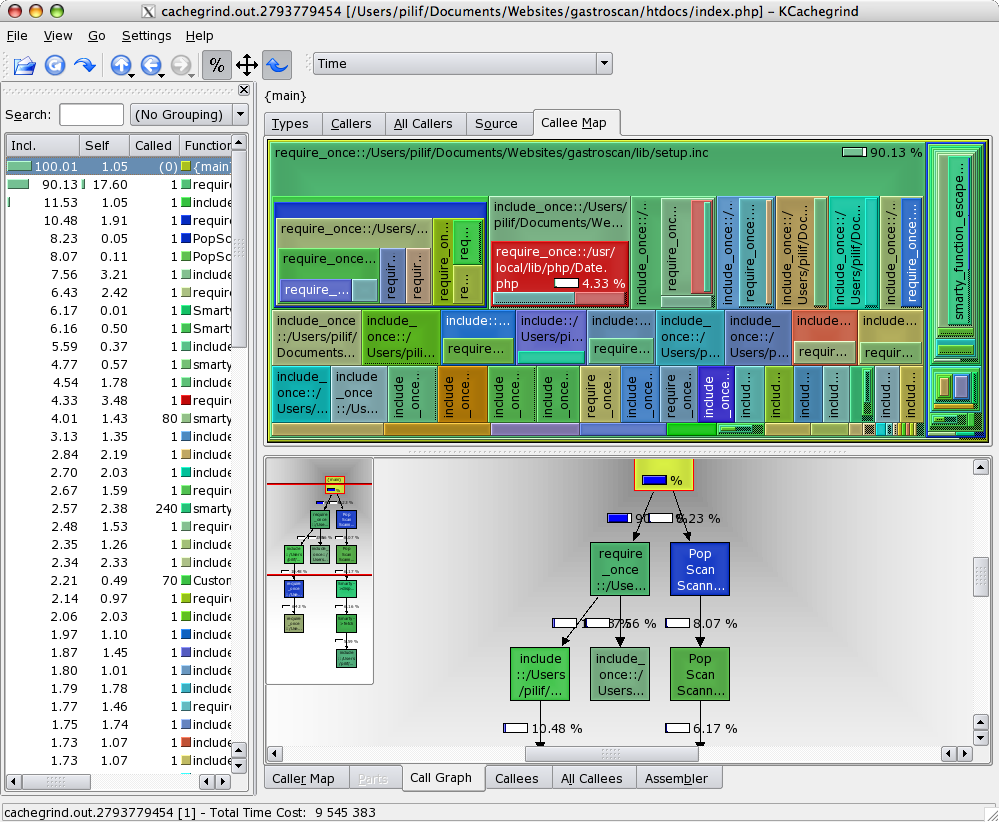
And once you have that profiling information, you can use a tool like KCacheGrind to evaluate the data you’ve collected.

The tool provides some incredibly useful views of your code, making finding performance problems a joyful experience.

Best of all though is that I was able to compile KCacheGrind along with its dependencies on my MacBook Pro – another big advantage of having a real UNIX backend on your desktop.

By the way: Xdebug also is a debugger for PHP, though I’ve never used it for that as I never felt the need to step through PHP code. Because you don’t have to compile it, you are often faster by instrumenting the code and just running the thing – especially once the code is spreading over a multitude of files.

Backup with dirvish

Using tape drives for your backups (in contrast to for example external hard drives) has some advantages and a whole lot of disadvantages which makes it impractical for me and a whole lot of other people:

  • There’s (next to) no random access. Need a specific file? Often you have to restore the backup until that file is restored.
  • Tapes are maintenance intensive: You have to clean the streamer, clean the tapes, store the tapes in specific environmental conditions and so on.
  • Tapes are a slow medium. You won’t get much more than 5-10 MB/s while writing to the tape.
  • The inaccuracy of tapes makes a verify run something important if not absolutely needed to do.
  • The equipment is expensive. Both tapes and streamer (or tape robots) cost quite some money.

That’s why I am using external hard drives for quite some time now. Granted, they have some serious disadvantages in long-livety (but they still outperform tapes not stored in said environmental conditions), but really important documents must be archived on a read-only medium anyways.

What harddisks provide you with is cheap storage, random access and the possibility to use common file system access tools to work with them.

External drives can be disconnected and stored at a different location from the backup machine and as they have a much larger capacity per medium than tape drives, you usually get away with one or two drives where you’d use many more tapes (at least in the affordable range of things).

If you need a pragmatic yet perfectly working and clever backup solution to fill up these external drives, I’d recommend dirvish

Dirvish uses existing tools like SSH and mainly rsync to create backups.

What I like most about it is it’s functionality to create incremental backups by creating hardlinks to non-changed files (actually a feature of rsync).

That way, a initial backup of 22G can be incrementally backed up creating only 20M of more/different data here on my system I’m currently looking at.

This obviously depends on the type of data you are backing up and as the mechanism is file-based (it always operates on complete files), your savings won’t be that good if you back up ever growing files like log files.

Still. For my use, dirvish does exactly what I want it to do and it does it very, very well. Perfect!

The tool creates backup sets as folders containing all the backed up files in their original structure. Restoring a specific file this is very, very easy.

To get you started, I would recommend you reading the dirvish HOWTO by Jason Boxman – especially as dirvish uses sometimes not quite obvious terminology.

IE7 – Where is the menu?

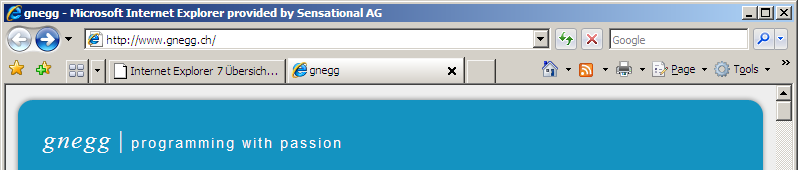
Today, I finally went ahead and installed the current Beta 3 of Internet Explorer, so I too will have the opportunity to comment on it.

What I ask myself is: Where is the menu?

Well. I know it’s to the right of the screen behind these buttons. But it’s no real menu. It’s something menu-alike.

Why radically change the GUI? Even in Vista itself, there won’t be a menu any more. Or at least not a permanently visible one.

The problem is: It took me years to teach my parents, that all functionality of a program is accessible via the menu and that the menu is always at the top of the application (whereas it’s at the top of the screen on the mac).

Now with this new mood of removing the menus and putting them behind arbitrary buttons, how will I explain my parents how to use the application? I can’t say “Go to File / Save” any more. Besides the names of the menu items, in the future I will also have to remember where the menu is.

And as each application will do it differently, I’ll have to remember it countless of times for different applications.

And even if I know: How to explain it to them? “Click that Icon with the cogwheel”? I doubt they’d associate that icon with the same thing as I do. Thankfully in IE7, there’s still text so I could say “Click on Tools”. But what if some “intelligent” UI designer decides that not even the text is needed any more?

In my opinion, removing the menu has nothing to do with making the application easier to use. It’s all about looking different. And looking different is counter-productive to usability. Why move away from something everyone knows? Why change for changes sake?

It’s not that people were overwhelmed by that one line of text at the top of the application. People that didn’t use the menu didn’t bother. But in the case where they needed it, or needed assistance in using it, it was clear where it was and how to use it.

This has changed now.

And even worse: It has changed in a non-consistant way: Each application will display its own menu replacement where each one will work in a different way.

So I repeat my question: How can I teach my parents how to use one of these new applications? How can I remotely support them if I can’t make them “read the menu” when I’m not sure of the layout of the application in question?

Thankfully, for my parents browsing needs, all this doesn’t apply: They are happy users of Firefox.

But I’m still afraid of the day when the new layouts will come in effect in Office, Acrobat and even the file system explorer (in vista). How to help them? How to support them?

Usable Playstation emulation

Up until now, the Playstation emulation scene was – in my opinion – in a desolate state: Emulators do exist, but they are dependant on awfully complicated to configure plugins each with its own bugs and features and none of the emulators were updated in the last two years.

Up until now, the best thing you could do was to use ePSXe with the right plugins. What you got then was a working emulation with glitches all over the place. Nothing even remotely comparable to the real thing.

And it failed my personal acceptance check: Final Fantasy 7 had severe performance problems (“slideshow” after battle and before opening the menu interface) and the blurred color animation on the start of a battle didn’t work either.

Well. I was used to the latter problem: They never worked and it was – for me – a given fact that these animations just don’t work in emulators

The other thing that didn’t work in epsxe was FFIX. You could play up to that village where they are creating these black mage robots. The emulator crashed on the airship movie after that part of the game. The workaround was to downgrade to epsxe 1.5.1 which actually worked, but IMHO that just underlines the fact that epsxe is not what I’d call working software.

I was not willing to cope with that – mainly because I own a PSOne, so I could use that. Unfortunately, it’s an european machine though and both games I own and I’m currently interested in replaying, FFIX and FFVI, are german and especially FFVI is the worst translation I’ve ever seen in a game (even the manual was bad, btw).

So, there is some incentive in getting an emulator to work: You know, getting the US versions of the games isn’t exactly hard, but playing them on a european console is quite the challenge even if the games were optained through retail channels.

Keep in mind that a) both games are no longer sold and b) I own them already albeit in the wrong language.

And today I found for the Playstation what ZSNES was compared to Snes9x back in 1995: I’m talking about the emulator pSX emulator.

Granted. The name is awfully uninventive, but the software behind that name, well… works very, very nicely:

  • No cryptic plugins needed. Unpack, run, play.
  • It’s fast. No performance problems at all on my MacBook Pro (using BootCamp)
  • It’s stable. It just does not crash on me.
  • And you know what: Even the color animations work – precisely these color animations which we were told would never work properly on PC hardware.

But I’m not finished yet: The software even is under active development! And the author is actually taking and even fixing(!) bug reports. He/She is never blaming the player for bad configurations on the emulators forum. He’s always looking into reports and often fixing the stuff reported.

It’s not Free (freedom) software. It’s Windows only. But it has one hell of an advantage over all other Playstation emulators out there: It works.

As I hinted above: This is just like SNES emulation back in 1995: You had many abandoned projects, one emulator you were told was good (Snes9x) and one that worked (ZSNES). It looks like history is once again repeating itself.

My big, heartfelt thanks to whoever is behind pSX emulator! You rock!

mod_php, LightTPD, FastCGI – What’s fastest?

Remember last April where I found out that Ruby on Rails was that quick compared to a PHP application? Remember when I told that it may be caused by FastCGI, but that I didn’t have the time to benchmark the thing properly?

Well… today I needed to know.

This article is even larger than my usual articles, so I had to split it up and create an extended entry. I hope you don’t mind.

Continue reading “mod_php, LightTPD, FastCGI – What’s fastest?”

After 13 years something new in Monkey Island

It has been 14 years ago that I played Monkey Island for the first time. Well… maybe 13. I just don’t remember exactly if it was 1992 or 1993 when my parents finally bought a computer and I illegally copied the game from a classmate (including a photocopied version of that “copy protection” wheel).

Of course it didn’t take me 13 years to complete it. But the game was so incredibly cool that I played through it over and over again. And with the downfall of DOS came the advent of ScummVM, allowing me to still play the game.

And just now I started another run – probably because I’ve seen Pirates of the Carribean 2 last monday and I noticed quite some similarities to Monkey Island – especially the second part (Voodoo Lady in a swamp comes to mind)

Anyways. Today was the first time ever I’ve seen the scene I screenshotted there.

In all my previous runs, I always “salvaged” the idol as my last task which mean that as soon as I got out of the water, I’ve seen the ghost ship fade away with Elaine on it.

Now, I did it first as it actually makes sense as that task requires the least amount of walking around, which led me to see this cute scene between Guybrush and Elaine (and not to mention her stupid excuse for not kissing shortly afterwards.

How nice to find something new after 13 long years.

Tracking comments with cocomment

I’m subscribed to quite a long list of feeds lately. Most of them are blogs and almost all of them allow users to comment on posts.

I often leave comments on these blogs. Many times, they are as rich as a posting here as I got lots to say once you make me open my mouth. Many times, I quietly hope for people to respond to my comments. And I’m certainly eager to read these responses and to participate in a real discussion.

Now this is a problem: Some of the feeds I read are aggregated feeds (like PlanetGnome or PlanetPHP or whatever) and it’s practically impossible to find the entry in question again.

Up until now, I had multiple workarounds: Some blogs (mainly those using the incredibly powerful Serendipity engine) provide the commenter with a way to subscribe to an entry, so you get notified per Email when new comments are posted.

For all non-s9y-blogs, I usually dragged the link to the site to my desktop and tried to remember to visit them again to check if replies to my comments where posted (or maybe another interesting comment).

While the email method was somewhat comfortable to use, the link-to-desktop one was not: My desktop is enough cluttered with icons without these additional links anyways. And I often forgot to check them none the less (making a bookmark would guarantee myself forgetting them. The desktop link at least provides me with a slim chance of not forgetting).

Now, by accident, I came across cocomment.

cocomment is interesting from multiple standpoints. For one, it just solves my problem as it allows you to track discussions on various blog entries – even if they share no affiliation at all with cocomment itself.

This means that I finally have a centralized place where I can store all my comments I post and I can even check if I got a response on a comment of mine.

No more links on the desktop, no more using bandwidth of the blog owners mail server.

As a blog owner, you can add a javascript-snippet to your template so cocomment is always enabled for every commenter. Or you just keep your blog unmodified. In that case, your visitors will use a bookmarklet provided by cocomment which does the job.

Cocomment will crawl the page in question to learn if more comments were posted (or it will be notified automatically if the blog owner added that javascript snippet). Now, crawling sounds like they waste the blog owners bandwidth. True. In a way. But on the other hand: It’s way better if one centralized service checks your blog once than if 100 different users each check your blog once. Isn’t it?

Anyways. The other thing that impresses me about cocomment is how much you can do with JavaScript these days.

You see, even if the blog owner does not add that snippet, you can still use the service by clicking on that bookmarklet. And once you do that, so many impressive things happen: In-Page popups, additional UI elements appear right below the comment field (how the hell do they do that? I’ll need to do some research on that), and so on.

The service itself currently seems a bit slow to me, but I guess that’s because they are getting a lot of hits currently. I just hope, they can keep up, as the service they are providing is really, really useful. For me and I imagine for others aswell.