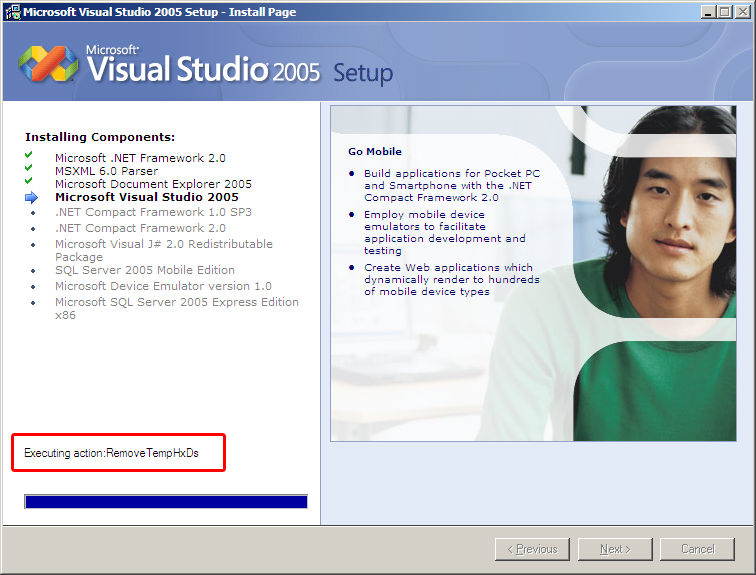
My task: RemoveTempHxDs

Le’ts say, you want to inform your user about what’s going on (which is a nice thing to do).

This is an example of how not to do it:

What exactly is that “RemoveTempHxDs”, the installer is doing right there? And why is the progress bar at 100% for more than three minutes when I made the screenshot?

If you are unable to provide meaningful progress information, don’t provide it at all. Make your program display a “neutral” progress bar (some spinning wheel or something like that) and make it tell the user it’s “Doing stuff…”. Why expose useless internals?

While I see some value in displaying information like that if it’s to have more information when you are trying to support the application. But in that case, a log file of some kind is much more valuable as it both gives YOU as developer the information you need and does not confuse your user.

Programatically generating XML

If you have to generate XML, it’s usually considered good style to use one of these defined APIs like DOM or XMLWriter.

Just writing out a string to the line is considered bad practice because… why, actually?

Jeff Atwood once more wrote down what I have been thinking for quite some time now.

In many cases, just dumping out XML with sprintf or whatever your language provides you with is faster, independent of bugs in the libraries you use and easier to read.

There are five characters that need to be treated with caution in XML: the &, the <, the >, the " and the '.

Quoting even is straight forward and you usually don’t run into niceties like quoting backslashes in regular expressions you are passing to perl -e inside a double quoted string on your shell (I don’t even want to count the ‘s needed to actually get the regex parser in perl to see just one of them).

And even if you screw up, you can still rely on the XML parser to bail out if something is wrong.

The time you waste learning your library, coping with its bugs and finally working with the usual bloat of todays OOP interfaces (interface as in “user interface”) far outweighs the occasional quoting problem which should not happen anyways.

And don’t make me get started on trying to understand the structure of the XML code like Jeff posted is going to create:

System.Text.StringBuilder sb = new System.Text.StringBuilder();

XmlWriterSettings xs = new XmlWriterSettings();
xs.ConformanceLevel = ConformanceLevel.Fragment;
xs.Indent = true;

XmlWriter xw = XmlWriter.Create(sb, xs);
xw.WriteStartElement("status");
xw.WriteAttributeString("code", "1");
xw.WriteEndElement();
xw.WriteStartElement("data");
xw.WriteStartElement("usergroup");
xw.WriteAttributeString("id", "usr");
xw.WriteEndElement();
xw.Flush();
return sb.ToString();

If you are seeing this in code you have to maintain (but you have not written), how would you tell what XML it generates? How does the readability of that compare to this?

string s =
@"<status code=""{0}"" />
<data>
<usergroup id=""{1}"" />
</data>";
return String.Format(s, "1", "usr");

Note that I’m not that much of a .NET guy, but I’m quoting Jeff’s code here

Summary in one word: Jeff’s Article: ACK!

One day with Serendipity

Here we go: Everything migrated. Every link (hopefully) fixed. Worked around (I think) some problems with images uploaded from MT clashing with Serendipity’s (s9y from now on) mod_rewrite handling and re-categorized every entry: the new gnegg.ch is up and running.

So, how is life with s9y?

Fist of all: I got no single comment SPAM. This is due to the better SPAM countermeasures and due to all URLs changing. I’ll have to see how good the SPAM prevention will work, though I have an idea it can’t be that bad (see below).

While s9y is slower than MT in delivering pages (understandable considering MT is generating static pages), it’s more feature-rich compared to MT – at least if you consider s9y to be a blogging engine, not a framework to create blogging-engine-like tools.

I love the plugin system: There’s nothing you can’t write a plugin for and people seem to have noticed that – at least considering the wealth of plugins available for you to download and install (directly from the administration interface).

Also, because I’m using a premade template and because s9y is a bit more intelligent in reusing templates, the whole site finally has a consistent look. No more usage of outdated templates when commenting or displaying error messages.

The most interesting thing though is the SPAM prevention: When you post a comment, it will go through the following procedure:

  • Is it exactly the same comment as another posted before? If so, reject it. This prevents a spammer that got through once from getting through again. And it prevents you from double-posting by accident.
  • Is your IP-Address posting a comment within 2 minutes after posting another one, the comment will be rejected. I know proxy servers and NAT routers exist and I will tweak the time if I should ever get more popular. A cookie-based approach obviously doesn’t work to flood-protect the blog from malicious spammers.
  • Does the comment point to an URL listed on SURBL, it’ll be rejected. I’m sorry, but this is a sacrifice I must ask for.
  • If you post a comment to an entry older than 30-days, it’ll be insta-moderated. I promise to activate it as soon as possible.
  • If you post to a comment older than 7 days, you’ll have to solve a captcha, just to be sure. If you cannot solve it, feel free to contact me via Email
  • After you post a comment with more than 3 links, I’ll have to approve it first. If you post more than 20 links, it’ll be rejected.
  • A word-filter is active aswell, though I think all these measures stop the spam before even getting here.
  • If all this fails, I’m sure the SPAM will be detected by Akismet

While I know that some restrictions may hurt you, please believe me that the restrictions are in place to both increase the overall quality of content here and to make my life a bit easier.

Serendipity really is a nice blogging engine. Go ahead and try it!

Comments disabled

Ok. this is it. I have enough.

While I value the legit comments of my visitors, I’m deleting over 200 spam comments per day lately. This must stop. NOW.

Unfortunately, no technical measure currently available really prevents comment spam at least not without serious disadvantages.

Let me go into this:

  • Use a catpcha: Captchas can be broken and in fact ARE broken all over the place. No point in placing another hurdle that’s easily overcome by machines, but can’t be overcome at all by some humans. True: I could decrease the readability to make OCRing the thing harder, but what’s the point? Once the captcha is unreadable, it can’t be broken by machines, but it can’t be solved by humans either.
  • Use a service like TypeKey to authenticate users and let only authenticated users post: Easy to implement, but unfortunately, noone seems to trust MT (neither do I – fully), so noone is using the service. Unfortunately, it doesn’t solve the problem either as machines are well able to create TypeKey accounts (I doubt their captcha is so much better – and even if it currently is: Above problems apply to them aswell).
  • Create your own authentication service: While this may be more liked than TypeKey, it means a lot of work to integrate it into MT and has the same drawbacks (machines can create accounts unless you use a captcha, where my first point applies again).
  • Use a SpamAssassin-like system to get rid of the SPAM. MT has such a system, but it doesn’t really work. Neither seem the blacklists to do their job.

So I come to the only tool that really works to take care of all comment spam: Turn off comments. No discriminating against visually impaired people, no possibility for even the smartest algorithm to sneak a comment into the system. Problem solved.

Personally, I think MT is lacking in terms of counter-spam measures and I will once more have a look at Serendipity which provides more fine-grained control. Until then, I’m sorry, but I have to disable comments on this site.

Spammers: 1, Freedom: 0

New face, new engine, new everything

Management Summary of this longer entry: 1) Comments are back, 2) I’m using Serendipity instead of Movable Type and 3) This layout – though premade – is going to stay.

But now my reasoning:

As I’ve stated earlier today, I had enough comment spam arriving on gnegg.ch. Not only the blog was filled up with junk, but also my mailbox was hit (MT was sending mails for every comment).

To underline how BAD it was, notice this: During last weekend I was off the internet most of the time. In the two nights (friday to saturday and saturday to sunday), gnegg.ch was hit by 683 SPAM comments, of which MT only classified 4 as spam.

For each of these 683 comments, I got an email message. Which was especially bad as I was checking mail from my mobile phone (that was the most expensive mail checking process in my life I guess – imagine the sheer size of only the headers)

Even worse was the interface for comment removal: The biggest page size I could select was 50 comments, so I had to delete the comments in groups of 50, each time waiting for the affected pages to be rebuilt over and over again.

There is a mutliselect option in MT, but it always affects all comments per page, so chosing to display all comments and then using the “Select All” feature would not have helped as it would have deleted the legit comments too.

This just so you understand why I had to do something. I did not want to have another “fun” comment removal session next sunday evening (most of the comments get posted on the weekends – probably in the hope they will remain unnoticed for a while longer – which they did).

At first, I just wanted to turn off the comments and keep it at that.

But what is a blog without comments? Yeah. right… not much.

So I went ahead and installed Serendipity because I knew that it had some really nice SPAM-countermeasures included.

As I currently don’t have the time needed to port the old MT template over, I selected a template that comes with s9y and I have to say: It looks great, IMHO. I think I’ll keep it at this.

I’m no web designer and even if I could convince Richard to create a new layout for me (thinking that the old one just is a bit too dark and grey for my current mood), it would take AGES for me to create a Smarty version out of it, so I decided to go with premade templates.

And this one (Perun Blue) is really nice – IMHO even better than the old, custom made, one. So, I hope, you can live with this.

While the import process worked flawlessly, many links inside the site are broken and I’m currently in the process of fixing them.

Howto kill your mac? Use Acrobat!

Today I though I’d lost my mac.

I was creating a PDF from Word using Adobe Acrobat. While Mac OS provides a built-in method to generate PDFs, I was under the impression that using the distiller word macro will generate better PDFs – mostly because the macro knows meta information about the text it converts and thus can create links and other PDF hints.

The system completely locked up.

I was able to still move the mouse, but the rest was dead.

I did the 4 seconds power button trick to restart the machine in the hope that this was just the usual flakiness of distiller on intel macs

Unfortunately, the system just froze again after a short wile (seconds)

And on every restart, the freeze happened earlier till I could not even log in in the end.

Using bootcamp (which I’m only using for playing World of Warcraft currently) I determined that it was no hardware problem (Windows had no lockups) which made me considerably happier.

I also learned that you have to press and hold shift on boot until that progress indicator is displayed to boot in some kind of Safe Mode

Using that, I was able to boot, log in and even work in OSX without the crash. I began stripping my system.

I’ve uninstalled the newly released RC of Parallels, removed all startup items (/Library/StartupItems, /Users/pilif/Library/StartupItems) – thinking that one of those things may have caused the problem.

A reboot showed no improvement unfortunately. The system still locked up. The error log did not show anything of interest.

Googling about “lockup macbook pro” after rebooting yet again in safe mode (which takes AGES), showed me lots of people having this problem after the recent security update released by Apple.

Usually the hint was to reinstall the OS (like in the old days of windows…) and to skip installing that securtiy update. Unfortunately that was no option at all as I did not have the CDs in range and I’m completely against not installing a security relevant patch.

Remembering the crash first happening when using Acrobat, I opened the printer setup utility and got the message that no printer was installed.

This made me notice that Safe Mode also seemed to disable printers, giving me some hope that maybe Acrobat was the problem: More stuff to disable is always a good thing when debugging something like this.

The printer setup utility has a nice feature. It’s called “Reset printing system…” and it’s placed in the application menu.

The feature works exactly as advertized, thus removing that acrobat printer (and all other printers *sigh*).

I rebooted once more and… it worked.

That recent security update did something to Rosetta (I’m guessing, but the same lockups seem to happen with Adobe Version Cue and they don’t happen on PPC systems) causing these lockups. And probably the printing system reinitializes the printer drivers after the updated.

And as I did not print after installing the update until now, the problem was triggered only just now.

While I’m happy that everything is working again, I’m certainly pissed right now.

A security update should never render your system unusable. I don’t mind who screwed up here (Apple, Adobe, Rosetta), but something like this must not happen.

The only good thing is that I’m quite experienced with situations like this. But still: This is my first mac. It was sheer luck that I found out how to fix this.

If such situations can’t be averted then please, please provide meaningful error reporting or just logging. Were there lines like ‘initializing printers’ in some logfile, I’d have known where the problem was.

But no. It just crashes with no way what so ever to just kill the hanging process. Why does failing to load a printer driver crash my whole system? Granted. The problem is probably in Rosetta, but something like this still MUST NOT happen.

The emulation layer stops responding? Easy: Kill and restart it.

This is majorly unpleasant. And it took away nearly two hours of my time which I’d have preferred to use for more useful stuff.
Mac Mail: Can software perform worse?

I’m a fan of Mac Mail (Mail.app). It looks nice, it renders fonts very nicely it creates mails conforming to the relevant RFCs and it basically supports most of the requirements I’ve posted back in 2003.

There are some drawbacks though. First one is no proper IMAP search support. This is not as bad as it sounds as the local full text index works very nicely (faster than our exchange server) and it’s even integrated into Spotlight.

Then, the threading support sucks as it’s not multi-level. This does not matter as much as back in 2003 though as my daily dose of technology-update now comes from RSS and blogs. Actually I’m currently not subscribed to any mailing list.

Everything else on that list is supported and the beautiful UI and font-rendering convince me to live with those two drawbacks and not use Mozilla Thunderbird for example which supports the whole set of features but looks foreign to OS X.

BUT. There’s a big BUT

Performance is awful.

Even though I’m using IMAP, Mail.app insists on downloading all messages – probably to index them. I know that you can turn this behavior off, but then it doesn’t download any message at all, rendering the program useless in offline situations. In Thunderbird you can make the program just download the messages as you read them and then use the contents of the cache for later offline display.

Then again: I have no problem with downloading and it even displays new mail while still downloading in the background. It does a better job at not blocking the UI than Thunderbird too.

What sucks is the performance while doing its thing.

I have around 3GB of mails on my IMAP server and before I could use Mail.app for the first time, the program downloaded the whole thing, utilizing 100% of one CPU core (it’s not SMP capable ;-) ), forcing my MacBook Pro to turn on the fans – it was louder than after playing 4 hours of World of Warcraft in Windows (via Boot Camp – it’s around twice as fast than the mac version).

It also took lots and lots of RAM making working with the machine a non-fun experience.

Later I decided to throw away two years worth of Cron-Emails containing a basic “Job done” which were filtered away on the server so I never noticed them. Deleting those ~22000 emails took two hours – again with 100% CPU usage on one core.

Even worse: Mail.app does not send an IMAP move command to move the messages to the trash (or just mark them as deleted). It actually manually copies the messages over! Message by Message. From the local copy to the server. Then it deletes them. And then begins the awful “Writing Changes to disk”, completely killing the performance of my MacBook.

Also annoying: Mail.app does not support IMAP folder subscriptions. It insists to fetch all folders – if you have a full calendar on your exchange server, it’s going to fetch all those (useless for Mail.app) entries aswell – and we know now how well Mail.app works with large folders.

My conclusion is: Mail.app is perfect for reading and writing your daily mail. It fails miserably at all mail administration jobs.

I’m going to stick with it none the less as reading my daily mail is what I’m doing most of the time. It’s just a good thing that Thunderbird exists and I’m going to use that for the next round of cleanup (hoping that Mail.app picks up the changes and does not take too long to mirror them to its local store).

RAM for my MacBook Pro

Today, another GB of RAM for my MacBook Pro arrived (I bought it at Heiniger AG. It’s no original Apple RAM, but it’s about a third as expensive as the original).

Installation was very easy to do (I link the instructions for the 17″ model because that’s what I found on the web – it works the same for the 15″ model).

And I tell you: This is the best thing to ever happen to a computer of mine performance-wise.

While the system feels a lot snappier in “default mode”, it shines even more when I’m running Parallels Workstation in the background (at full screen – using VirtueDesktop).

I’m inclined to say that the parallels-thing just got usable with this upgrade.

Funny thing: When you are working with Windows XP, you won’t notice as much as a speed increase in normal operating mode when you upgrade your RAM from 1GB to 2GB. I guess the memory manager of OSX is just more eager to swap out stuff if RAM gets scarce. And as we all know: Swapping kills a system.

More Asterisk stuff

I thought I’d give a little update on what’s going on in my Asterisk installation as some of the stuff might be useful for you:

Speed Dial

If you have Snom Phones and want to program the function keys to dial a certain number, be sure to select “Speed Dial” and not “Destination” when entering the number.

Destination was used in earlier firmwares but it now used to not only make the phone dial that number, but also subscribe to the line to make the LED light up when the line is used.

This obviously makes no sense at all with external numbers and requires some configuration for internal ones (see below). The additional benefit is that buttons with “Speed Dial” assigned don’t turn on the LED.

Dial by click

You can dial a number from the Mac OS X address book aswell. Asterisk will make your phone ring and redirect the call once you pick up (just like AstTapi on Windows). I had the best experience with app_notify. I don’t quite like the way how it notifies clients of incoming calls (hard-coding IP-Addresses of clients is NOT how I want my network to operate), but maybe there will be a better solution later on. Currently, I’m not using this feature.

Dialing works though.

You don’t have to modify manager.conf, btw, if you already have the entry for the AstTapi-Solution. app_notify will ask for username (manager context) and password when it launches the first time.

Subscription

As noted above, your Snom Phone can be advised to monitor a line. The corresponding LED will blink (asterisk 1.2+) when it’s ringing and light up when the line is busy.

Snom-wise, you’ll have to configure a function key to a “Destination” and enter the extension you like to monitor.

Asterisk-wise you have to make various changes:

sip.conf

  • Add subscribecontext=[context], where context is the context in extensions.conf where the corresponding SNOM phone is configured in. I’ve put this to the [general]-Section because all phones are sharing the same context (internal).
  • Add notifyringing=yes if you have Asterisk >= 1.2 and want to make the LEDs blink when the line is ringing.

extensions.conf
This is a bit hacky: In the sip-context add a notify extension for every line you want to be allowed to be monitored. Unfortunately, you can’t use macros or variables here, so it’s messy.

On my configuration it’s:

[internal]
exten => 61,hint,SIP/61
exten => 62,hint,SIP/62
exten => 63,hint,SIP/63
exten => 64,hint,SIP/64
exten => _6[1-9],1,Dial(SIP/${EXTEN},,tWw)

While I would have preferred

[internal]
exten => _6[1-9],hint,SIP/${EXTEN}
exten => _6[1-9],1,Dial(SIP/${EXTEN},,tWw)

Though this may have been fixed with 1.2.2, but I’m not sure just yet.

You may have to reboot your phone after making the configuration change there. To check the registration in asterisk use SIP show subscriptions.

You should get something like this:

asterisk*CLI> SIP show subscriptions
Peer User Call ID Extension Last state Type
192.168.2.152 62 3c26700b57e 61 Idle dialog-info+xml
1 active SIP subscription

This is not quite tested as of yet because the guy at extension 61 is currently in his office and I don’t want to bother him ;-)

Update while editing/correcting this text: It works. They guy has left and I checked it.

Pragmatic AJAX

img_hc_ajaxfreshflavour.jpg

Today, my hardcopy of Pragmatic Ajax arrived. I bought the bundle edition consisting of the PDF beta version of the book and the printed edition.

It’s a wonderful book. I have been doing AJAX since a bit earlier than the launch of Google Maps, but I still thought that I need some brushing up especially in the matters of usable frameworks (I’ve been doing everything from scratch) and useful practices.

Considering that I liked every book of the Pragmatic Programmers I’ve read so far (we share the same mindset I guess), the decision to buy that book was a non-issue.

I’ve been reading the PDF-edition so far and completed about the first half of it, but I’m very happy now to see the dead-tree edition as reading that is much easier in terms of handling (no cheap printouts and no computer needed to read it).

The first half was very interesting, but I think I’ll better write a complete review once I’m through with it.

And in case you wonder what that picture above means… Well… Here in Switzerland, we have a brand of cleaner fluid which is called AJAX.

And we have had that for years, so they are not just riding some strange fashion mood like these guys. I wonder if the inventor of the AJAX acronym knew :-)