Ubuntu 8.04

I’m sure that you have heard the news: Ubuntu 8.04 is out.

Congratulations to Canonical and their community for another fine release of a really nice Linux distribution.

What prompted me to write this entry though is the fact that I have updated shion from 7.10 to 8.04 this afternoon. Over a SSH connection.

The whole process took about 10 minutes (including the download time) and was completely flawless. Everything kept working as it was before. After the reboot (which also went flawlessly), even OpenVPN came back up and connected to the office so I could have a look at how the update went.

This is very, very impressive. Updates are tricky. Especially considering that it’s not one application that’s updated, not even one OS. It’s a seemingly random collection of various applications with their interdependencies, making it virtually impossible to test each and every configuration.

This shows that with a good foundation, everything is possible – even when you don’t have the opportunity to test for each and every case.

Congratulations agin, Ubuntu team!

PostgreSQL on Ubuntu

Today, it was time to provision another virtual machine. While I’m a large fan of Gentoo, there were some reasons that made me decide to gradually start switching over to Ubuntu Linux for our servers:

  • One of the large advantages of Gentoo is that it’s possible to get bleeding edge packages. Or at least you are supposed to. Lately, it’s taking longer and longer for an ebuild of an updated version to finally become available. Take PostgreSQL for example: It took about 8 months for 8.2 to become available and it looks like history is repeating itself for 8.3
  • It seems like there are more flamewars than real development going on in Gentoo-Land lately (which in the end leads to above problems)
  • Sometimes, init-scripts and stuff changes over time and there is not always a clear upgrade-path. emerge -u world once, then forget to etc-update and on next reboot, hell will break loose.
  • Installing a new system takes ages due to the manual installation process. I’m not saying it’s hard. It’s just time-intensive

Earlier, the advantage of having current packages greatly outweighted the issues coming with Gentoo, but lately, due to the current state of the project, it’s taking longer and longer for packages to become available. So that advantage fades away, leaving me with only the disadvantages.

So at least for now, I’m sorry to say, Gentoo has outlived it’s usefulness on my productive servers and has been replaced by Ubuntu, which albeit not being bleeding-edge with packages, at least provides a very clean update-path and is installed quickly.

But back to the topic which is the installation of PostgreSQL on Ubuntu.

(it’s ironic, btw, that Postgres 8.3 actually is in the current hardy beta, together with a framework to concurrently use multiple versions whereas it’s still nowhere to be seen for Gentoo. Granted: An experimental overlay exists, but that’s mainly untested and I had some headaches installing it on a dev machine)

After installing the packages, you may wonder how to get it running. At least I wondered.

/etc/init.d/postgresql-8.3 start

did nothing (not very nice a thing to do, btw). initdb wasn’t in the path. This was a real WTF moment for me and I assumed some problem in the package installation.

But in the end, it turned out to be an (underdocumented) feature: Ubuntu comes with a really nice framework to keep multiple versions of PostgreSQL running at the same time. And it comes with scripts helping to set up that configuration.

So what I had to do was to create a cluster with

pg_createcluster --lc-collate=de_CH --lc-ctype=de_CH -e utf-8 8.3 main

(your settings my vary – especially the locale settings)

Then it worked flawlessly.

I do have some issues with this process though:

  • it’s underdocumented. Good thing I speak perl and bash, so I could use the source to figure this out.
  • in contrast to about every other package in Ubuntu, the default installation does not come with a working installation. You have to manually create the cluster after installing the packages
  • pg_createcluster –help bails out with an error
  • I had /var/lib/postgresql on its own partition and forgot to remount it after a reboot which caused the init-script to fail with a couple of uninitialized value errors in perl itself. This should be handeled cleaner.

Still. It’s a nice configuration scheme and a real progress from gentoo. The only thing left for me now is to report these issues to the bugtracker and hope to see this fixed eventually. And it it isn’t, there is this post here to remind me and my visitors.

Closed Source on Linux

One of the developers behind the Linux port of the new Flex Builder for Linux has a blog post about how building closed source software for linux is hard

Mostly, all the problems boil down to the fact that Linux distributors keep patching the upstream source to fit their needs which clearly is a problem rooted in the fact that open source software is, well, open sourced.

Don’t get me wrong. I love the concepts behind free software and in fact, every piece of software I’ve written so far has been open source (aside of most of the code I’m doing for my eployer of course). I just don’t see why every distribution feels the urgue to patch around upstream code, especially as this issue applies to both open- and closed source software projects.

And worse yet: Every distribution adds their own bits and pieces – sometimes doing the same stuff in different ways and thus making it impossible or at least very hard for a third party to create add-ons for a certain package.

What good is a plugin system if the interface works slightly different on each and every distribution?

And think of the time you waste learning configuration files over and over again. To make an example: Some time ago, SuSE delivered an apache server that was using a completely customized configuration file layout, thereby breaking every tutorial and documentation written out there because none of the directives where in the files they are supposed to be.

Other packages are deliberately broken up. Bind for example often comes in two flavors: The server and the client, even though officially, you just get one package. Additionally, every library package these days is broken up in the real library and the development headers. Sometimes the source of these packages may even get patched to support such breaking up.

This creates an incredible mess for all involved parties:

  • The upstream developer gets blamed for bugs she didn’t cause because they were introduced by the packager.
  • Third party developers can’t rely on their plugins or whatever pluggable components to work across distributions if they work upstream
  • Distributions have to do the same work over and over again as new upstream versions are released, thus wasting time better used for other improvements.
  • End users suffer from the general disability of reliably installing precompiled third-party binaries (mysql recommends the use of their binaries, so this even affects open sourced software) and from the inability to follow online-tutorials not written for the particular distribution that’s in use.

This mess must come to an end.

Unfortunately, I don’t know how.

You see: Not all patches created by distributions get merged upstream. Sometimes, political issues prevent a cool feature from being merged, sometimes clear bugs are not recognized as such upstream and sometimes upstream is dead – you get the idea.

Solution like FHS and LSB tried to standardize many aspects of how linux distributions should work in the hope of solving this problem. Bureaucracy and idiotic ideas (german link, I’m sorry) are causing quite the bunch of problems lately, making it hard to impossible to implement the standards. And often the standards don’t specify the latest and greatest parts of current technology.

Personally, I’m hoping that we’ll either end up with one big distribution defining the “state of the art”, with the others being 100% compatible or with distributions switching to pure upstream releases with only their own tools custom-made.

What do you think? What has to change in your opinion?

podcast recommendation

I haven’t been much into podcasts till now: The ones I heard were boring, unprofessional or way too professional. Additionally, I didn’t have a nice framework set up to get them and to listen to them.

That’s because I don’t often sync my ipod. Most of the time, it’s not connected to a computer: About once every two months, I connect it to upload a new batch of audiobooks (I can’t fit my whole connection on the nano). So podcasting was – even if I had found one that I could interest myself in, an experience to have while behind the computer monitor.

Now two things have changed:

  1. I found the Linux Action Show. They guy doing that podcast are incredibly talented people. The entries sound very professionally made, while still not being on the obviously commercial side of things. They cover very, very interesting topics and they are everything but boring. Funny, entertaining and competent. Very good stuff.
  2. At least since the release of SlimServer 6.5, my Squeezebox is able to tune into RSS feeds with enclosures (or podcast for the less technical savy people – not that those would read this blog). Even better: The current server release brought a firmware which finally gives the Squeezebox the capability of natively playing ogg streams.

    Up until now, it could only play FLAC, PCM and MP3, requiring tools like sox to convert ogg streams on the fly. Unfortunately, that didn’t work as stable as I would have liked, but native OGG support helped a lot

So now, whenever a new episode of the podcast is released (once per week – and each episode is nearly two hours in length), I can use my Squeezebox to hear it via my home stereo.

Wow… I’m so looking forward to do that in front of a cozy fire in my fireplace once I can finally move into my new flat.

ripping DVDs

I have plenty of DVDs in my possession: Some movies of dubious quality which I bought when I was still going to school (like “Deep Rising” – eeew) and many, many episodes of various series (Columbo, the complete Babylon 5 series, A-Team and other pearls).

As you may know, I’m soon to move into a new flat which I thought would be a nice opportunity to reorganize my library.

shion has around 1.5TB of storage space and I can easily upgrade her capacity (shion is the only computer I own I’m using a female pronoun for – the machine is something really special to me – like the warships of old times) by plugging in yet another USB hub and USB hard drives.

It makes totally sense to use that unlimited amount of storage capacity to store all my movies – not only the ones I’ve downloaded (like video game speed runs). Spoiled by the ease of use of ripping CDs, I thought, that this would be just another little thing to do before moving.

You know: Enter the DVD, use the ripper, use the encoder, done.

Unfortunately, this is proving to be harder than it looked like in the first place:

  • Under Mac OS X, you can try to use the Unix tools with fink or some home-grown native tools. Whatever you do, you either get outdated software (fink) or not really working freeware tools documented in outdated tutorials. Nah.
  • Under Windows, there are two kinds of utilities: On one hand, you have the single-click ones (like AutoGK) which really do what I initially wanted. Unfortunately, they are limited in their use: They provide only a limited amount of output formats (like no x264) and they hard-code the subtitles into the movie stream. But they are easy to use. On the other hand, you have the hardcore tools like Gordian Knot or MeGUI or even StaxRip. These tools are frontends for other tools that work like Unix tools: Each does one thing, but tries to excel at that one thing.

    This could be a good thing, but unfortunately, it fails at things like awful documentation, hard-coded paths to files everywhere and outdated tools.

    I could not get any of the tools listed above to actually create a x264 AVI or MKV-File without either throwing a completely unusable error message (“Unknown exception ocurred”) or just not working at all or missing things like subtitles.

  • Linux has dvd::rip which is a really nice solution, but unfortunately, no solution for me as I don’t have the right platform to run it on: My MCE machine is – well – running Windows MCE, my laptop is running Ubuntu (no luck with the debian packages and no ubuntu-packages). shion is running Gentoo, but she’s headless, so I have to use a remote X-connection which is awfully slow and non-scriptable.

The solution I want works on the Linux (or MacOS X) console, is scriptable and – well – works.

I guess I’m going the hard-core way and use transcode which is what dvd::rip is using – provided I find good documentation (I’m more than willing to read and learn – if the documentation is current enough and actually documents the software that I’m running and not the software at the state of two years ago).

I’ll keep you posted on how I’m progressing.

Profiling PHP with Xdebug and KCacheGrind

Profiling can provide real revelations.

Sometimes, you have that gut feeling that a certain code path is the performance bottleneck. Then you go ahead and fix that only to see, that the code is still slow.

This is when a profiler kicks in: It helps you determine the real bottlenecks, so you can start fixing them

The PHP IDE I’m currently using, Zend Studio (it’s the only PHP IDE filling my requirements on the Mac currently) does have a built-in profiler, but it’s a real bitch to set up.

You need to install some binary component into your web server. Then the IDE should be able to debug and profile your application.

Emphasis on “should”.

I got it to work once, but it broke soon after and I never really felt inclined to put more effort into this – even more so as I’m from time to time working with a snapshot version of PHP for which the provided binary component may not work at all.

There’s an open source solution that works much better both in terms of information you can get out of it and in terms of ease of setup and use.

It’s Xdebug.

On gentoo, installing is a matter of emerge dev-php5/xdebug and on other systems, pear install xdebug might do the trick.

Configuration is easy too.

Xdebug generates profiling information in the same format as valgrind, the incredible debugger the KDE people created.

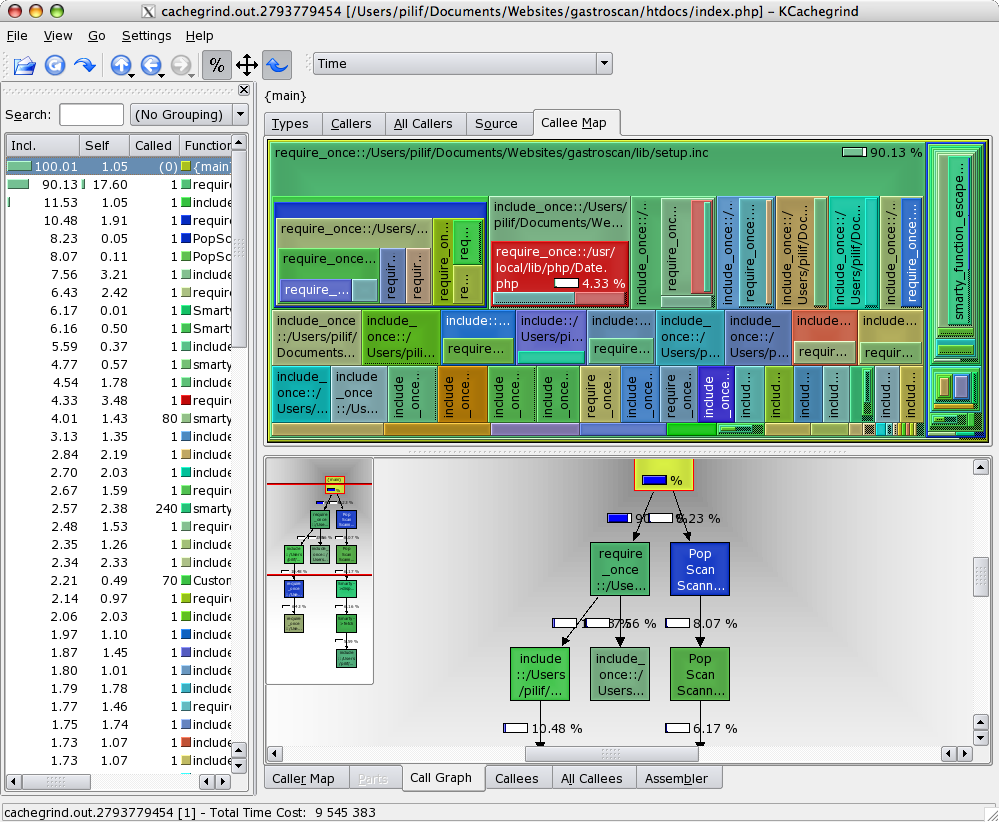
And once you have that profiling information, you can use a tool like KCacheGrind to evaluate the data you’ve collected.

The tool provides some incredibly useful views of your code, making finding performance problems a joyful experience.

Best of all though is that I was able to compile KCacheGrind along with its dependencies on my MacBook Pro – another big advantage of having a real UNIX backend on your desktop.

By the way: Xdebug also is a debugger for PHP, though I’ve never used it for that as I never felt the need to step through PHP code. Because you don’t have to compile it, you are often faster by instrumenting the code and just running the thing – especially once the code is spreading over a multitude of files.

Blogroll is back – on steroids

I finally got around to adding an excerpt of the list of blogs I’m regularly reading to the navigation bar to the right.

The list is somewhat special as it’s auto-updating: It refereshes every 30 minutes and displays a list of blogs in descending order of last-updated-time.

Adding the blogroll was a multi step process:

At first, I thought adding the Serendipity blogroll plugin and pointing it to my Newsgator subscription list (I’m using Newsgator to always have an up-to-date read-status in both Net News Wire and FeedDemon) was enough, but unfortunately, that did not turn out to be the case.

First, the expat module of the PHP installation on this server has a bug making it unable to parse files with the unicode byte order mark at the beginning (basically three bytes telling your machine if the document was encoded on a little- or big-endian machine). So it was clear that I had to do some restructuring of the OPML-feed (or patching around in the s9y plugin, or upgrading PHP).

Additionally, I wanted the list to be sorted in a way that the blogs with the most recent postings will be listed first.

My quickly hacked-together solution is this script which uses a RSS/Atom-parser I took from WordPress, which means that the script is licensed under the GNU GPL (as the parser is).

I’m calling it from a cron-job once per 30 minutes (that’s why the built-in cache is disabled on this configuration) to generate the OPML-file sorted by the individual feeds update time stamp.

That OPML-file then is fed into the serendipity plugin.

The only problem I now have is that the list is unfairly giving advantage to the aggregated feeds as these are updated much more often than individual persons blogs. In the future I will thus either create a penalty for these feeds, remove them from the list or just plain show more feeds on the page.

Still, this was a fun hack to do and fulfills its purpose. Think of it: Whenever I add a feed in either Net News Wire or FeedeDemon, it will automatically pop up on the blogroll on gnegg.ch – this is really nice.

On a side note: I could have used the Newsgator API to get the needed information faster and probably even without parsing the individual feeds. Still, I went the OMPL-way as that’s an open format making the script useful for other people or for me should I ever change the service.

Amazing Ubuntu

I must say, I’m amazed how far Ubuntu Linux has come in the last 6 months.

When I tried 5.10 last october, it was nice, but it was still how I experienced Linux ever since I tried it out on the desktop – Flaky: WLAN didn’t work, DVDs didn’t work, Videos didn’t work (well… they did, but audio and video desynched after playing for more than 10 seconds), fonts looked crappy compared to Windows and OS X and suspend and hibernate didn’t work (or rather worked too well – the notebook didn’t come up again after suspending / hibernating).

I know, there were tutorials explaining how to fix some of the problems, but why working through tons of configuration files when I can also just install Windows or OSX and have it work out-of-the box?

Now, yesterday, I installed Ubuntu 6.06 on my Thinkpad T42.

Actually, I tried updating my 5.10 installation, but after doing so, my network didn’t work any longer. And in comparison with Windows and OSX and even Gentoo Linux where the fix is obvious or well documented with useful error messages, I had no chance in fixing it in Ubuntu on short notice.

Seeing that I had no valuable data on the machine, I could just go ahead with the reinstallation.

WPA still didn’t work with the tools provided by default. Now, we all know that WEP is not safe any more and in my personal experience is much flakyer than WPA (connections dropping or not even getting up). How can a system like Linux which is that security-centered not support WPA? Especially as it also works better than WEP.

To Ubuntu’s credit I have to say, that a tool, NetworkManager to fix WPA on the desktop was released post-feature-freeze. If you know what to do, it’s just a matter of installing the right packages to get it to work (and fixing some strange icon resource error preventing the gnome applet from starting).

Aside the connectivity issue (you won’t read any praise for NetworkManager here as a tool like that is nothing special in any other OS which is designed for desktop-use), the Ubuntu Experience was a very pleasant one.

Syspend to RAM worked (Hibernate didn’t – it doesn’t even hibernate). Fonts looked OK. And best of all:

I was able to play Videos (even HD with sufficient performance) and watch a DVD. Hassle-free.

Granted, I had to install some legally not-so-safe packages (with the help of EasyUbuntu which does the hard work for you), but you’d have to do that on any other system aswell, so that’s ok IMHO.

This was a real plesant experience.

And in the whole process I only got three or four meaningless error-messages or stuff not-working silently which is supposed to work according to the documentation.

I’m good enough with computers to fix stuff like that and I had enough time to do it, so I’m not very upset about that, but I’ll only recommend Ubuntu as a real desktop OS once I can install it on a machine and connect to my home network without cryptic error messages and as cryptic fixes (that NetworkManager-bug).

Still: They’ve come a really long way in the past 6 months. Ubuntu is the first Linux distribution ever that manages to play an AVI video and a DVD without forcing me to tweak around for at least two hours.

Linux, PowerPC, gcc, segmentation fault

If you ask of me me to name the one machine in my possession I love the most, that’ll be my Mac Mini.

It’s an old PPC one, I bought a bit more than a year ago with the intention of installing Linux on it and using it as home-server/router. It’s not the quickest machine there is, but it’s the most quiet and it does its job like no other machine I ever had: Its Samba file server, OpenVPN Gateway, bittorrent client, mp3 streaming server, SlimServer, just all you could ever use a home server for.

From the beginning, it was clear to me: The distribution I’m going to install on the beauty was to be Gentoo Linux. This decision was based on multiple reasons, from hard facts like always current software to soft facts like nice command-prompts.

Basically, the machine just sat there after I installed it, doing its job. Until this week when I wanted to install some software on it – mainly the unrar command to extract some file right on one of the external HDs I plugged in (shion – that’s what the machine is called – is connected to about 1TB worth of external HDs).

Unfortunately, emerge unrar failed.

It failed hard with a SIGSEGV in gcc (or its cousin cc1).

Naturally I assumed there to be some bug in the gcc I originally installed (3.3 something – as I said: I did not touch the installation for a year now) and I tried to reemerge gcc.

… which ALSO failed with a segmentation fault.

I had no interest what so ever in reinstalling the box – I invested much too much time in its configuration. Cron jobs here, certificates there, home grown scripts everywhere. Even with all the backups I had in mind – I did not want to do that kind of job. Besides: Who tells me if it’s really a software problem? Maybe the hardware is at fault which would mean that my work was in vain.

Searching for “gcc segmentation fault ppc” in google is… interesting… but not really something you can do if you actually want a solution for this problem.

In the end, I mentally prepared myself to go on with the reinstallation – still hoping it’d be a software problem.

And by accident, I came across the Gentoo PPC FAQ which I more or less read out of pure interest while waiting for the ISO to be burned.

To my biggest delight, said FAQ was really helpful though as it had a question that went “Why does gcc keep segfaulting during ebuilds?

So it is a kernel problem! Of course I had preemption enabled! And that option – while working perfectly on all my x86 boxes – causes cache corruption on PPC.

Now that I knew what the problem was, I had two possible ways to go on: Quick and dirty or slow, but safe and clean:

  1. Recompile the kernel on the obviously defective machine, hoping the cache corruption would not hit or at least would not lead to a non-bootable kernel to be compiled.
  2. Boot from a Gentoo live-CD, chroot into my installation, recompile the kernel.

Obviously, I took the option 1.

I had to repeat the make command about 20 times as it continued to fail with a segmentation fault here and then. Usually I got away with just repeating the command – the cache corruption is random after all.

I was unable to get past the compilation of reiserfs though – thank god I’m using ext3, so I could just remove that from the kernel and continue with my make-loop.

Rebooting that kernel felt like doing something really dangerous. I mean: If the cache corruption leads to a SIGSEGV, that’s fine. But what if it leads to a corrupted binary? And I was going to boot from it…

To my delight, this worked flawlessly though and I’m writing this blog entry behind the rebooted MacMini-router. This time, even compiling the all new gcc 4.1.1 worked as expected, so I guess the fix really helped and the hardware’s ok.

Personally, I think fixing this felt great. And in retrospect, I guess I was lucky as hell to have read that FAQ – without it, I would have gone ahead with the reinstallation, compiling yet another kernel with preemption enabled which would have led to just the same problems as before.

Maybe the (very talented) Gentoo Hanbook guys should add a big, fat, red (and maybe even blinking) warning to the handbook to tell the user not to enable preemption in the kernel.

I know it’s in the FAQ, but why is it not in the installation handboook? That’s the place you are reading anyways when installing Gentoo.

Still: Problem solved. Happy.
SQLite on .NET CF – Revisited

Another year, another posting.

Back in 2004, I blogged about Finisar.SQLitem which at the time was the way to go.

Today, I am in quite the same situation as I was back then, with the difference that this time, it’s not about experimenting. It’s a real-world will-go-life-thing. I’m quite excited to finally have a chance at doing some PocketPC / Windows Mobile stuff that will actually be seen by someone else than myself.

Anyways: The project I blogged about is quite dead now and does not even support the latest versions of SQLite (3.2 is the newest supported file format). Additionally, it’s a ADO.NET 1.0 library and thus does not provide the latest bells and whistles.

Fortunately, someone stepped up and provided the world with
ADO.NET SQLite, which is what I’m currently trying out. The project is alive and kicking, supporting the latest versions of SQLite.

So, if you, like me, need a fast and small database engine for your PocketPC application, this project is the place to look I guess.