linktrail – a failed startup – introduction

I guess it’s inevitable. Good ideas may fail. And good ideas may be years ahead of their time. And of course, sometimes, people just don’t listen.

But one never stops learning.

In the year 2000, I took part in a plan of a couple of guys to become the next Yahoo (Google wasn’t quite there yet back then), or, to use the words we used on the site,

For these reasons, we have designed an online environment that offers a truly new way for people to store, manage and share their favourite online resources and enables them to engage in long-lasting relationships of collaboration and trust with other users.

The idea behind the project, called linktrail, was basically what would much later on be picked up by the likes of twitter, facebook (to some extent) and the various community based news sites.

The whole thing went down the drain, but the good thing is that I was able to legally salvage the source code, the install it on a personal server of mine and to publish the source code. And now that so many years have passed, it’s probably time to tell the world about this, which is why I have decided to start this little series about the project. What is it? How was it made? And most importantly: Why did it fail? And concequently: What could we have done better?

But let’s first start with the basics.

As I said, I was able to legally acquire the database and code (which is mostly written by me anyways) and to install the site on a server of mine, so let’s get that out to start with. The site is available at linktrail.pilif.ch. What you see running there is the result of 6 months of programming by myself after a concept done by the guys I’ve worked with to create this.

What is linktrail?

If the tour we made back then is any good, then just taking it would probably be enough, but let me phrase in my words: The site is a collection of so called trails which in turn are small units, comparable to blogs, consisting of links, titles and descriptions. These micro-blogs are shown in a popup window (that’s what we had back then) beside the browser window to allow quick navigation between the different links in the trail.

Trails are made by users, either by each user on their own or as a collaborative work between multiple users. The owner of a trail can hand out permissions to everybody or their friends (using a system quite similar to what we currently see on facebook for example)

A trail is placed in a directory of trails which was built around the directory structures we used back then, though by now, we would probably do this much more different. Users can subscribe to trails they are interested in. In that case, they will be notified if a trail they are subscribed to is updated either by the owner or anybody else with the rights to update the trail.

Every user (called expert in the site’s terms) has their profile page (here’s mine) that lists the trails they created and the ones they are subscribed to.

The idea was for you as an user to find others with similar interests and form a community around those interests to collaborate on trails. An in-site messaging-system helped users to communicate with each other: Aside of just sending plain text messages, it’s possible to recommend trails (for easy one-click subscription) .

linktrail was my first real programming project, basically 6 months after graduating in what the US would call high school. Combine that fact with the fact that it was created during the high times of the browser wars (year 2000, remember)  with web standards basically non-existing, then you can imagine what a mess is running behind the scenes.

Still, the site works fine within those constraints.

In future posts, I will talk about the history of the project, about the technology behind the site, about special features and, of course, about why this all failed and what I would do differently – both in matters of code and organization.

If I woke your interest, feel free to have a look at the code of the site which I just now converted from CVS (I started using CVS about 4 months into development, so the first commit is HUGE) to SVN to git and put it up on github for public consumption. It’s licensed under a BSD license, but I doubt that you’d find anything in this mess of PHP3(!) code (though it runs unchanged(!) on PHP5 – topic of another post I guess), HTML 3.2(!) tag soup and java-script hacks.

Oh and if you can read german, I have also converted the CVS repository that contained the concept papers that were written over the time.

In preparation of this series of blog-posts, I have already made some changes to the code base (available at github):

  • login after register now works
  • warning about unencrypted(!) passwords in the registration form
  • registering requires you to solve a reCAPTCHA.
Introducing sacy, the Smarty Asset Compiler

We all know how beneficial to the performance of a web application it can be to serve assets like CSS files and JavaScript files in larger chunks as opposed to smaller ones.

The main reason behind this is the latency incurring from requesting a resource from the server plus the additional bandwidth of the request metadata which can grow quite large when you take cookies into account.

But knowing this, we also want to keep files separate during development to help us with the debugging and development process. We also want the deployment to not increase too much in difficulty, so we naturally dislike solutions that require additional scripts to run at deployment time.

And we certainly don’t want to mess with the client-side caching that HTTP provides.

And maybe we’re using Smarty and PHP.

So this is where sacy, the Smarty Asset Compiler plugin comes in.

The only thing (besides a one-time configuration of the plugin) you have to do during development is to wrap all your <link>-Tags with {asset_compile}….{/asset_compile} and the plugin will do everything else for you, where everything includes:

  • automatic detection of actually linked files
  • automatic detection of changed files
  • automatic minimizing of linked files
  • compilation of all linked files into one big file
  • linking that big file for your clients to consume. Because the file is still served by your webserver, there’s no need for complicated handling of client-side caching methods (ETag, If-Modified-Since and friends): Your webserver does all that for you.
  • Because the cached file gets a new URL every time any of the corresponding source files change, you can be sure that requesting clients will retrieve the correct, up-to-date version of your assets.
  • sacy handles concurrency, without even blocking while one process is writing the compiled file (and of course without corrputing said file).

sacy is released under the MIT license and ready to be used (though it currently only handles CSS files and ignores the media-attribute – stuff I’m going to change over the next few days).

Interested? Visit the project’s page on GitHub or even better, fork it and help improving it!

Snow Leopard and PHP

Earlier versions of Mac OS X always had pretty outdated versions of PHP in their default installation, so what you usually did was to go to entropy.ch and fetch the packages provided there.

Now, after updating to Snow Leopard you’ll notice that the entropy configuration has been removed and once you add it back in, you’ll see Apache segfaulting and some missing symbol errors.

Entropy has not updated the packages to snow leopard yet, so you could have a look at PHP that came with stock snow leopard: This time it’s even bleeding edge: Snow Leopard comes with PHP 5.3.0.

Unfortunately though, some vital extensions are missing, most notably for me, the PostgeSQL extension.

This time around though, Snow Leopard comes with a functioning PHP development toolset, so there’s nothing stopping you to build it yourself, so here’s how to get the official PostgreSQL extension working on Snow Leopard’s stock php:

  1. Make sure that you have installed the current Xcode Tools. You’ll need a working compiler for this.
  2. Make sure that you have installed PostgreSQL and know where it is on your machine. In my case, I’ve used the One-click installer from EnterpriseDB (which persisted the update to 10.6).
  3. Now that Snow Leopard uses a full 64bit userspace, we’ll have to make sure that the PostgreSQL client library is available as a 64 bit binary – or even better, as an universal binary.Unfortunately, that’s not the case with the one-click installer, so we’ll have to fix that first:
    1. Download the sources of the PostgreSQL version you have installed from postgresql.org
    2. Open a terminal and use the following commands:
      % tar xjf postgresql-[version].tar.bz2
      % cd postgresql-[version]
      % CFLAGS="-arch i386 -arch x86_64" ./configure --prefix=/usr/local/mypostgres
      % make

      make will fail sooner or later because you the postgres build scripts can’t handle building an universal binary server, but the compile will progress enough for us to now build libpq. Let’s do this:

      % make -C src/interfaces
      % sudo make -C src/interfaces install
      % make -C src/include
      % sudo make -C src/include install
      % make -C src/bin
      % sudo make -C src/bin install
  4. Download the php 5.3.0 source code from their website. I used the bzipped version.
  5. Open your Terminal and cd to the location of the download. Then use the following commands:
    % tar -xjf php-5.3.0.tar.bz2
    % cd php-5.3.0/ext/pgsql
    % phpize
    % ./configure --with-pgsql=/usr/local/mypostgres
    % make -j8 # in case of one of these nice 8 core macs :p
    % sudo make install
    % cd /etc
    % cp php.ini-default php.ini
  6. Now edit your new php.ini and add the line extension=pgsql.so

And that’s it. Restart Apache (using apachectl or the System Preferences) and you’ll have PostgreSQL support.

All in all this is a tedious process and it’s the price us early adopters have to pay constantly.

If you want an honest recommendation on how to run PHP with PostgreSQL support on Snow Leopard, I’d say: Don’t. Wait for the various 3rd party packages to get updated.

Converting ogg streams into mp3 ones

This is just an announcement for my newest quick-hack which can be used to on-the-fly convert streams from webradios which use the ogg/vorbis format into the mp3 format which is more widely supported by the various devices out there.

I have created an own dedicated page for the project for those who are interested.

Also, I really got to like github.com, not as the commercial service they intend to be (I’ve already written about the stupidity of hosting your company trade secrets at a company in a foreign country with foreign legislation), but as a place to quickly and easily dump some code you want to be publically available without going through all the hassle otherwise associated with public project hosting.

This is why this little script is hosted there and not here. As I’m using git, even if github goes away, I still have the full repository around to either self-host or let someone else host for me, which is a crucial requirement for me to outsource anything.

Simplest possible RPCs in PHP

After spending hours to find out why a particular combination of SoapClient in PHP itself and SOAP::Server from PEAR didn’t consistenly work together (sometimes, arrays passed around lost an arbitrary number of elements), I thought about what would be needed to make RPCs work form a PHP client to a PHP server.

I wanted nothing fancy and I certainly wanted as less an overhead as humanly possible.

This is what I came up with for the server:

<?php
header('Content-Type: text/plain');

require_once('a/file/containing/a/class/you/want/to/expose.php');

$method = str_replace('/', '', $_SERVER['PATH_INFO']);

if ($_SERVER['REQUEST_METHOD'] != 'POST'){
   sendResponse(array('state' =&gt; 'error', 'cause' =&gt; 'unsuppored HTTP method'));
}

$s = new MyServerObject();
$params = unserialize(file_get_contents('php://input'));
if ( ($res = call_user_func_array(array($s, $method), $params)) === false)
   sendResponse(array('state' => 'error', 'cause' => 'RPC failed'));
if (is_object($res))
   $res = get_object_vars($res);
sendResponse($res);

function sendResponse($resobj){
    echo serialize($resobj);
    exit;

}

?>

This client as shown below is a bit more complex, mainly because it contains some HTTP protocol logic. Logic, which could possibly be reduced to 2-3 lines of code if I’d use the CURL library, but the client in this case does not have the luxury of having access to such functionality.

Also, I’ve already had the function laying around (/me winks at domi), so that’s what I used (as opposed to file_get_contents with a pre-prepared stream context). This way, we DO have the advantage of learning a bit of how HTTP works and we are totally self-contained.

<?php
class Client{
    function __call($name, $args){
        $req = $this-&gt;openHTTPRequest('http://localhost:5436/restapi.php/'.$name, 'POST', array('Content-Type' =&gt; 'text/plain'), serialize($args));
        $data = unserialize(stream_get_contents($req['handle']));
        fclose($req['handle']);
        return $data;
    }
    private function openHTTPRequest($url, $method = 'GET', $additional_headers = null, $data = null){
        $parts = parse_url($url);

        $fp = fsockopen($parts['host'], $parts['port'] ? $parts['port'] : 80);
        fprintf($fp, "%s %s HTTP/1.1rn", $method, implode('?', array($parts['path'], $parts['query'])));
        fputs($fp, "Host: ".$parts['host']."rn");
        if ($data){
            fputs($fp, 'Content-Length: '.strlen($data)."rn");
        }
        if (is_array($additional_headers)){
            foreach($additional_headers as $name => $value){
                fprintf($fp, "%s: %srn", $name, $value);
            }
        }
        fputs($fp, "Connection: closernrn");
        if ($data)
            fputs($fp, "$datarn");

        // read away header
        $header = array();
        $response = "";
        while(!feof($fp)) {
            $line = trim(fgets($fp, 1024));
            if (empty($response)){
                $response = $line;
                continue;
            }
            if (empty($line)){
                break;
            }
            list($name, $value) = explode(':', $line, 2);
            $header[strtolower(trim($name))] = trim($value);
        }
        return array('response' => $response, 'header' => $header, 'handle' => $fp);
   }

}

$client = new Client();
$result = $client->someMethod(array('data' => 'even arrays work'));

?>

What you can’t pass around this way is objects (at least object which are not of type stdClass) as both client and server would need to have access to the prototype. Also, this seriously lacks error handling. But it generally works much better than what SOAP ever could accomplish.

Naturally, I give up stuff when compared to SOAP or any «real» RPC solution:

  • This one works only with PHP
  • It has limitations on what data structures can be passed around, though that’s aleviated by PHP’s incredibly strong array support.
  • It relies heavily on PHP’s loosely typed nature and thus probably isn’t as robust.

Still, protocols like SOAP (or even any protocol with either «simple» or «lightweight» in its name) tend to be so complicated that it’s incredibly hard if not impossible to create different implementations what still correctly work together in all cases.

In my case, where I have the problem of having to separate two pieces of the same application due to unstable third-party libraries which I would not want to have linked into every PHP instance running on that server for which the solution outlined above (plus some error handling code) works better than SOAP on so many levels:

  • it’s easily debuggable. No need for wireshark or comparable tools
  • client and server are written by me, so they are under my full control
  • it works all the time
  • it relies on as little functionality of PHP as possible and the functionality it depends on is widely used and tested, to I can assume that it’s reasonably bug-free (aside of my own bugs).
  • it’s a whole lot faster than SOAP, though this does not matter at all in this case.

PHP 5.2.4

Today, the bugfix-release 5.2.4 of PHP has been released.

This is an interesting release, because it includes my fix for bug 42117 which I discovered and fixed a couple of weeks ago.

This means that with PHP 5.2.4 I will finally be able to bzip2-encode data as it is generated on the server and stream it out to the client, greatly speeding up our windows client.

Now I only need to wait for the updated gentoo package to update our servers.

PHP, stream filters, bzip2.compress

Maybe you remember that, more than a year ago, I had an interesting problem with stream filters.

The general idea is that I want to output bz2-compressed data to the client as the output is being assembled – or, more to the point: The PopScan Windows-Client supports the transmission of bzip2 encoded data which gets really interesting as the amount of data to be transferred increases.

Even more so: The transmitted data is in XML format which is very easily compressed – especially with bzip2.

Once you begin to transmit multiple megabytes of uncompressed XML-data, you begin to see the sense in jumping through a hoop or two to decrease the time needed to transmit the data.

On the receiving end, I have an elaborate construct capable of downloading, decompressing, parsing and storing data as it arrives over the network.

On the sending end though, I have been less lucky: Because of that problem I had, I was unable to stream out bzip2 compressed data as it was generated – the end of the file was sometimes missing. This is why I’m using ob_start() to gather all the output and then compress it with bzcompress() to send it out.

Of course this means that all the data must be assembled before it can be compressed and the sent to the client.

As we have more and more data to transmit, the client must wait longer and longer before the data begins to reach it.

And then comes the moment when the client times out.

So I finally really had to fix the problem. I could not believe that I was unable to compress and stream out data on the fly.

It turns out that I finally found the smallest possible amount of code to illustrate the problem in a non-hacky way:

So: This fails under PHP up until 5.2.3:

<?
$str = "BEGIN (%d)n
Lorem ipsum dolor sit amet, consectetur adipisicing elit, sed do
eiusmod tempor incididunt ut labore et dolore magna aliqua. Ut enim ad
minim veniam, quis nostrud exercitation ullamco laboris nisi ut aliquip
ex ea commodo consequat. Duis aute irure dolor in reprehenderit in
voluptate velit esse cillum dolore eu fugiat nulla pariatur. Excepteur
sint occaecat cupidatat non proident, sunt in culpa qui officia deserunt
mollit anim id est laborum.
nEND (%d)n";

$h = fopen($_SERVER['argv'][1], 'w');
$f = stream_filter_append($h, "bzip2.compress", STREAM_FILTER_WRITE);
for($x=0; $x < 10000; $x++){
   fprintf($h, $str, $x, $x);

}
fclose($h);
echo "Writtenn";
?>

Even worse though: It doesn’t fail with a message, but it writes out a corrupt bzip-File.

And it gets worse: With a little amount of data it works, but as the amount of data increases, it begins to fail – at different places depending on how you shuffle the data around.

Above script will write a bzip file which – when uncompressed – will end around iteration 9600.

So now that I had a small reproducible testcase, I could report a bug in PHP: Bug 47117.

After spending so many hours on a problem which in the end boiled down to a bug in PHP (I’ve looked anywhere, believe me. I also tried workarounds, but all to no avail), I just could not let the story end there.

Some investigation quickly turned up a wrong check for a return value in bz2_filter.c which I was able to patch up very, very quickly, so if you visit that bug above, you will find a patch correcting the problem.

Then, when I finished patching PHP itself, hacking up the needed PHP-code to let the thing stream out the compressed data as it arrived was easy. If you want, you can have a look at bzcomp.phps which demonstrates how to plug the compression into either the output buffer handling or something quick, dirty and easier else.

Oh, and if you are tempted to do this:

function ob($buf){
        return bzcompress($buf);
}

ob_start('ob');

… it won’t do any good because you will still gobble up all the data before compressing. And this:

function ob($buf){
        return bzcompress($buf);
}

ob_start('ob', 32768);

will encode in chunks (good), but it will write a bzip2-end-of-stream marker after every chunk (bad), so neither will work.

Nothing more satisfying than to fix a bug in someone else’s code. Now let’s hope this gets applied to PHP itself so I don’t have to manually patch my installations.

The return of Expect: 100-continue

Yesterday I had to work with a PHP-application using the CURL library to send a HTTP POST request to a lighttpd server.

Strangely enough I seemed unable to get anything back from the server when using PHP and I got the correct answer when I was using wget as a reference.

This made me check the lightpd log and I once more (I recommend you to read that entry as this is very much dependent on it) came across the friendly error 417

A quick check with Wireshark confirmed: curl was sending the Expect: 100-continue header.

Personally, I think that 100-continue thing is a good thing and it even seems to me that the curl library is intelligent about it and only does that thing when the size of the data to send is larger than a certain threshold.

Also, even though people are complaining about it, I think lighttpd does the right thing. The expect-header is mandatory and if lighttpd doesn’t support this particular header, the error 417 is the only viable option.

What I think though is that the libraries should detect that automatically.

This is because they are creating a behavior that’s not consistent to the other types of request: GET, DELETE and HEAD requests all follow a fire-and-forget paradigm and the libraries employ a 1:1 mapping: Set up the request. Send it. Return the received data.

With POST (and maybe PUT), the library changes that paradigm and in fact sends two request to the wire while actually pretending in the interface that it’s only sending one request.

If it does that, then it should at least be capable enough to handle the cases where their scheme of transparently changing semantics breaks.

Anyways: The fix for the curl-library in PHP is:

curl_setopt($ch, CURLOPT_HTTPHEADER, array('Expect:'));

Though I’m not sure how pure this solution is.

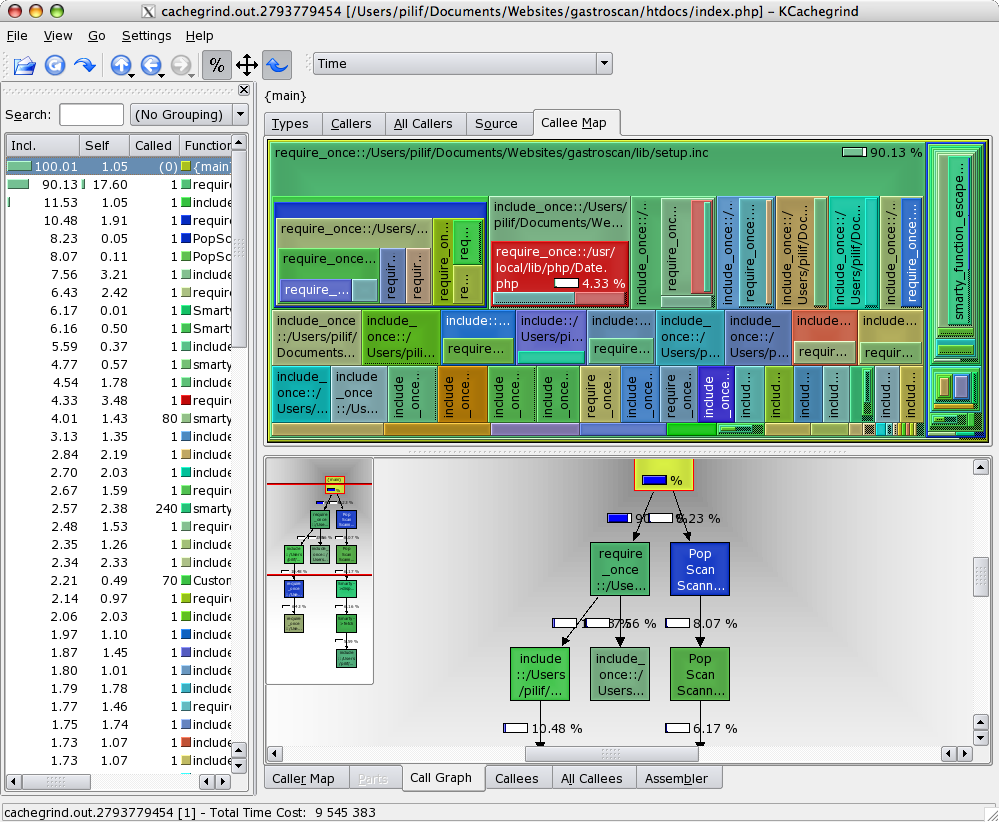
Profiling PHP with Xdebug and KCacheGrind

Profiling can provide real revelations.

Sometimes, you have that gut feeling that a certain code path is the performance bottleneck. Then you go ahead and fix that only to see, that the code is still slow.

This is when a profiler kicks in: It helps you determine the real bottlenecks, so you can start fixing them

The PHP IDE I’m currently using, Zend Studio (it’s the only PHP IDE filling my requirements on the Mac currently) does have a built-in profiler, but it’s a real bitch to set up.

You need to install some binary component into your web server. Then the IDE should be able to debug and profile your application.

Emphasis on “should”.

I got it to work once, but it broke soon after and I never really felt inclined to put more effort into this – even more so as I’m from time to time working with a snapshot version of PHP for which the provided binary component may not work at all.

There’s an open source solution that works much better both in terms of information you can get out of it and in terms of ease of setup and use.

It’s Xdebug.

On gentoo, installing is a matter of emerge dev-php5/xdebug and on other systems, pear install xdebug might do the trick.

Configuration is easy too.

Xdebug generates profiling information in the same format as valgrind, the incredible debugger the KDE people created.

And once you have that profiling information, you can use a tool like KCacheGrind to evaluate the data you’ve collected.

The tool provides some incredibly useful views of your code, making finding performance problems a joyful experience.

Best of all though is that I was able to compile KCacheGrind along with its dependencies on my MacBook Pro – another big advantage of having a real UNIX backend on your desktop.

By the way: Xdebug also is a debugger for PHP, though I’ve never used it for that as I never felt the need to step through PHP code. Because you don’t have to compile it, you are often faster by instrumenting the code and just running the thing – especially once the code is spreading over a multitude of files.

Template engines complexity

The current edition of the german computer magazine iX has an article comparing different template engines for PHP.

When I read it, the old discussion about Smarty providing too many flow controlling options sprang to my mind again, even though that article itself doesn’t say anything about whether providing a rich template language is good or not.

Many purists out there keep telling us that no flow control what so ever should be allowed in a template. The only thing a template should allow is to replace certain marker by some text. Nothing more.

Some other people insist, that having blocks which are parsed in a loop is ok too. But all the options Smarty provides are out of the question as it begins intermixing logic and design again.

I somewhat agree on that argument. But the problem is that if you are limited to simple replacements and maybe blocks, you begin to create logic in PHP which serves no other purpose than filling that specially created block structure.

What happens is that you end up with a layer of PHP (or whatever other language) code that’s so closely tailored to the template (or even templates – the limitations of the block/replacement engines often require you to split a template into many partial file) that even the slightest changes in layout structure will require a rewrite in PHP.

Experience shows me that if you really intend to touch your templates to change the design, it won’t suffice to change the order of some replacements here and there. You will be moving parts around and more often than not the new layout will force changes in the different blocks / template files (imagine marker {mark} moving from block HEAD to block FOOT).

So if you want to work with the down-stripped template engines while still keeping the layout easily exchangeable, you’ll create layout-classes in PHP which get called from the core. These in turn use tightly coupled code to fill the templates.

When you change the layout, you’ll dissect the page layouts again, recreate the wealth of template files / blocks and then update your layout classes. This means that changing the layout does in-fact require your PHP backend coders to work with the designers yet again.

Take smarty.

Basically you can feed a template a defined representation of view data (or even better: Your model data) in unlimited complexity and in raw form. You want to have floating numbers on your template represented with four significant digits? Not your problem with smarty. The template guys can do the formatting. You just feed a float to the template.

In other engines, formatting numbers for example is considered backend logic and thus must be done in PHP.

This means that when the design requirement in my example changes and numbers must be formatted with 6 significant digits, the designer is stuck. He must refer back to you, the programmer.

Not with Smarty. Remember: You got the whole data in a raw representation. A Smarty template guy, knows how to format Numbers from within Smarty. He just makes the change (which is a presentation change only) right in the template. No need to bother the backend programmer.

Furthermore, look at complex structures. Let’s say a shopping cart. With Smarty, the backed can push the whole internal representation of that cart to the template (maybe after some cleaning up – I usually pass an associative array of data to the template to have a unified way of working with model data over all templates). Now it’s your Smarty guys responsibility (and possibility) to do whatever job he has to do to format your model (the cart) in a way the current layout specification asks him to.

If the presentation of the cart changes (maybe some additional text info must be displayed what the template was not designed for in the first place), the model and the whole backend logic can stay the same. The template just uses the model object it’s provided with to display that additional data.

Smarty is the template engine allowing to completely decouple the layout from the business logic.

And let’s face it: Layout DOES in-fact contain logic: Alternating row colors, formatting numbers, displaying different texts if no entries could be found,…

When you remove logic from the layout, you will have to move it to the backend where it immediately means that you will need a backend worker whenever the layout logic changes (which it always does on redesigns).

Granted. Smarty isn’t exactly easy to get used to for a HTML only guy.

But think of it: They managed to learn to replace <font> tags in their code with something more reasonable (CSS), that works completely differently and follows a completely different syntax.

What I want to say is that your layout guys are not stupid. They are well capable of learning the little bits of pieces of logic you’d want to have in your presentation layer. Let them have that responsibility means that you yourself can go back to the business logic once and for all. Your responsibility ends after pushing model objects to the view. The rest is the Smarty guys job.

Being in the process of redesigning a fully smarty-based application right now, I can tell you: It works. PHP does not need to get touched (mostly – design flaws exist everywhere). This is a BIG improvement over other stuff I’ve had to do before which was using the way everyone is calling clean: PHPLIB templates. I still remember fixing up tons and tons of PHP-code that was tightly coupled into the limited structure of the templates.

In my world, you can have one backend, no layout code in PHP and a unlimited amount of layout templates. Interchangable without changing anything in the PHP code. Without adding any PHP code when creating a new template.

Smarty is the only PHP template engine I know of that makes that dream come true.

Oh and btw, Smarty won the performance contest in that article with a lot of distance to the second fastest entry. So bloat can’t be used as argument against smarty. Even if it IS bloated, it’s not slower than non-bloated engines. It’s faster.