Failing silently is bad

Today, I’ve experienced the perfect example of why I prefer PostgreSQL (congratulations for a successful 8.3 release today, guys!) to MySQL.

Let me first give you some code, before we discuss it (assume that the data which gets placed in the database is – wrongly so – in ISO-8859-1):

This is what PostgreSQL does:

bench ~ > createdb -Upilif -E utf-8 pilif
CREATE DATABASE
bench ~ > psql -Upilif
Welcome to psql 8.1.4, the PostgreSQL interactive terminal.

Type:  copyright for distribution terms
       h for help with SQL commands
       ? for help with psql commands
       g or terminate with semicolon to execute query
       q to quit

pilif=> create table test (blah varchar(20) not null default '');
CREATE TABLE
pilif=> insert into test values ('gnügg');
ERROR:  invalid byte sequence for encoding "UTF8": 0xfc676727293b
pilif=>

and this is what MySQL does:

bench ~ > mysql test
Welcome to the MySQL monitor.  Commands end with ; or g.
Your MySQL connection id is 97
Server version: 5.0.44-log Gentoo Linux mysql-5.0.44-r2

Type 'help;' or 'h' for help. Type 'c' to clear the buffer.

mysql> create table test( blah varchar(20) not null default '')
    -> charset=utf8;
Query OK, 0 rows affected (0.01 sec)

mysql> insert into test values ('gnügg');
Query OK, 1 row affected, 1 warning (0.00 sec)

mysql> select * from test;
+------+
| blah |
+------+
| gn   |
+------+
1 row in set (0.00 sec)

mysql>

Obvisouly it is wrong to try and place latin1 encoded data in an utf-8 formatted data store: While every valid utf-8 byte sequence is a valid latin1 byte sequence (latin1 does not restrict the validity of bytes, though some positions may be undefined), the reverse certainly is not true. The character ü from my example is 0xfc in latin1 and U+00fc in unicode which must be encoed as 0xc3 0xbc in utf-8. 0xfc alone is no valid utf-8 byte sequence.

So if you pass this invalid sequence to any entity accepting an utf-8 encoded byte stream, it will not be clear what to do with that data. It’s not utf-8, that’s for sure. But assuming that no character set is specified with the stream, it’s impossible to guess what to translate the byte sequence into.

So PostgreSQL sees the error and bails out (if both the server and the client are set to utf-8 encoding and data is sent in non-utf8-format – otherwise it knows how to convert the data – conversion from any character set to utf-8 is possible all the time). MySQL on the other hand decides to fail silently and to try to fix up the invalid input.

Now while I could maybe live with the default of assuming latin1 encoding, just stopping to process the data without warning what so ever leads to undetected loss of data!

What if I’m not just entering one word? What if it’s a blog-entry like this one? What if the entry is done by a non tech-savvy user? Remember: This mistake can easily be produced: Wrong Content-Type headers, old browsers, broken browsers… it’s very easy to get Latin1 when you want utf-8.

While I agree that sanitization must be done in the application tier (preferably on the model), it’s inacceptable for a database application to store different data than what it was ordered to store without warning the user in any way. This easily leads to data loss or data corruption.

There are many more little things like this where MySQL decides to silently fail where PostgreSQL (and any other database) bail out correctly. As a novice this can feel tedious for you. It can feel like PostgreSQL is pedantic and like you are faster with MySQL. But let’s be honest: What do you prefer? An error message or lost data with no way of knowing that it’s lost?

This, by the way, is the outcome of a lengthy debugging session on a Typo3 installation, which also, but not ultimately is to blame here. In a perfect world, MySQL would bail out, but Typo3 would either

  • Not specify charset=utf8 when creating the table unless specifically asked to.
  • Send a charset=utf-8 http-header, knowing that the database has been created as containing utf-8
  • Sanitize user input before handing it over to the mysql-backend which is obviously broken in this instance.
  • Now back to debugging real software on real databases *grin*
reddit’s commenting system

This is something I wanted to talk about for quite some time now, but I never got around to it. Maybe you know reddit. reddit basically works like digg.com – it’s one of these web2.0 mashup community social networking bubble sites. reddit is about links posted by users and voted for by users.

Unlike digg, reddit has an awful screen design and thus seems to attract  a bit more mature crowds than digg does, but lately it seems to be taken over by politics and pictures which devalues the whole site a bit.

What is really interesting though is the commenting system. In fact, it’s interesting enough for me to write about it and it works well enough for me to actually post a comment there here and then. It’s even good enough for me to be sure that whenever I will be in the situation to design a system to allow users to comment on something that I will have a look at what reddit did and I will model my solution around that base.

There are so many commenting systems out there, but all fail in some regards. Either they disturb your reading flow, making it too difficult to post something. Or they either hide comments behind a foldable tree structure or they display a flat list making it difficult to see any kind of threading going on.

And once you actually are interested in a topic enough to post a comment or a reply to a comment, you’ll quickly lose track of the discussion which gets as quickly buried by newly arriving posts.

reddit works differently.

First, messages are displayed in a threaded, but fully expanded view, thus allowing to skip over content you are not interested in while still providing all the overview you need. Then, posting is done inline via some AJAX interface. You see a comment you want to reply to, you hit the reply link, enter the text and hit "save". The page is not reloaded, you end up just where you left off.

But what good is answering to a comment if the initial commenter quickly forgets about his or her comment? Or if he or she just plain doesn’t find her comment again?

reddit puts all direct replies to any comments you made into your personal inbox folder. If you have any of these replies, the envelope to the top right will light up red allowing you to see newly arrived replies to your comments. With one click, you can show the context of the post you replied to, your reply and the reply you got. This makes it incredibly easy to be notified when someone posted something in response, thus keeping the discussion alive, no matter how deeply it may have been buried by comments arriving after yours.

So even if reddit looks awful (one gets used to the plain look though), it has one of the best, if not the best online discussion systems under its hood and so many other sites should learn from that example. It’s so easy that it even got me to post a comment here and then – and I even got replies despite not obviously trolling (which usually helps you get instant-replies, though I don’t recommend this practice).

The IE rendering dilemma – solved?

A couple of months a IE rendering dilemma: How to fix IE8’s rendering engine without breaking all the corporate intranets out there? How to create both a standards oriented browser and still ensure that the main customers of Microsoft – the enterprises – can still run a current browser without having to redo all their (mostly internal) web applications.

Only three days after my posting IEBlog talked about IE8 passing the ACID2 test. And when you watch the video linked there, you’ll notice that they indeed kept the IE7 engine untouched and added an additional switch to force IE8 into using the new rendering engine.

And yesterday, A List Apart showed us how it’s going to work.

While I completely understand Microsofts solution and the reasoning behind it, I can’t see any other browser doing what Microsoft recommended as a new standard. The idea to keep multiple rendering engines in the browser and default to outdated ones is in my opinion a bad idea. Download-Sizes of browser increase by much, security problems in browsers must be patched multiple times, and, as the Webkit blog put it, “[..] hurts the hackability of the code [..]”.

As long as the other browser vendors don’t have IE’s market share nor the big company intranets depending on these browsers, I don’t see any reason at all for the other browsers to adapt IE’s model.

Also, when I’m doing (X)HTML/CSS work, usually it works and displays correctly in every browser out there – with the exception of IE’s current engine. As long as browsers don’t have awful bugs all over the place and you are not forced to hack around them, deviating from the standard in the process, there is no way a page you create will only work in one specific version of a browser. Even more so: When it breaks on a future version, that’s a bug in the browser that must be fixed there.

Assuming that Microsoft will, finally, get it right with IE8 and subsequent browser versions, we web developers should be fine with

<meta http-equiv="X-UA-Compatible" content="IE=edge" />

on every page we output to a browser. These compatibility hacks are for people that don’t know what they are doing. We know. We follow standards. And if IE begins to do so as well, we are fine with using the latest version of the rendering engine there is.

If IE doesn’t play well and we need to apply braindead hacks that break when a new version of IE comes out, then we’ll all be glad that we have this method of forcing IE to use a particular engine, thus making sure that our hacks continue to work.

The IE rendering dilemma

There’s a new release of Internet Explorer, aptly named IE8, pending and a whole lot of web developers are in fear of new bugs and no fixes to existing ones. Like the problems we had with IE7.

A couple of really nasty bugs where fixed, but there wasn’t any significant progress in matters of extended support for web standards or even a really significant amount of bugfixes.

And now, so fear the web developers, history is going to repeat itself. Why, are people asking, aren’t they just throwing away the currently existing code-base, replacing it with something more reasonable? Or if licensing or political issues prevent using something not developed in-house, why not rewrite IE’s rendering engine from scratch?

Backwards compatibility. While the web itself has more or less stopped using IE-only-isms and began embracing the way of the web standards (and thus began cursing on IE’s bugs), corporate intranets, the websites accessed by Microsoft’s main customer base, certainly have not.

ActiveX, <FONT>-Tags, VBScript – the list is endless and companies don’t have the time or resources to remedy that. Remember. Rewriting for no real purpose than “being modern” is a real waste of time and certainly not worth the effort. Sure. New Applications can be developped in a standards compliant way. But think about the legacy! Why throw all that away when it works so well in the currently installed base of IE6?

This is why Microsoft can’t just throw away what they have.

The only option I see, aside of trying to patch up what’s badly broken, is to integrated another rendering engine into IE. One that’s standards compliant and one that can be selected by some means – maybe a HTML comment (the DOCTYPE specification is already taken).

But then, think of the amount of work this creates in the backend. Now you have to maintain two completely different engines with completely different bugs at different places. Think of security problems. And think of what happens if one of these buggers is detected in a third party engine a hypothetical IE may be using. Is MS willing to take responsibility of third-party bugs? Is it reasonable to ask them to do this?

To me it looks like we are now paying the price for mistakes MS did a long time ago and for quick technological innovation happening at the wrong time on the wrong platform (imagine the intranet revolution happening now). And personally, I don’t see an easy way out.

I’m very interested in seeing how Microsoft solves this problem. Ignore the standards-crowd? Ignore the corporate customers? Add the immense burden of another rendering engine? FIx the current engine (impossible, IMHO)? We’ll know once IE8 is out I guess.

Gmail – The review

It has been quite a while since I began routing my mail to Gmail with the intention of checking that often-praised mail service out thoroughly.

The idea was to find out if it’s true what everyone keeps saying: That gmail has a great user interface, that it provides all the features one needs and that it’s a plain pleasure to work with it.

Personally, I’m blown away.

Despite the obviously longer load time to be able to access the mailbox (Mac Mail launches quicker than it takes gmail to load here – even with a 10 MBit/s connection), the gmail interface is much faster to use – especially with the nice keyboard shortcuts – but I’m getting ahead of myself.

When I began to use the interface for some real email work, I immediately noticed the shift of paradigm: There are no folders and – the real new thing for me – you are encouraged to move your mail out of the inbox as you take notice of them and/or complete the task associated with the message.

When you archive a message, it moves out of the inbox and is – unless you tag it with a label for quick retrieval – only accessible via the (quick) full text search engine built into the application.

The searching part of this usage philosophy is known to me. When I was using desktop clients, I usually kept arriving email in my inbox until it contained somewhere around 1500 messages or so. Then I grabbed all the messages and put them to my “Old Mail” folder where I accessed them strictly via the search functionality built into the mail client (or the server in case of a good IMAP client).

What’s new for me is the notion of moving mail out of your inbox as you stop being interested in the message – either because you plain read it or because the associated task is completed.

This allows you for a quick overview over the tasks still pending and it keeps your inbox nice and clean.

If you want quick access to certain messages, you can tag them with any label you want (multiple labels per message are possible of course) in which case you can access the messages with one click, saving you the searching.

Also, it’s possible to define filters allowing you to automatically apply labels to messages and – if you want, move them out of the inbox automatically – a perfect setup for the SVN commit messages I’m getting, allowing me to quickly access them at the end of the day and looking over the commits.

But the real killer feature of gmail is the keyboard interface.

Gmail is nearly completely accessible without requiring you to move your hands off the keyboard. Additionally, you don’t even need to press modifier keys as the interface is very much aware of state and mode, so it’s completely usable with some very intuitive shortcuts which all work by pressing just any letter button.

So usually, my workflow is like this: Open gmail, press o to open the new message, read it, press y to archive it, close the browser (or press j to move to the next message and press o again to open it).

This is as fast as using, say, mutt on the console, but with the benefit of staying usable even when you don’t know which key to press (in that case, you just take the mouse).

Gmail is perfectly integrated into google calendar, and it’s – contrary to mac mail – even able to detect outlook meeting invitations (and send back correct responses).

Additionally, there’s a MIDP applet available for your mobile phone that’s incredibly fast and does a perfect job of giving you access to all your email messages when you are on the road. As it’s a Java application, it runs on pretty much every conceivable mobile phone and because it’s a local application, it’s fast as hell and can continue to provide the nice, keyboard shortcut driven interface which we are used to from the AJAXy web application.

Overall, the experiment of switching to gmail proofed to be a real success and I will not switch back anytime soon (all my mail is still archived in our Exchange IMAP box). The only downside I’ve seen so far is that if you use different email-aliases with your gmail-account, gmail will set the Sender:-Header to your gmail-address (which is a perfectly valid – and even mandated – thing to do), and the stupid outlook on the receiving end will display the email as being sent from your gmail adress “in behalf of” your real address, exposing your gmail-address at the receiving. Meh. So for sending non-private email, I’m still forced to use Mac Mail – unfortunately.

Trying out Gmail

Everyone and their friends seems to be using Gmail lately and I agree: The application has a clean interface, a very powerful search feature and is easily accessible from anywhere.

I have my Gmail address from back in the days when invites were scarce and the term AJAX wasn’t even a term yet, but I never go around to really take advantage of the services as I just don’t see myself checking various email accounts at various places – at least not for serious business.

But now I found a way to put gmail to the test as my main email application – at least for a week or two.

My main mail storage is and will be our Exchange server. I have multiple reasons for that

  1. I have all my email I ever sent or received in that IMAP account. That’s WAY more than the 2.8 GB you get in Gmail and even if I had enough space there, I would not want to upload all my messages there.
  2. I don’t trust gmail to be as diligent with the messages I store there as I would want it to. I managed to keep every single email message from 1998 till now and I’d hate to lose all that to a “glitch in the system”.
  3. I need IMAP access to my messages for various purposes.
  4. I need the ability of a strong server-side filtering to remove messages I’m more or less only receiving for logging purposes. I don’t want to see these – not until I need them. No reason to even have them around usually.

So for now I have added yet another filter to my collection of server-side filters: This time I’m redirecting a copy of all mail that didn’t get filtered away due to various reasons to my Gmail address. This way I get to keep all mail of my various aliases all at the central location where they always were and I can still use Gmail to access the newly arrived messages.

Which leaves the problem with the sent messages which I ALSO want to archive at my own location – at least the important ones.

I fixed this by BCCing all Mail I’m writing in gmail to a new alias I created. Mail to that alias with my Gmail address as sender will be filtered into my sent-box by Exchange so it’ll look as though I sent the message via Thunderbird and then uploaded the copy via IMAP.

I’m happy with this solution, so testing Gmail can begin.

I’m asking myself: Is a tag based storage system better than a purely search based (the mail I don’t filter away is kept in one big INBOX which I access purely via search queries if I need something)? Is a web based application as powerful as a mail client like Thunderbird or Apple Mail? Do I unconsciously use features I’m going to miss when using Gmail instead of Apple Mail or Thunderbird? Will I be able to get used to the very quick keyboard-interface to gmail?

Interesting questions I intend to answer.

MediaFork 0.8-beta1

A few months ago, I was looking for a nice usable solution to rip DVDs. I was trying out a lot of different things, but the only application that had acceptable usability and speed was HandBrake

Unfortunately, the main developer of that tool has run out of time to continue to develop HandBrake which made the project stall for some time.

Capable fans of the tool have now created a form, aptly named MediaFork and they have just released Version 0.8-beta1 with some fixes.

But that’s not all. Aside from the new release, they also created a blog, set up a trac environement.

Generally, I’d say the project moved back to be totally alive and kicking.

The new release provides a linux command line utility. Maybe I should go ahead and try it out on a machine even more powerful than my Mac Pro (which is running linux without X) – let’s see how many FPS I’m going to get.

Anyways: Congratulations to the MediaFork developers for their great release! You’re doing for video what iTunes did for audio: You make ripping DVDs doable.

VMWare Server, chrony and slow clocks

We have quite many virtual machines running under VMWare server. Some for testing purposes, some for quite real systems serving real webpages.

It’s wonderful. Need a new server? Just cp -r the template I created. Need more RAM in your server? No problem. Just add it via the virtual machine configuration file. Move to another machine? No problem at all. Power down the virtual machine and move the file where you want it to be.

Today I noticed something strange: The clocks on the virtual machines were way slow.

One virtual second was about ten real seconds.

This was so slow that chrony which I used on the virtual machines thought that the data sent from the time servers was incorrect, so chrony was of no use.

After a bit of digging around, I learned that VMware server needs access to /dev/rtc to provide the virtual machines with an usable time signal (usable as in “not too slow”).

The host’s /var/log/messages was full of lines like this (you’ll notice that I found yet another girl from a console RPG to name that host):

Dec 15 16:12:58 rikku /dev/vmmon[6307]: /dev/rtc open failed: -16
Dec 15 16:13:08 rikku /dev/vmmon[6307]: host clock rate change request 501 -> 500

-16 means “device busy”

The fix was to stop chrony from running on the host machine so VMWare could open /dev/rtc. This made the error messages vanish and additionally it allowed the clocks of the virtual machines to work correctly.

Problem solved. Maybe it’s useful for you too.

Button placement

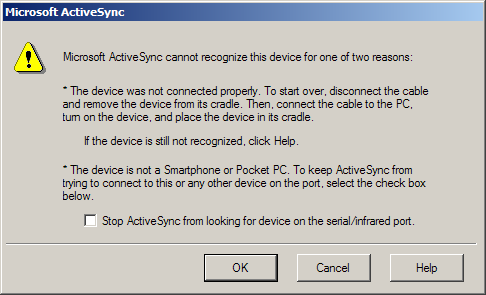
Besides the fact that this message is lying to me (the device in question certainly is a Windows Mobile device and there can’t be any cradle problem because it’s an emulated image ActiveSync is trying to connect to), I have one question: What exactly do the OK and the Cancel button do?

And this newly created dialog is in ActiveSync 4.2 – way after the MS guys are said to have seen the light and are trying to optimize usability.

Oh and I could list some other “fishy” things about this dialog:

  • It has no indication of what the real problem is (a soft reset of the emulator image helped, by the way).
  • It has way too much text on it
  • Trying to format a list using * and improper indentation looks very unprofessional. Judging from the bottom part of the dialog where the buttons are, this is no plain MessageBox anyways, so it would have been doable to fix that.
  • The spacing between the buttons is not exactly consistend with the Windows-Standard

Dialogs like these is precisely why I doubt that Windows Mobile really is the right OS to run on a barcode scanner – at least if it’s a scanner that will be distributed among end-users with no clue of PCs. It’s such a good thing that the scanners finally have GPRS included.

Mysql in Acrobat 8

I have Acrobat 8 running on my Mac. And look what I’ve found by accident:

I had console.log open to check something, when I found these lines:

<p>061115 9:57:48 [Warning] Can’t open and lock time zone table: Table ‘mysql.time_zone_leap_second’ doesn’t exist trying to live without them</p>

/Applications/Adobe Acrobat 8 Professional/Adobe Acrobat Professional.app/Contents/MacOS/mysqld: ready for connections.

Version: ‘4.1.18-standard’ socket: ‘/Users/pilif/Library/Caches/Acrobat/8.0_x86/Organizer70’ port: 0 MySQL Community Edition – Standard (GPL)

</tt>

MySQL shipped with Acrobat? Interesting.

The GPL-Version shipped with Acrobat? IMHO a clear license breach.

Of course, I peeked into the Acrobat bundle:

% pwd
/Applications/Adobe Acrobat 8 Professional/Adobe Acrobat Professional.app/Contents/MacOS
% dir mysql*
-rwxrwxr-x    1 pilif    admin     2260448 Feb 20  2006 mysqladmin
-rwxrwxr-x    1 pilif    admin     8879076 Feb 20  2006 mysqld

Interesting. Shouldn’t the commercial edition not print “Community Edition (GPL)”? Even if Adobe doesn’t violate the license (because they are just shipping the GPLed server and have bought the client library (which is GPL too) or written their own client), the GPL clearly states that I can get the sourcecode and a copy of the license. I couldn’t find these anywhere though…

I guess I should ask at mysql what’s going on here.