Bugs, Bugs and more Bugs

I love my job. Ever loved it, always will love it.

But if you ask me what the most annoying aspect of it is, then I would answer you that it’s stuff always breaking all around me.

Whatever I do, there is no guarantee that any defined thing will work like it’s expected to, it will break from one moment to another or it will never work. There are hardware failures, OS failures, software failures – each and every day I lose at least one or two hours due to stuff not working or suddenly stopping to work.

Let me give you an account of what happened since the beginning of 2009:

  • When installing two previously configured servers at a collocation center, one didn’t start up at all (opening and reclosing the case fixed that) and the ESX server on the other machine refused to connect to the VMWare license server despite a working TCP/IP connection between them which turned out to be a missing host file entry despite connecting via IP-address.
  • One day later, Outlook on a computer of someone I’m looking after the PC a bit decided to trash the .PST-file and I had to remotely guide (on the phone) the person to restore it from the backup.
  • Yesterday, my Firebug suddenly stopped working. At least the console-object wasn’t any longer available in my scripts and the console itself didn’t work. Reinstalling the Addon helped (WTF?)
  • One of my two Vista Media Center PCs suddenly stopped to play any video file, despite me not doing updates on these machines to prevent stuff like this from happening. To this date I have no idea how to fix this.
  • My Delphi 2007 installation just now decided to stop displaying the online help. Trying to fix that by reinstalling it ended with an Error message containing title and content of “Error”, but not after first completely uninstalling Delphi with no way of getting it back (you know… “Error” again). This was fixed by removing D2009 and then reinstalling 2007 and 2009 – a process that took 2 hours of installation time and another three to figure out what’s going on.
  • When I was frustrated enough and wanted to vent (i.e. write this post), my WordPress just now decided to do something really strange to the layout of the “Add New Post” page which made it impossible to post anything. Disabling Google Gears and restarting the browser helped.

Our everyday technology is becoming more and more complex, thus causing more and more strange problems, requiring more and more knowledge and time to work around them. If we continue on that path, sooner or later it will be impossible to keep up with fixing problems popping up.

That will be the day when I’ll hopefully live on some island way off the net and all this stuff.

Monitoring servers with munin

If you want to monitor runtime parameters of your machines, there are quite many tools available.

But in the past, I’ve never been quite happy with any of them. Some didn’t work, others didn’t work right and some others worked ok but then stopped working all of a sudden.

All of them were a pain to install and configure.

Then, a few days ago, I found Munin. Munin is optimized for simplicity, which makes it work very, very well. And the reports actually look nice and readable which is a nice additional benefit.

Apache parameters

Like many other system monitoring solutions, Munin relies on custom plugins to access the various system parameters. Unlike other solutions though, the plugins are very easy to write, understand and debug which encourages you to write your own.

Adding additional servers to be watched is a matter of configuring the node (as in “apt-get install munin-node”) and adding two lines to your master server configuration file.

Adding another plugin for a new parameter to monitor is a matter of creating one symlink and restarting the node.

Manifestation of a misconfigured cronjob

On the first day after deployment the tool already proved useful in finding a misconfigured cronjob on on server which ran every minute for one hour every second hour instead of once per two hours.

Munin may not have all the features of the foll-blown solutions, but it has three real advantages over everything else I’ve seen so far:

  1. It’s very easy to install and configure. What good is an elaboration solution if you can never get it to work correctly?
  2. It looks very nicely and clean. If looking at the reports hurts the eyes, you don’t look at them or you don’t understand what they want to tell you.
  3. Because the architecture is so straight-forward, you can create customized counters in minutes which in the end provides you with a much better overview over what is going on.

The one big drawback is that the master data collector needs to access the monitored servers on port 4949 which is not exactly firewall-friendly.

Next time, we’ll learn how to work around that (and I don’t mean the usual ssh tunnel solution).

Windows Media Encoder: File not found

Today I have come across an installation of a Windows Media Encoder that refused to actually encode media. Whenever I started the encoding process, the encoder quit with the error 0x80070002 and gave the very helpful unformation that “the system cannot find the file specified”.

The problem appeared quite suddenly after working perfectly fine for the last three months. As the system is behind a very air-tight firewall and is the only machine in the network segment (aside of some IP cameras), the system hasn’t even been updated via Windows Update. So I have to conclude, that the problem appeared out of the blue. One day it worked, the next it stopped working.

I’ve tried everything to fix this (the encoder in question was encoding a live stream for a client of ours): From reinstalling the Axis capture driver to reinstalling Windows Media Encoder – nothing worked – the error message stayed the same.

Even googling proved all but helpful: There are quite many pages apparently mirroring all and the same MSDN forum on which someone actually posted the same problem but never got an answer. How annoying is that? You find 10 or more hits, everyone having your problem right in the title and everyone on a different page, but in the end, it’s all the same posting mirrored by different sites and plastered with advertisements.

On a hunch though, I have deleted “%Localappdata%MicrosoftWindows Media” and “%Localappdata%MicrosoftWindows Media Player” seeing that these folders stayed intact after a reinstallation while also being somewhat Windows media related.

Of course that helped!

So if you ever are in the same problem and Media Encoder suddenly stops encoding, it’s maybe caused by a corrupted cache of sorts. In that case, remove the cache and be encoding again, but note though, that if you are on a client machine with all your media on, removing these folders may be unwise as they could contain some meta information about your media.

In my case that didn’t matter though.

Dropbox

Dropbox is cloud storage on the next level: You install their little application – available for Linux, Mac OS X and Windows – which will create a folder which will automatically be kept synchronized between all the computers where you have installed that little application on.

Because it synchronizes in the background and always keeps the local copy around, the access-speed isn’t different from a normal local folder – mainly because it is, after all, a local folder you are accessing. Dropbox is not one of these slow “online hard drives” it’s more like rsync in the background (and rsync it is – the application is intelligent enough to only transmit deltas – even from binary files).

They do provide you with a web interface of course, but the synchronizing aspect is the most interesting.

The synchronized data ends up somewhere in Amazon’s S3 service, which is fine with me.

Unfortunately, while the data stored in an encrypted fashion on S3, the key is generated by the Dropbox server and thus known to them, which makes Dropbox completely unusable for sensitive unencrypted data. They do state in the FAQ that this will maybe change sometime in the future, but for not it is as it is.

Still, I found some use for Dropbox: ~/Library/Preferences, ~/.zshrc and ~/.ssh all are now stored in ~/Dropbox/System and symlinked back to their original place. This means that a large chunk of my user profile is availalbe on all the computers I’m working on. I would even try the same trick with ~/Library/Application Support, but that seems risky due to the missing encryption and due to the fact that Application Support sometimes contains database files which get corrupted for sure when moved around while they are open – like the Firefox profile.

This naturally even works when the internet connection is down – DropBox synchronizes changes locally, so when the internet (or Dropbox) is down, I just have the most recent copy of when the service was still working – that’s more than good enough.

Another use that comes to mind for Dropbox storage are game save files or addons you’d want to have access to on every computer you are using – just move your stuff to ~/Dropbox and symlink it back to the original place.

Very convenient.

Now if only they’d provide me with a way to provide my own encryption key. That way I would instantly buy the pro account with 25GB of storage and move lots and lots of data in there.

Dropbox is the answer to the ever increasing amount of computers in my life because now I don’t care about setting up the same stuff over and over again. It’s just there and ready. Very helpful.

Listen to your home music from the office

My MP3 collection is safely stored on shion, on a drobo mounted as /nas. Naturally, I want to listen to said music from the office – especially considering my fully routed VPN access between the office and my home infrastructure and the upstream which suffices for at least 10 concurrent 128bit streams (boy – technology has changed in the last few years – I remember the times where you couldn’t reliably stream 128 bit streams – let alone my 160/320 mp3s).

I’ve tried many things so far to make this happen:

  • serve the files with a tool like jinzora. This works, but I don’t really like jinzora’s web interface and I was never able to get it to work correctly on my Ubuntu box. I was able to trace it down to null bytes read from their tag parser, but the code is very convoluted and practically unreadable without putting quite some effort into that. Considering that I didn’t much like the interface in the first place, I didn’t want to invest time into that.
  • Use a SlimServer (now Squeezecenter) with a softsqueeze player. Even though I don’t use my squeezebox (an original model with the original slimdevices brand, not the newer Logitech one) any more because the integrated amplifier in the Sonos players works much better for my current setup. This solution worked quite ok, but the audio tends to stutter a bit at the beginning of tracks, indicating some buffering issues.
  • Use iTune’s integrated library sharing feature. This seemed both undoable and unpractical. Unpractical because it would force me to keep my main mac running all the time and undoable because iTunes sharing can’t pass subnet boundaries. Aside of that, it’s a wonderful solution as audio doesn’t stutter, I already know the interface and access is very quick and convenient.

But then I found out how to make the iTunes thing both very much doable and practical.

The network boundary problem can be solved using Network Beacon, a ZeroConf proxy. Start the application, create a new beacon. Chose any service name, use «_daap._tcp.» as service type, set the port number to 3689, enable the host proxy, keep the host name clear and enter the IP address of the system running iTunes (or firefly – see below).

Oh, and the target iTunes refuses to serve out data to machines in different subnets, so to be able to directly access a remote iTunes, you’d also have to set up an SSH tunnel.

Using Network Beacon, ZeroConf quickly begins working across any subnet boundaries.

The next problem was about the fact that I was forced to keep my main workstation running at home. I fixed that with Firefly Media Server for which even a pretty recent prebuilt package exists for Ubuntu (apt-get install mt-daapd).

I’ve installed that, configured iptables to drop packets for port 3689 on the external interface, configured Firefly to use the music share (which basically is a current backup of the itunes library of my main workstation – rsync for the win).

Firefly in this case even detects the existing iTunes playlists (as the music share is just a backup copy of my iTunes library – including the iTunes Library.xml), though smart playists don’t work, but can easily be recreated in the firefly web interface.

This means that I can access my complete home mp3 library from the office, stutter free, using an interface I’m well used to, without being forced to keep my main machine running all the time.

And it isn’t even that much of a hack and thus easy to rebuild should the need arise.

I’d love to not be forced to do the Network Beacon thing, but avahi doesn’t relay ZeroConf information across VPN interfaces.

Sonos news

Today, Sonos announced their new 2.7 software version for their home appliances with some additional web radio features in which I’m not particularly interested as I’m more or less only listening to one web radio station. What they’ve also announced though was much more interesting: An iPhone Version of their Controller application (iTunes Link).

The thing doesn’t just look nice, it also works perfectly well and provides all the functionality you are used to have in your sonos controller, but without the controllers bulkyness (the thing is heavy and quite large). I’m constantly carrying my iPhone around anyways and it’s constantly connected to the WiFi network in my home, so it’s the perfect fit to be a sonos controller.

The application starts up quite instantly: It does show a splash screen for around three seconds, but that is still way shorter than a controller booting up from deep sleep, which you have to put it into if you want it to last longer than a day or so.

Functionality-wise the iPhone application provides everything a real controller does – well… nearly everything. I truly miss the alarm functionality, but I’m quite sure that’ll come soon enough.

Aside of that, I’m inclined to say that this little application more or less obsoletes the original controller. And in every case but the 32GB iPod Touch, it’s always cheaper to buy any Apple device and install the application than it is to buy the original Sonos controller (here in Switzerland, you can get an 8 GB touch for half the price of a Sonos controller)  – if you can live with setting up alarms in the desktop software. It’s certainly possible (and thankfully much quicker than with the original controller) to cancel a running alarm in the iPhone controller.

Very nice indeed.

On related news: I have updated my ogg to mp3 stream converter to stop looking at the url to decide whether the url to play is a stream itself or a playlist, but instead to fetch the information from the HTTP response header themselves, thus making the script to continue to work with Rainwave despite them having changed the URL for the tune in link.

My favourite asterisk feature

I’ve just included this into the context of the dialplan where the calls from and to our internal phones live.

[intercom]
exten => _55[6-8][1-9],1,SIPAddHeader("Call-Info: sip:asterisk;answer-after=0")
exten => _55[6-8][1-9],2,Dial(SIP/${EXTEN:2})

this is as useless as it is fun.

Too bad softphones are getting some real attention in the office lately, as they don’t support the answer-after feature and even if they did, where is the fun of just making yourself heard on the headphones of the victim as opposed to doing that directy on their speaker – loud enough to be heard in the whole office.

VoIP is fun and it’s about time I do more to our asterisk config but just watch it work and never fail.

IRC user interface idea

Don’t you know this problem?

You are connected to some amount of IRC servers and you are watching a certain amount of channels.

Every IRC client I know either uses tabs or windows to separate these channels in their own context, usually providing some visual clue if there was activity in a different channel you are not currently watching.

While this metaphor probably makes a lot of sense in very busy channels, I think that consolidating every channel into one single window probably is a much better way for you to follow what’s going on and to talk back to the channels – especially when you are watching lesser populated channels.

This frees you from the burden of constantly switching channel windows (or tabs) to see what is going on.

Let’s say you are connected to irc1.example.com and irc2.example.com. On irc1, you are connected to #channel1a and #channel1b and on irc2, you are connected to #channel2a

Now, to my knowledge, every current IRC client either uses three windows or three tabs (maybe even 5 windows/tabs because the server themselves get a window too) to represent this information. In window based clients, you can arrange all of them aside of each other, but talking to a certain channel still forces you to focus different windows.

Now with my idea, you would consolidate these channels. You would only get one window which contains all the messages from all channels.

So in the simplest incarnation, you’d probably see something like this in your chat window:

1) irc1/#channel1a [user1aa]> hi there!
2) irc1/#channel1b [user1a]> hi there!
1) irc1/#channel1a [user1ab]> hi user1aa
3) irc2/#channel2a [user2aa]> hi folks!

though you would probably understand much more easily what’s going on if the server-, channel- and user names were a bit more… well… distinct.

Of course, you could add color. You assign each channel a color, like this:

1) irc1/#channel1a [user1aa]> hi there!
2) irc1/#channel1b [user1a]> hi there!
1) irc1/#channel1a [user1ab]> hi user1aa
3) irc2/#channel2a [user2aa]> hi folks!

and if you need to, you can still color nicks.

1) irc1/#channel1a [user1aa]> hi there!
2) irc1/#channel1b [user1a]> hi there!
1) irc1/#channel1a [user1ab]> hi user1aa
3) irc2/#channel2a [user2aa]> hi folks!

Now… how to talk back?

Easy. Every channel is assigned a number for quick access. Just type /[channel number] to switch to that channel and type, then hit enter. The channel you last talked to is predefined and sticks around until you hit /[another channel number].

This feels so much an easier and more intuitive way to handle multiple connections, especially in cases where the channels you are joined are not too active, as in this way, you can easily watch everything that is going on.

Also, usually, discussions happen in intervals in different channels. You will only very rarely see the color concert I’ve shown above as usually, you have a discussion going on in one channel while the others are relatively quiet.

I’ll probably have to go and implement a proof-of-concept sometime in the future, but this feels like such a nice idea when just looking at it. Why is nobody doing it? What am I missing?

Automatic language detection

If you write a website, do not use Geolocation to determine the language to display to your user.

If you write a desktop application, do not use the region setting to determine the language to display to your user.

This is incredibly annoying for some of us, especially for me which is why I’m ranting here.

The moment Google released their (awful) German translation for their RSS reader, I was served the German version just because I have a Swiss IP address.

Here in Switzerland, we actually speak one of three (or four, depending on who you ask) languages, so defaulting to German is probably not of much help for the people in the french speaking part.

Additionally, there are many users fluent in (at least reading) English. We always prefer the original language if at all possible because generally, translations never quite work. Even if you have the best translators at work, translated texts never feel fluid. Especially not when you are used to the original version.

So, Google, what were you thinking to switch me over to the German version of the reader? I have been using the English version for more than a year, so clearly, I understood enough of that language to be able to use it. More than 90% of the RSS feeds I’m subscribed to are, in fact, in English. Can you imagine how pissed I was to see the interface changed?

This is even worse on the iPhone/iPod frontend, because, there, you don’t even provide an option to change the language aside of manually hacking the URL.

Or take desktop applications. I live in the German speaking parts of Switzerland. True. So naturally I have set my locale settings to Swiss German. You know: I want to have the correct number formatting, I want my weeks to start on Mondays. I want the correct currency. I want my 24 hours clock I’m used to.

Actually, I also want the German week and month names, because I will be using these in most of my letters and documents, which are, in fact, German too.

But my OS installation is English. I am used to English. I prefer English. Why do so many programs insist to use the locale setting to determine the display language? Do you developers think it’s funny to have a mish-mash of languages on the screen? Don’t you think that me using an English OS version may be an indication that I do not want to read your crappy German translation alongside the English user interface of my OS?

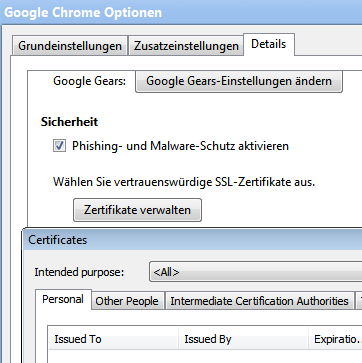
Don’t you think that it feels really stupid to have a button in a German dialog box open another, English, dialog (the first one is from Chrome, the one that opens once you click “Zertifikate verwalten” (Manage certificates) is from Windows itself)?

In Chrome, I can at least fix the language – once I found the knob to turn. At first, it was easier for me to just delete the German localization file from the chrome installation because, due to being completely unused to German UIs, I was unable to find the right setting.

This is really annoying and I see this particular problem being neglected on an incredibly large scale. I know that I am a minority, but the problem is so terribly easy to fix:

  • All current browsers send an Accept-Language header. In contrast to the earlier times, nowadays, it is actually correctly preset in all the common browsers. Use that. Don’t use my IP-address.
  • Instead of reading the locale setting in my OS, ask the OS for its UI language and use that to determine which localization to load (actually, this is the recommended way of doing things according to Microsoft’s guidelines at least since Windows XP which was 2001).

Using these two simple tricks, you help a minority without hindering the majority in any way and without additional development overhead!

Actually, you’ll be getting away a lot cheaper than before. GeoIP is expensive if you want it to be accurate (and you do want that. Don’t you?), whereas there are ready-to-use libraries to determine the correct language even from the most complex Accept-Language-Header.

Asking the OS for the UI language isn’t harder than asking it for the locale, so no overhead there either.

Please, developers, please have mercy! Stop the annoyance! Stop it now!

VMWare Fusion Speed

This may be totally placebo, but I noticed that using Vista inside a VMWare Fusion VM has just turned from nearly unbearable slow to actually quite fast by updating from 2.0 Beta 2 to 2.0 Final.

It may very well be that the beta versions contained additional logging and/or debug code which was keeping the VM from reaching its fullest potential.

So if you are too lazy to upgrade and still running one of the Beta versions, you should consider updating. For me at least, it really brought a nice speed-up.