AJAX, Architecture, Frameworks and Hacks

Today I was talking with @brainlock about JavaScript, AJAX and Frameworks and about two paradigms that are in use today:

The first is the “traditional” paradigm where your JS code is just glorified view code. This is how AJAX worked in the early days and how people are still using it. Your JS-code intercepts a click somewhere, sends an AJAX request to the server and gets back either more JS code which just gets evaulated (thus giving the server kind of indirect access to the client DOM) or a HTML fragment which gets inserted at the appropriate spot.

This means that your JS code will be ugly (especially the code coming from the server), but it has the advantage that all your view code is right there where all your controllers and your models are: on the server. You see this pattern in use on the 37signals pages or in the github file browser for example.

Keep the file browser in mind as I’m going to use that for an example later on.

The other paradigm is to go the other way around an promote JS to a first-class language. Now you build a framework on the client end and transmit only data (XML or JSON, but mostly JSON these days) from the server to the client. The server just provides a REST API for the data plus serves static HTML files. All the view logic lives only on the client side.

The advantages are that you can organize your client side code much better, for example using backbone, that there’s no expensive view rendering on the server side and that you basically get your third party API for free because the API is the only thing the server provides.

This paradigm is used for the new twitter webpage or in my very own tempalias.com.

Now @brainlock is a heavy proponent of the second paradigm. After being enlightened by the great Crockford, we both love JS and we both worked on huge messes of client-side JS code which has grown over the years and lacks structure and feels like copy pasta sometimes. In our defense: Tons of that code was written in the pre-enlightened age (2004).

I on the other hand see some justification for the first pattern aswell and I wouldn’t throw it away so quickly.

The main reason: It’s more pragmatic, it’s more DRY once you need graceful degradation and arguably, you can reach your goal a bit faster.

Let me explain by looking at the github file browser:

If you have a browser that supoports the HTML5 history API, then a click on a directory will reload the file list via AJAX and at the same time the URL will be updated using push state (so that the current view keeps its absolute URL which is valid even after you open it in a new browser).

If a browser doesn’t support pushState, it will gracefully degrade by just using the traditional link (and reloading the full page).

Let’s map this functionality to the two paradigms.

First the hacky one:

  1. You render the full page with the file list using a server-side template
  2. You intercept clicks to the file list. If it’s a folder:
  3. you request the new file list
  4. the server now renders the file list partial (in rails terms – basically just the file list part) without the rest of the site
  5. the client gets that HTML code and inserts it in place of the current file list
  6. You patch up the url using push state

done. The view code is only on the server. Whether the file list is requested using the AJAX call or the traditional full page load doesn’t matter. The code path is exactly the same. The only difference is that the rest of the page isn’t rendered in case of an AJAX call. You get graceful degradation and no additional work.

Now assuming you want to keep graceful degradation possible and you want to go the JS framework route:

  1. You render the full page with the file list using a server-side template
  2. You intercept the click to the folder in the file list
  3. You request the JSON representation of the target folder
  4. You use that JSON representation to fill a client-side template which is a copy of the server side partial
  5. You insert that HTML at the place where the file list is
  6. You patch up the URL using push state

The amount of steps is the same, but the amount of work isn’t: If you want graceful degradation, then you write the file list template twice: Once as a server-side template, once as a client-side template. Both are quite similar but usually you’ll be forced to use slightly different syntax. If you update one, you have to update the other or the experience will be different whether you click on a link or you open the URL directly.

Also you are duplicating the code which fills that template: On the server side, you use ActiveRecord or whatever other ORM. On the client side, you’d probably use Backbone to do the same thing but now your backend isn’t the database but the JSON response. Now, Backbone is really cool and a huge timesaver, but it’s still more work than not doing it at all.

OK. Then let’s skip graceful degradation and make this a JS only client app (good luck trying to get away with that). Now the view code on the server goes away and you are just left with the model on the server to retrieve the data, with the model on the client (Backbone helps a lot here, but there’s still a substatial amount of code that needs to be written that otherwise wouldn’t) and with the view code on the client.

Now don’t ge me wrong.

I love the idea of promoting JS to a first class language. I love JS frameworks for big JS only applications. I love having a “free”, dogfooded-by-design REST API. I love building cool architectures.

I’m just thinking that at this point it’s so much work doing it right, that the old ways do have their advantages and that we should not condemn them for being hacky. True. They are. But they are also pragmatic.
DNSSEC to fix the SSL mess?

After Firesheep it has become clear that there’s no way around SSL.

But still many people (and I’m including myself) are unhappy with the fact that to roll out SSL, you basically have to pay a sometimes significant premium for the certificate. And that’s not all: You have to pay the same fee every n years (and while you could say that the CA does some work the first time, every following year, it’s plain sucking money from you) and you have to remember to actually do it unless you want embarrassing warnings pop up to your users.

The usual suggestion is to make browsers accept self-signed certificates without complaining, but that doesn’t really work to prevent a Firesheep style attack and is arguably even worse as it would allow not only your session id, but also your password to leak from sites that use the traditional SSL-for-login-HTTP-afterwards mechanism.

See my comment on HackerNews for more details.

To make matters worse, last week news about a CA being compromised and issuing fraudulent (but still trusted) certificates made the rounds, so now even with the current CA based security mechanism, we still can’t completely trust the infrastructure.

Thinking about this, I had an idea.

Let’s assume that one day, one glorious day, DNSSEC will actually be deployed.

If that’s the case, then if I was the owner of gnegg.ch, I could just publish the certificate (or its fingerprint or a link to the certificate over SSL) in the DNS as a TXT record. DNSSEC would ensure that it was the owner of the domain who created the TXT entry and that the domain is the real one and not a faked one.

So if that entry says that gnegg.ch is supposed to serve a certificate with the fingerprint 0xdeadbeef, then a connecting browser would be sure that if the site is serving that certificate (and has the matching private key), then the connection would be secure and not man-in-the-middle’d.

Even better: If I lose the private key of gnegg.ch, I would just update the TXT record, making the old key useless. No non-working CRL or OCSP. Just one additional DNS query.

And you know what? It would put CAs out of business for signing of site certificates as a self-signed certificate would be as good as an official one (they would still be needed to sign your DNSSEC zone file of course, but that could be done by the TLD owners).

Oh and by the way: I could create my certificate with an incredibly long (if ever) expiration time: If I want the certificate to be invalid, I remove or change the TXT record and I’m done. As simple as that. No more embarrassing warnings. No more fear of missing the deadline.

Now, this feels so incredibly simple that there must be something I’m missing. What is it? Is it just that politics is preventing DNSSEC from ever being real? Is there an error in my thinking?


rails, PostgreSQL and the native uuid type

UUID have the very handy property that they are uniqe and there are quite many of them for you to use. Also they are difficult to guess and knowing the UUID of one object, it’s very hard to guess a valid UUID of another object.

This makes UUIDs perfect for identifying things in web applications:

  • Even if you shard across multiple machines, each machine can independently generate primary keys without (realistic) fear of overlapping.
  • You can generate them without using any kind of locks.
  • Sometimes, you have to expose such keys to the user. If possible, you will of course do authorization checks, but it still makes sense not allowing users know about neighboring keysThis gets even more important when you are not able to do authorization keys because the resource you are referring to is public (like a mail alias) but it should still not possible to know other items if you know one.

Knowing that UUIDs are a good thing, you might want to use them in your application (or you just have to in the last case above).

There are multiple recipes out there that show how to do it in a rails application (this one for example).

All of these recipes store UUIDs as varchar’s in your database. In general, that’s fine and also the only thing you can do as most databases don’t have a native data type for UUIDs.

PostgreSQL the other hand indeed has a native 128 bit integer type to store UUID.

This is more space efficient than storing the UUID in string form (288 bit) and it might be a tad bit faster when doing comparison operations on the database as integer operations (even if they are this big) require a constant amount of operations whereas comparing two string UUIDs is a string comparison which is dependent on the string size and size of the matching parts.

So maybe for the (minuscule) speed increase or for the purpose of correct semantics or just for interoperability with other applications, you might want to use native PostgreSQL UUIDs from your Rails (or other, but without the abstraction of a “Migration”, just using UUID is trivial) applications.

This already works quite nicely if you generate the columns as strings in your migrations and then manually send an alter table (whenever you restore the schema from scratch).

But if you want to create the column with the correct type directly from the migration and you want the column to be created correctly when using rake db:schema:load, then you need a bit of additional magic, especially if you want to still support other databases.

In my case, I was using PostgreSQL in production (what else?), but on my local machine, for the purpose of getting started quickly, I wanted to still be able to use SQLite for development.

In the end, everything boils down to monkey patching ActiveRecord::ConnectionAdapters::Adapters and PostgreSQLColumn of the same module. So here’s what I’ve addded to config/initializers/uuuid_support.rb (Rails 3.0.):

module ActiveRecord
  module ConnectionAdapters
    SQLiteAdapter.class_eval do
      def native_database_types_with_uuid_support
        a = native_database_types_without_uuid_support
        a[:uuid] = {:name => 'varchar', :limit => 36}
        return a
      end
      alias_method_chain :native_database_types, :uuid_support
    end if ActiveRecord::Base.connection.adapter_name == 'SQLite'

    if ActiveRecord::Base.connection.adapter_name == 'PostgreSQL'
      PostgreSQLAdapter.class_eval do
        def native_database_types_with_uuid_support
          a = native_database_types_without_uuid_support
          a[:uuid] = {:name => 'uuid'}
          return a
        end
        alias_method_chain :native_database_types, :uuid_support
      end

      PostgreSQLColumn.class_eval do
        def simplified_type_with_uuid_support(field_type)
          if field_type == 'uuid'
            :uuid
          else
            simplified_type_without_uuid_support(field_type)
          end
        end
        alias_method_chain :simplified_type, :uuid_support
      end
    end
  end
end

In your migrations you can then use the :uuid type. In my sample case, this was it:

class AddGuuidToSites < ActiveRecord::Migration
  def self.up
    add_column :sites, :guuid, :uuid
    add_index :sites, :guuid
  end

  def self.down
    remove_column :sites, :guuid
  end
end

Maybe with a bit better Ruby knowledge than I have, it should be possible to just monkey-patch the parent AbstractAdaper while still calling the method of the current subclass. This would not require a separate patch for all adapters in use.

For my case which was just support for SQLite and PostgreSQL, the above initializer was fine though.

How I back up gmail

There was a discussion on HackerNews about Gmail having lost the email in some accounts. One sentiment in the comments was clear:

It’s totally the users problem if they don’t back up their cloud based email.

Personally, I think I would have to agree:

Google is a provider like every other ISP or basically any other service too. There’s no reason to believe that your data is more save on Google than it is any where else. Now granted, they are not exactly known for losing data, but there’s other things that can happen.

Like your account being closed because whatever automated system believed your usage patterns were consistent with those of a spammer.

So the question is: What would happen if your Google account wasn’t reachable at some point in the future?

For my company (using commercial Google Apps accounts), I would start up that IMAP server which serves all mail ever sent to and from Gmail. People would use the already existing webmail client or their traditional IMAP clients. They would lose some productivity, but no single byte of data.

This was my condition for migrating email over to Google. I needed to have a back up copy of that data. Otherwise, I would not have agreed to switch to a cloud based provider.

The process is completely automated too. There’s not even a backup script running somewhere. Heck, not even the Google Account passwords have to be stored anywhere for this to work.

So. How does it work then?

Before you read on, here are the drawbacks of the solution:

  • I’m a die-hard Exim fan (long story. It served me very well once – up to saving-my-ass level of well), so the configuration I’m outlining here is for Exim as the mail relay.
  • Also, this only works with paid Google accounts. You can get somewhere using the free ones, but you don’t get the full solution (i.e. having a backup of all sent email)
  • This requires you to have full control over the MX machine(s) of your domain.

If you can live with this, here’s how you do it:

First, you set up your Google domain as normal. Add all the users you want and do everything else just as you would do it in a traditional set up.

Next, we’ll have to configure Google Mail for two-legged OAuth access to our accounts. I’ve written about this before. We are doing this so we don’t need to know our users passwords. Also, we need to enable the provisioning API to get access to the list of users and groups.

Next, our mail relay will have to know about what users (and groups) are listed in our Google account. Here’s what I quickly hacked together in Python (my first Python script ever – be polite while flaming) using the GData library:

import gdata.apps.service

consumer_key = 'yourdomain.com'
consumer_secret = '2-legged-consumer-secret' #see above
sig_method = gdata.auth.OAuthSignatureMethod.HMAC_SHA1

service = gdata.apps.service.AppsService(domain=consumer_key)
service.SetOAuthInputParameters(sig_method, consumer_key,
  consumer_secret=consumer_secret, two_legged_oauth=True)

res = service.RetrieveAllUsers()
for entry in res.entry:
    print entry.login.user_name

import gdata.apps.groups.service

service = gdata.apps.groups.service.GroupsService(domain=consumer_key)
service.SetOAuthInputParameters(sig_method, consumer_key,
  consumer_secret=consumer_secret, two_legged_oauth=True)
res = service.RetrieveAllGroups()
for entry in res:
    print entry['groupName']

Place this script somewhere on your mail relay and run it in a cron job. In my case, I’m having its output redirected to /etc/exim4/gmail_accounts. The script will emit one user (and group) name per line.

Next, we’ll deal with incoming email:

In the Exim configuration of your mail relay, add the following routers:

yourdomain_gmail_users:
  driver = accept
  domains = yourdomain.com
  local_parts = lsearch;/etc/exim4/gmail_accounts
  transport_home_directory = /var/mail/yourdomain/${lc:$local_part}
  router_home_directory = /var/mail/yourdomain/${lc:$local_part}
  transport = gmail_local_delivery
  unseen

yourdomain_gmail_remote:
  driver = accept
  domains = yourdomain.com
  local_parts = lsearch;/etc/exim4/gmail_accounts
  transport = gmail_t

yourdomain_gmail_users is what creates the local copy. It accepts all mail sent to yourdomain.com, if the local part (the stuff in front of the @) is listed in that gmail_accounts file. Then it sets up some paths for the local transport (see below) and marks the mail as unseen so the next router gets a chance too.

Which is yourdomain_gmail_remote. This one is again checking domain and the local part and if they match, it’s just delegating to the gmail_t remote transport (which will then send the email to Google).

The transports look like this:

gmail_t:
  driver = smtp
  hosts = aspmx.l.google.com:alt1.aspmx.l.google.com:
    alt2.aspmx.l.google.com:aspmx5.googlemail.com:
    aspmx2.googlemail.com:aspmx3.googlemail.com:
    aspmx4.googlemail.com
  gethostbyname

gmail_local_delivery:
  driver = appendfile
  check_string =
  delivery_date_add
  envelope_to_add
  group=mail
  maildir_format
  directory = MAILDIR/yourdomain/${lc:$local_part}
  maildir_tag = ,S=$message_size
  message_prefix =
  message_suffix =
  return_path_add
  user = Debian-exim
  create_file = anywhere
  create_directory

the gmail_t transport is simple. The local one you might have to patch up users and groups plus the location where you what to write the mail to.

Now we are ready to reconfigure Google as this is all that’s needed to get a copy of every inbound mail into a local maildir on the mail relay.

Here’s what you do:

  • You change the MX of your domain to point to this relay of yours

The next two steps are the reason you need a paid account: These controls are not available for the free accounts:

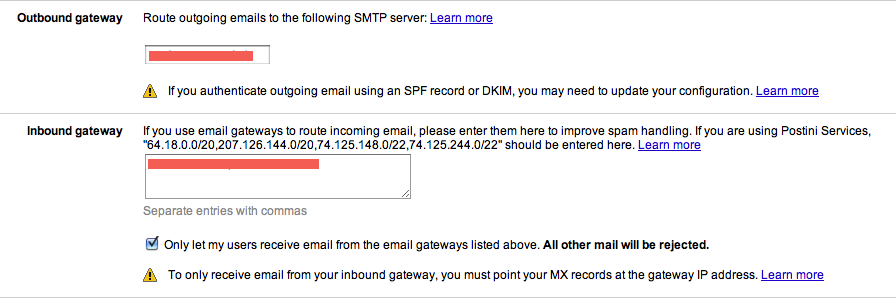
  • In your Google Administration panel, you visit the Email settings and configure the outbound gateway. Set it to your relay.
  • Then you configure your inbound gateway and set it to your relay too (and to your backup MX if you have one).

This screenshot will help you:

gmail config

All email sent to your MX (over the gmail_t transport we have configured above) will now be accepted by gmail.

Also, Gmail will now send all outgoing Email to your relay which needs to be configured to accept (and relay) email from Google. This pretty much depends on your otherwise existing Exim configuration, but here’s what I added (which will work with the default ACL):

hostlist   google_relays = 216.239.32.0/19:64.233.160.0/19:66.249.80.0/20:
    72.14.192.0/18:209.85.128.0/17:66.102.0.0/20:
    74.125.0.0/16:64.18.0.0/20:207.126.144.0/20
hostlist   relay_from_hosts = 127.0.0.1:+google_relays

And lastly, the tricky part: Storing a copy of all mail that is being sent through Gmail (we are already correctly sending the mail. What we want is a copy):

Here is the exim router we need:

gmail_outgoing:
  driver = accept
  condition = "${if and{
    { eq{$sender_address_domain}{yourdomain.com} }
    {=={${lookup{$sender_address_local_part}lsearch{/etc/exim4/gmail_accounts}{1}}}{1}}} {1}{0}}"
  transport = store_outgoing_copy
  unseen

(did I mention that I severely dislike RPN?)

and here’s the transport:

store_outgoing_copy:
  driver = appendfile
  check_string =
  delivery_date_add
  envelope_to_add
  group=mail
  maildir_format
  directory = MAILDIR/yourdomain/${lc:$sender_address_local_part}/.Sent/
  maildir_tag = ,S=$message_size
  message_prefix =
  message_suffix =
  return_path_add
  user = Debian-exim
  create_file = anywhere
  create_directory

The maildir I’ve chosen is the correct one if the IMAP-server you want to use is Courier IMAPd. Other servers use different methods.

One little thing: When you CC or BCC other people in your domain, Google will send out multiple copies of the same message. This will yield some message duplication in the sent directory (one per recipient), but as they say: Better backup too much than too little.

Now if something happens to your google account, just start up an IMAP server and have it serve mail from these maildir directories.

And remember to back them up too, but you can just use rsync or rsnapshot or whatever other technology you might have in use. They are just directories containing one file per email.

sacy 0.2 – now with less, sass and scss

To fresh up your memory (it has been a while): sacy is a Smarty (both 2 and 3) plugin that turns

{asset_compile}
<link type="text/css" rel="stylesheet" href="/styles/file1.css" />
<link type="text/css" rel="stylesheet" href="/styles/file2.css" />
<link type="text/css" rel="stylesheet" href="/styles/file3.css" />
<link type="text/css" rel="stylesheet" href="/styles/file4.css" />
 type="text/javascript" src="/jslib/file1.js">
 type="text/javascript" src="/jslib/file2.js">
 type="text/javascript" src="/jslib/file3.js">
{/asset_compile}

into

<link type="text/css" rel="stylesheet" href="/assets/files-1234abc.css" />
 type="text/javascript" src="/assets/files-abc123.js">

It does this without you ever having to manually run a compiler, without serving all your assets through some script (thus saving RAM) and without worries about stale copies being served. In fact, you can serve all static files generated with sacy with cache headers telling browsers to never revisit them!

All of this, using two lines of code (wrap as much content as you want in {asset_compile}…{/asset_compile})

Sacy has been around for a bit more than a year now and has since been in production use in PopScan. During this time, no single bug in Sacy has been found, so I would say that it’s pretty usable.

Coworkers have bugged me enough about how much better less or sass would be compared to pure CSS so that I finally decided to update sacy to allow us to use less in PopScan:

Aside of consolidating and minimizing CSS and JavaScript, sacy can now also transform less and sass (or scss) files using the exact same method as before but just changing the mime-type:

<link type="text/x-less" rel="stylesheet" href="/styles/file1.less" />
<link type="text/x-sass" rel="stylesheet" href="/styles/file2.sass" />
<link type="text/x-scss" rel="stylesheet" href="/styles/file3.scss" />

Like before, you don’t concern yourself with manual compilation or anything. Just use the links as is and sacy will do the magic for you.

Interested? Read the (by now huge) documentation on my github page!

Find relation sizes in PostgreSQL

Like so many times before, today I was yet again in the situation where I wanted to know which tables/indexes take the most disk space in a particular PostgreSQL database.

My usual procedure in this case was to dt+ in psql and scan the sizes by eye (this being on my development machine, trying to find out the biggest tables I could clean out to make room).

But once you’ve done that a few times and considering that dt+ does nothing but query some PostgreSQL internal tables, I thought that I want this solved in an easier way that also is less error prone. In the end I just wanted the output of dt+ sorted by size.

The lead to some digging in the source code of psql itself (src/bin/psql) where I quickly found the function that builds the query (listTables in describe.c), so from now on, this is what I’m using when I need to get an overview over all relation sizes ordered by size in descending order:

select
  n.nspname as "Schema",
  c.relname as "Name",
  case c.relkind
     when 'r' then 'table'
     when 'v' then 'view'
     when 'i' then 'index'
     when 'S' then 'sequence'
     when 's' then 'special'
  end as "Type",
  pg_catalog.pg_get_userbyid(c.relowner) as "Owner",
  pg_catalog.pg_size_pretty(pg_catalog.pg_relation_size(c.oid)) as "Size"
from pg_catalog.pg_class c
 left join pg_catalog.pg_namespace n on n.oid = c.relnamespace
where c.relkind IN ('r', 'v', 'i')
order by pg_catalog.pg_relation_size(c.oid) desc;

Of course I could have come up with this without source code digging, but honestly, I didn’t know about relkind s, about pg_size_pretty and pg_relation_size (I would have thought that one to be stored in some system view), so figuring all of this out would have taken much more time than just reading the source code.

Now it’s here so I remember it next time I need it.

overpriced data roaming

You shouldn’t complain if something gets cheaper. But if something just gets 7 times cheaper from one day to the next, then that leaves you thinking whether the price offered so far might have been a tad bit too high.

I’m talking about Swisscom’s data roaming charges.

Up to now, you paid CHF 50 per 5 MB (CHF 10 per MB) when roaming in the EU. Yes. That’s around $10 and EUR 6.60 per Megabyte. Yes. Megabyte. Not Gigabyte. And you people complain about getting limited to 5 GB for your $30.

Just now I got a press release form Swisscom that they are changing their roaming charges to CHF 7 per 5 MB. That’s CHF 1.40 per MB which is 7 times cheaper.

If you can make a product of yours 7 times cheaper from one day to the other, the rates you charged before that were clearly way too high.

How to kill IE performance

While working on my day job, we are often dealing with huge data tables in HTML augmented with some JavaScript to do calculations with that data.

Think huge shopping cart: You change the quantity of a line item and the line total as well as the order total will change.

This leads to the same data (line items) having three representations:

  1. The model on the server
  2. The HTML UI that is shown to the user
  3. The model that’s seen by JavaScript to do the calculations on the client side (and then updating the UI)

You might think that the JavaScript running in the browser would somehow be able to work with the data from 2) so that the third model wouldn’t be needed, but due to various localization issues (think number formatting) and data that’s not displayed but affects the calculations, that’s not possible.

So the question is: Considering we have some HTML templating language to build 2), how do we get to 3).

Back in 2004 when I initially designed that system (using AJAX before it was widely called AJAX even), I hadn’t seen Crockford’s lectures yet, so I still lived in the “JS sucks” world, where I’ve done something like this

<!-- lots of TRs -->
<tr>
    <td>Column 1 addSet(1234 /*prodid*/, 1 /*quantity*/, 10 /*price*/, /* and, later, more, stuff, so, really, ugly */)</td>
    <td>Column 2</td>
    <td>Column 3</td>
</tr>
<!-- lots of TRs -->

(Yeah – as I said: 2004. No object literals, global functions. We had a lot to learn back then, but so did you, so don’t be too angry at me – we improved)

Obviously, this doesn’t scale: As the line items got more complicated, that parameter list grew and grew. The HTML code got uglier and uglier and of course, cluttering the window object is a big no-no too. So we went ahead and built a beautiful design:

<!-- lots of TRs -->
<tr class="lineitem" data-ps-lineitem='{"prodid": 1234, "quantity": 1, "price": 10, "foo": "bar", "blah": "blah"}'>
    <td>Column 1</td>
    <td>Column 2</td>
    <td>Column 3</td>
</tr>
<!-- lots of TRs -->

The first iteration was then parsing that JSON every time we needed to access any of the associated data (and serializing again whenever it changed). Of course this didn’t go that well performance-wise, so we began caching and did something like this (using jQuery):

$(function(){
    $('.lineitem').each(function(){
        this.ps_data = $.parseJSON($(this).attr('data-ps-lineitem'));
    });
});

Now each DOM element representing one of these <tr>’s had a ps_data member which allowed for quick access. The JSON had to be parsed only once and then the data was available. If it changed, writing it back didn’t require a re-serialization either – you just changed that property directly.

This design is reasonably clean (still not as DRY as the initial attempt which had the data only in that JSON string) while still providing enough performance.

Until you begin to amass datasets. That is.

Well. Until you do so and expect this to work in IE.

800 rows like this made IE lock up its UI thread for 40 seconds.

So more optimization was in order.

First,

$('.lineitem')

will kill IE. Remember: IE (still) doesn’t have getElementsByClassName, so in IE, jQuery has to iterate the whole DOM and check whether each elements class attribute contains “lineitem”. Considering that IE’s DOM isn’t really fast to start with, this is a HUGE no-no.

So.

$('tr.lineitem')

Nope. Nearly as bad considering there are still at least 800 tr’s to iterate over.

$('#whatever tr.lineitem')

Would help if it weren’t 800 tr’s that match. Using dynaTrace AJAX (highly recommended tool, by the way) we found out that just selecting the elements alone (without the iteration) took more than 10 seconds.

So the general take-away is: Selecting lots of elements in IE is painfully slow. Don’t do that.

But back to our little problem here. Unserializing that JSON at DOM ready time is not feasible in IE, because no matter what we do to that selector, once there are enough elements to handle, it’s just going to be slow.

Now by chunking up the amount of work to do and using setTimeout() to launch various deserialization jobs we could fix the locking up, but the total run time before all data is deserialized will still be the same (or slightly worse).

So what we have done in 2004, even though it was ugly, was way more feasible in IE.

Which is why we went back to the initial design with some improvements:

<!-- lots of TRs -->
<tr class="lineitem">
    <td>Column 1 PopScan.LineItems.add({"prodid": 1234, "quantity": 1, "price": 10, "foo": "bar", "blah": "blah"});</td>
    <td>Column 2</td>
    <td>Column 3</td>
</tr>
<!-- lots of TRs -->

phew crisis averted.

Loading time went back to where it was in the 2004 design. It was still bad though. With those 800 rows, IE was still taking more than 10 seconds for the rendering task. dynaTrace revealed that this time, the time was apparently spent rendering.

The initial feeling was that there’s not much to do at that point.

Until we began suspecting the script tags.

Doing this:

<!-- lots of TRs -->
<tr class="lineitem">
    <td>Column 1</td>
    <td>Column 2</td>
    <td>Column 3</td>
</tr>
<!-- lots of TRs -->

The page loaded instantly.

Doing this

<!-- lots of TRs -->
<tr class="lineitem">
    <td>Column 1 1===1;</td>
    <td>Column 2</td>
    <td>Column 3</td>
</tr>
<!-- lots of TRs -->

it took 10 seconds again.

Considering that IE’s JavaScript engine runs as a COM component, this isn’t actually that surprising: Whenever IE hits a script tag, it stops whatever it’s doing, sends that script over to the COM component (first doing all the marshaling of the data), waits for that to execute, marshals the result back (depending on where the DOM lives and whether the script accesses it, possibly crossing that COM boundary many, many times in between) and then finally resumes page loading.

It has to wait for each script because, potentially, that JavaScript could call document.open() / document.write() at which point the document could completely change.

So the final solution was to loop through the server-side model twice and do something like this:

<!-- lots of TRs -->
<tr class="lineitem">
    <td>Column 1 </td>
    <td>Column 2</td>
    <td>Column 3</td>
</tr>
<!-- lots of TRs -->
</table>

PopScan.LineItems.add({prodid: 1234, quantity: 1, price: 10, foo: "bar", blah: "blah"});
// 800 more of these

Problem solved. Not too ugly design. Certainly no 2004 design any more.

And in closing, let me give you a couple of things you can do if you want to bring the performance of IE down to its knees:

  • Use broad jQuery selectors. $('.someclass') will cause jQuery to loop through all elements on the page.
  • Even if you try not to be broad, you can still kill performance: $('div.someclass'). The most help jQuery can expect from IE is getElementsByTagName, so while it’s better than iterating all elements, it’s still going over all div’s on your page. Once it’s more than 200, the performance extremely quickly falls down (probably doing some O(n^2) thing somehwere).
  • Use a lot of <script>-tags. Every one of these will force IE to marshal data to the scripting engine COM component and to wait for the result.

Next time, we’ll have a look at how to use jQuery’s delegate() to handle common cases with huge selectors.

Why node.js excites me

Today, on Hacker News, an article named “Why node.js disappoints me” appeared – right on the day I returned back from jsconf.eu (awesome conference. Best days of my life, I might add) where I was giving a talk about using node.js for a real web application that provides real use: tempalias.com

Time to write a rebuttal, I guess.

The main gripe Eric has with node is a gripe with the libraries that are available. It’s not about performance. It’s not about ease of deployment, or ease of development. In his opinion, the libraries that are out there at the moment don’t provide anything new compared to what already exists.

On that level, I totally agree. The most obvious candidates for development and templating try to mimik what’s already out there for other platforms. What’s worse: There seems to be no real winner and node itself doesn’t seem to make a recommendation or even include something with the base distribution.

This is inherently a good thing though. Node.js isn’t your complete web development stack. Far from it.

Node is an awesome platform to very easily write very well performing servers. Node is an awesome platform to use for your daily shell scripting needs (allowing you to work in your favorite language even for these tasks). Node isn’t about creating awesome websites. It’s about giving you the power to easily build servers. Web, DNS, SMTP – we’ve seen all.

To help you with web servers and probably to show us users how it’s done, node also provides a very good library to interact with the HTTP protocol. This isn’t about generating web pages. This isn’t about URL routing, or MVC or whatever. This is about writing a web server. About interracting with HTTP clients. Or HTTP servers. On the lowest level.

So when comparing node with other platforms, you must be careful to compare apple with apples. Don’t compare pure node.js to rails. Compare it to mod_wsgi, to fastcgi, to a servlet container (if you must) or to mod_php (the module that allows a script of yours access to server internals. Not the language) or mod_perl.

In that case, consider this. With node.js you don’t worry about performance, you don’t worry about global locks (you do worry about never blocking though), and you really, truly and most awesomely don’t worry about race conditions.

Assuming

    var a = 0;
    var f = function(){
        var t = a; // proving a point here. I know it's not needed
        a = t + 1;
    }
    setTimeout(f, 100);
    setTimeout(f, 100);

you’d always end up with a === 2 once both timeouts have executed. There is no interruption between the assignment of t and the increment. No worries about threading. No hours wasted trying to find out why a suddenly (and depending on the load on your system) is either 1, 2 or 3.

In the years we got experience in programming, we learned that what f does in my example above is a bad thing. We feel strange when typing code like this – seeking for any method of locking, of specifying a critical section. With node, there’s no need to.

This is why writing servers (remember: highly concurrent access to potentially the same code) is so much fun in node.

The perfect little helpers that were added to deal with the HTTP protocol are just the icing on the cake, but in so many other frameworks (cough WSGI cough) stuff like chunking, multipart parsing, even just reading the client’s data from an input stream are hard if you do them on your own, or completely beyond your control if you let the libraries do them.

With node you get to the knobs to turn in the easiest way possible.

Now we know that we can easily write well performing servers (of any kind with special support for HTTP) in node, so let’s build a web site.

In traditional frameworks, your first step would be to select a framework (because the HTTP libraries are so effing (technical term) hard to use).

You’d end up with something lightweight like, say, mnml or werkzeug in python or something more heavy like rails for ruby (though rack isn’t nearly as bad as wsgi) or django for python. You’d add some kind of database abstraction or even ORM layer – maybe something that comes with your framework.

Sure. You could do that in node too. There are frameworks around.

But remember: Node is an awesome tool for you to write highly specialized servers.

Do you need to build your whole site in node?

Do you see this as a black or white situation?

Over the last year, I’ve done two things.

One is to layout a way how to augment an existing application (PHP, PostgreSQL) with a WebSocket based service using node to greatly reduce the load on the existing application. I didn’t have time to implement this yet, but it would work wonders.

The other thing was to prove a point and to implement a whole web application in node.

I built tempalias.com

At first I fell into the same trap that anybody coming from the “old world” would be falling. I selected what seemed to be the most used web framework (Express) and rolled with that, but I soon found out that I have it all backwards.

I don’t want to write the 50iest web application. I wanted to do something else. Something new.

When you look at the tempalias source code (yeah – the whole service is open source so all of us can learn from it), you’ll notice that no single byte of HTML is dynamically generated.

I ripped out Express. I built a RESTful API for the main functionality of the site: Creating aliases. I built a server that does just that and nothing more.

I leveraged all the nice features JavaScript as a language provides me with to build a really cool backend. I used all the power that node provides me with to build a really cool (and simple!) server to web-enable that API (posting and reading JSON to and from the server)

The web client itself is just a client to that API. No single byte of that client is dynamically generated. It’s all static files. It’s using Sammy, jQuery, HTML and CSS to do its thing, but it doesn’t do anything the API I built on node doesn’t expose.

Because it’s static HTML, I could serve that directly from nginx I’m running in front of node.

But because I wanted the service to be self-contained, I plugged in node-paperboy to serve the static files from node too.

Paperboy is very special and very, very cool.

It’s not trying to replace node’s HTTP library. It’s not trying to abstract away all the niceties of node’s excellent HTTP support. It’s not even trying to take over the creation of the actual HTTP server. Paperboy is just a function you call with the request and response object you got as part of node’s HTTP support.

Whether you want to call it or not is your decision.

If you want to handle the request, you handle it.

If you don’t, you pass it on to paperboy.

Or foobar.

Or whatever.

Node is the UNIX of the tools to build servers with: It provides small dedicated tools that to one task, but truly, utterly excel at doing so.

So the libraries you are looking for are not the huge frameworks that do everything but just the one bit you really need.

You are looking for the excellent small libraries that live the spirit of node. You are looking for libraries that do one thing well. You are looking for libraries like paperboy. And you are relying on the excellent HTTP support to build your own libraries where the need arises.

It’s still very early in node’s lifetime.

You can’t expect everything to be there, ready to use it.

For some cases, that’s true. Need a DNS server? You can do that. Need an SMTP daemon? Easy. You can do that. Need a HTTP server that understands the HTTP protocol really well and provides excellent support to add your own functionality? Go for it.

But above all: You want to write your server in a kick-ass language? You want to never have to care about race conditions when reading, modifying and writing to a variable? You want to be sure not to waste hours and hours of work debugging code that looks right but isn’t?

Then node is for you.

It’s no turnkey solution yet.

It’s up to you to make the most out of it. To combine it with something more traditional. Or to build something new, maybe rethinking how you approach the problem. Node can help you to provide an awesome foundation to build upon. It alone will never provide you with a blog in 10 minutes. Supporting libraries don’t at this time provide you with that blog.

But they empower you to build it in a way that withstands even the heaviest pounding, that makes the most out of the available resources and above all, they allow you to use your language of choice to do so.

JavaScript.

Skype over 3G – calculations

With the availability of an iPhone Skype client with background availability, I wanted to find out, how much it would cost me if I move calls from the regular mobile network over to Skype over 3G.

Doing VoIP over 3G is a non-issue from a political standpoint here in Switzerland as there are no unlimited data plans available and the metered plans are expensive enough for the cellphone companies to actually be able to make money with, so there’s no blocking or anything else going on over here.

To see how much data is accumulated, I hold a phone conversation with my girlfriend that lasted exactly 2 minutes in which time, we both talked. Before doing so, I reset the traffic counter on my phone and immediately afterwards I checked.

After two minutes, I sent out 652 KB of data and received 798 KB.

This is equal to around 750 KB/minute (being conservative here and gracefully rounding up).

My subscription comes with 250 MB of data per month. Once that’s used, there’s a flat rate of CHF 5 per day I’m using any data, so I really should not go beyond the 250MB.

As I’m not watching video (or audio) over 3G, my data usage is otherwise quite low – around 50MB.

That leaves 200MB unused.

With 750KB/minute, this equals 4.4 hours of free Skype conversation. Which is something I would never ever reach wich means that at least with skype-enabled people, I can talk for free now.

Well. Could.

While the voice quality in Skype over 3G is simply astounding, the solution unfortunately still isn’t practical due to two issues:

  1. Skype sucks about 20% of battery per hour even when just idling in the background.
  2. Skype IM doesn’t know the concept of locations so all IM sent is replicated to all clients. This means that whenever I type something for a coworker, my phone will make a sound and vibrate.

2) I could work around by quitting Skype when in front of a PC, but 1) really is a killer. Maybe the new iPhone 4 (if I go that route instead of giving Andorid another try) with its bigger battery will be of help.