Dropbox

Dropbox is cloud storage on the next level: You install their little application – available for Linux, Mac OS X and Windows – which will create a folder which will automatically be kept synchronized between all the computers where you have installed that little application on.

Because it synchronizes in the background and always keeps the local copy around, the access-speed isn’t different from a normal local folder – mainly because it is, after all, a local folder you are accessing. Dropbox is not one of these slow “online hard drives” it’s more like rsync in the background (and rsync it is – the application is intelligent enough to only transmit deltas – even from binary files).

They do provide you with a web interface of course, but the synchronizing aspect is the most interesting.

The synchronized data ends up somewhere in Amazon’s S3 service, which is fine with me.

Unfortunately, while the data stored in an encrypted fashion on S3, the key is generated by the Dropbox server and thus known to them, which makes Dropbox completely unusable for sensitive unencrypted data. They do state in the FAQ that this will maybe change sometime in the future, but for not it is as it is.

Still, I found some use for Dropbox: ~/Library/Preferences, ~/.zshrc and ~/.ssh all are now stored in ~/Dropbox/System and symlinked back to their original place. This means that a large chunk of my user profile is availalbe on all the computers I’m working on. I would even try the same trick with ~/Library/Application Support, but that seems risky due to the missing encryption and due to the fact that Application Support sometimes contains database files which get corrupted for sure when moved around while they are open – like the Firefox profile.

This naturally even works when the internet connection is down – DropBox synchronizes changes locally, so when the internet (or Dropbox) is down, I just have the most recent copy of when the service was still working – that’s more than good enough.

Another use that comes to mind for Dropbox storage are game save files or addons you’d want to have access to on every computer you are using – just move your stuff to ~/Dropbox and symlink it back to the original place.

Very convenient.

Now if only they’d provide me with a way to provide my own encryption key. That way I would instantly buy the pro account with 25GB of storage and move lots and lots of data in there.

Dropbox is the answer to the ever increasing amount of computers in my life because now I don’t care about setting up the same stuff over and over again. It’s just there and ready. Very helpful.

My favourite asterisk feature

I’ve just included this into the context of the dialplan where the calls from and to our internal phones live.

[intercom]
exten => _55[6-8][1-9],1,SIPAddHeader("Call-Info: sip:asterisk;answer-after=0")
exten => _55[6-8][1-9],2,Dial(SIP/${EXTEN:2})

this is as useless as it is fun.

Too bad softphones are getting some real attention in the office lately, as they don’t support the answer-after feature and even if they did, where is the fun of just making yourself heard on the headphones of the victim as opposed to doing that directy on their speaker – loud enough to be heard in the whole office.

VoIP is fun and it’s about time I do more to our asterisk config but just watch it work and never fail.

VMWare Fusion Speed

This may be totally placebo, but I noticed that using Vista inside a VMWare Fusion VM has just turned from nearly unbearable slow to actually quite fast by updating from 2.0 Beta 2 to 2.0 Final.

It may very well be that the beta versions contained additional logging and/or debug code which was keeping the VM from reaching its fullest potential.

So if you are too lazy to upgrade and still running one of the Beta versions, you should consider updating. For me at least, it really brought a nice speed-up.

iTunes 8 visualization

Up until now I have not been a very big fan of iTunes’ visualization engine, probably because I’ve been spoiled with MilkDrop in my Winamp days (which still owns the old iTunes display on so many levels).

But with the release of iTunes 8 and their new visualization, I have to admit that, when you chose the right music (in this case it’s Liberi Fatali from Final Fantasy 8), you can really get something out of this.

The still picture really doesn’t do it justice, so I have created this video (it may be a bit small, but you’ll see what I’m getting at)  to visualize my point. Unfortunately, near the end it gets worse and worse, but the beginning is something of the more impressive shows I have ever seen generated out of this particular piece of music.

This may even beat MilkDrop and I could actually see myself assembling a playlist of some sort and put this thing on full screen.

Nice eyecandy!

… and back to Thunderbird

It has been a while since I’ve last posted about email – still a topic very close to my heart, be it on the server side or on the client side (though the server side generally works very well here, which is why I don’t post about it).

Waybackwhen, I’ve written about Becky! which is also where I’ve declared the points I deemed important in a mail client. A bit later, I’ve talked about The Bat!, but in the end, I’ve settled with Thunderbird, just to switch to Mac Mail when I’ve switched to the Mac.

After that came my excursion to Gmail, but now I’m back to Thunderbird again.

Why? After all, my Gmail review sounded very nice, didn’t it?

Well…

  • Gmail is blazingly fast once it’s loaded, but starting the browser and then gmail (it loads so slow that “starting (the) gmail (application)” is a valid term to use) is always slower than just keeping a mail client open on the desktop.
  • Google Calendar Sync sucks and we’re using Exchange/Outlook here (and are actually quite happy with it – for calendaring and address books – it sucks for mail, but it provides decent IMAP support), so there was no way for the other folks here to have a look at my calendar.
  • Gmail always posts a “Sender:”-Header when using a custom sender domain which technically is the right thing to do, but Outlook on the receiving end screws up by showing the mail as being “From xxx@gmail.com on behalf of xxx@domain.com” which isn’t really what I’d want.
  • Google’s contact management offering is sub par compared even to Exchange.
  • iPhone works better with Exchange than it does with Google (yes. iPhone, but that’s another story).
  • The cool Gmail MIDP client doesn’t work/isn’t needed on the iPhone, but originally was one of the main reasons for me to switch to Gmail.

The one thing I really loved about Gmail though was the option of having a clean inbox by providing means for archiving messages with just a single keyboard shortcut. Using a desktop mail client without that funcationality wouldn’t have been possible for me any more.

This is why I’ve installed Nostalgy, a Thunderbird extension allowing me to assign a “Move to Folder xxx” action to a single keystroke (y in my case – just like gmail).

Using Thunderbird over Mac Mail has its reasons in the performance and in the crazy idea of Mac Mail to always download all the messages. Thunderbird is no race horse, but Mail.app isn’t even a slug.

Lately, more and more interesting posts regarding the development of Thunderbird have appeared on Planet Mozilla, so I’m looking forward to see Thunderbird 3 taking shape in its revitalized form.

I’m all but conservative in my choice of applications and gadgets, but Mail  – also because of its importance for me – must work exactly as I want it. None of the solutions out there are doing that to the full extent, but TB certainly comes closest. Even after years of testing and trying out different solutions, TB is the thing that solves most of my requirements without adding new issues.

Gmail is splendid too, but it presents some shortcomings TB doesn’t come with.

Epic SSL fail

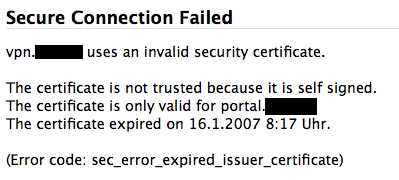
Today when I tried to use the fancy SSL VPN access a customer provided me with, I came across this epic fail:

Of all the things that can be wrong in a SSL certificate, this certificate manages to get them wrong. The self-signed(1) certificate was issued for the wrong host name(2) and it has expired(3) quite some time ago.

Granted: In this case the issue of trust is more or less constrained to the server to know who I am (I wasn’t intending on transferring any amount of sensitive data), but still – when you self-sign your certificate, the cost of issuing one for the correct host or issuing one with a very long validity becomes a non-issue.

Anyways – I had a laugh. And now you can have one too.

What sucks about the Touch Diamond

Contrary to all thinking and common-sense I’ve displayed in my «Which phone for me?»-post, I went and bought the Touch Diamond. The perspective of having a hackable device with high resolution, GPS and voip capability and flawlessly working Exchange-Synchronization finally pushed me over – oh and of course I just like new gadgets to try out.

In my dream world, the Touch would even replace my iPod Touch as a video player and bathtub browser, so I could go back to my old Nano for podcasts.

Unfortunately, the Touch is not much more than any other Windows Mobile phone with all the suckage and half-working features they usually come with. Here’s the list:

  • VoIP is a no-go. The firmware of the Touch is crippled and does not provide Windows Mobile 6+ SIP support, Skype doesn’t run on Windows Mobile 6.1, but all that doesn’t matter anway because none of the Voip-Solutions actually use the speakerphone. You can only get VoIP sound on the amplified speaker on the back of the phone – or you use a headset at which time, the thing isn’t better than any other VoIP solution at my disposal.
  • GPS is a no go as the Diamond takes *ages* to find a signal and it’s really fiddly to get it to work – even just in the integrated Google maps application.
  • Typing anything is really hard despite HTC really trying. Whichever input method you chose, you lose: The Windows Mobile native solutions only work with the pen and the HTC keypads are too large for the applications to remain really usable. Writing SMSes takes me so much longer than every other smart phone I’ve tried before.
  • T9 is a nice idea, but here and then, you need to enter some special chars. Like dots. Too bad that they are hidden behind another menu – especially the dot.
  • This TouchFLO 3D-thingie sounds nice on the web and in all the demonstrations, but it sucks anway, mainly because it’s slow as hell. The iPhone interface doesn’t just look good, it’s also responsive, which is where HTC fails. Writing an SMS message takes *minutes* when you combine the embarrassingly slow loading time of the SMS app with the incredibly fiddly text input system.
  • You only get a German T9 with the German version of the Firmware which has probably been translated using Google Translation or Babelfish.
  • The worst idea ever from a consumer perspective was that stupid ExtUSB connector. Aside of the fact that you’d practically have to buy an extra cable to sync from home and the office, you also need another extra cable if you want to plug in decent headphones. The ones coming with the device are unusable and it’s impossible to plug better ones. Also, the needed adapter cable is currently not available to buy anywhere I looked.
  • The screen, while having a nice DPI count is too small to be usable for earnest web browsing. Why does windows mobile have to paint everything four times as large when there are four times as many pixels available?
  • Finger gestures just don’t work on a touch sensitive display, no matter how much they try. At least they don’t work once you are used to the responsiveness and accuracy of an iPhone (or iPod touch).
  • The built-in opera browser, while looking nice and providing a much better page zoom feature than the iPod Touch also is unusable because it’s much too slow.

So instead of having a possible iPhone killer in my pocket, I have a phone that provides around zero more actually usable functionality than my previous W880i and yet is much slower, crashier, larger and heavier than the old solution.

Here’s the old feature comparison table listing the features I tought the touch would have as opposed to the features the touch actually has:

assumed actually
Phone usage
Quick dialing of arbitrary numbers (the phone application takes around 20 seconds to load, the buttons are totally unresponsive)
Acceptable battery life (more than two days) ? yes. Actually yes. 4 days is not bad.
usable as modem yes yes
usable while not looking at the device limited not at all mainly because of the laggyness of the interface
quick writing of SMS messages it’s much, much worse than anticipated.
Sending and receiving of MMS messages yes not really. Sending pictures is annoying as hell and everything is terribly slow.
PIM usage
synchronizes with google calendar/contacts
synchronizes with Outlook yes yes
usable calendar yes very, very slow
usable todo list yes slow
media player usage
integrates into current iTunes based podcast workflow
straight forward audio playing interface
straight forward video playing interface
acceptable video player yes no. No sound due to no way to plug my own headphones.
hackability
ssh client yes not really. putty doesn’t quite work right on VGA Winmob 6.1
skype client yes no. a) it doesn’t work and b) it would require headset usage as skype is unable to use the speakerphone.
OperaMini (browser usable on GSM) yes limited. No softkeys and touch-buttons too small to reliably hit.
WLAN-Browser yes no. Too slow, Screen real estate too limited.

Now tell me how this could be called progress.

I’m giving this thing until the end of the week. Maybe I get used to its deficiencies in the matters of interface speed. If not, it’s gone. As is the prospective of me buying any other Windows Mobile phone. Ever.

Sorry for the rant, but it had to be.

Mozilla Weave 0.2

I have quite many computers I use regularely, on all of which runs Firefox. Of course I’ve accumulated quite a lot of bookmarks, passwords and “keep me logged in”-cookies.

During my use of FF2, I’ve come across Google Browser Sync which was incredibly useful, albeit a bit unstable here and then, so last Christmas, I was very happy to see the prototype of Mozilla Weave to be released. It promised the same feature set as Google Browser Sync, but build from the makers of the browser on an open architecture.

I have been a user of Weave ever since and it was even more inconsistent in availability than what Google Browser Sync ever provided, but at least it was just the server not working, not affecting the client which GBS did here and then, which made me lose parts or all of my bookmarks.

Over time though, Weave got better and better and with todays 0.2 release, the installation and setup process actually got streamlined enough so that I can recommend the tool to anybody using more than one PC at any time.

Especially with the improved bookmarking functionality we got in Firefox 3, synchroniuzing bookmarks has become really important. I’m very happy to see a solution for this problem and I’m overjoyed that the solution is as open as weave is.

Congratulations, Mozilla Team!

A look at my IRC configuration

It has been a while since I’ve last talked about my irc setup. Last time was when I initially started to get my feet wet in IRC. In the three years (three years already? How time passes!), I have been active in IRC to various degrees (with some large wow-related holes, but that’s a different story).

Currently, my rate of IRC usage is back to quite high levels, mostly due to #git which is a place where I actually feel competent enough to help out here and then. Also #nesvideos is fun to be in as ever.

What has changed since 2005 is my setup:

  • Whereas back then, I was mainly working on Windows, I have by now switched over to OSX, so the question of clients is raised again, but see more on that later on.
  • By IRC proxy changed from ctrlproxy to ZNC. It’s easier to configure and I’ve had much better success with that than with any other bouncer I tried. It’s the only bouncer I know so far that does the thing I need bouncers for out-of-the box: Log the channel while I’m away and replay the log when I reconnect.
  • The client has radically changed. While I stayed true to X-Chat after my switch to OSX (using X-Chat Aqua), recently, I have tried other clients as Colloquy (no light-on-dark-theme with colored nicks) and Linkinus (not offering any features making up for the commercial nature), but honestly, Mibbit works best. And it works when I’m on my girlfriend’s computer. And it even (somewhat) works on my iPod Touch. And it looks good. And it provides all the features I need. I’m of course still connecting to my bouncer, but that’s easily configured once you create an account there.

IRC is still a very techie world, but it’s such a nice way to spend time on.

First mail, then office, now IRC. What’s next?

I know that I may be really late with this, but I recently came across Mibbit, a web based IRC client. This is another instance of the recent rush of applications being transported over to the web platform.

In the early days, there were webbased email services. Like Hotmail (or the third CGI script I’ve ever written – the firewall/proxy in my school only supported traffic on port 80 and I didn’t know about tunnels, nor did I have the infrastructure to create a fitting one).

Then came office applications like Google’s offering. And of course games. Many games.

Of course there were webbased chats in the earlier days. But they either required a plugin like java or flash or they worked by constantly reloading the page where the chat is appearing on. Neither of the solution provided what I’d call a full IRC-client. And many of the better solutions required a plugin to work.

mibbit is though. It provides many of the features a not-too-advanced IRC user would want to have. Sure. Scripting is (currently) absent, but everything else is here. In a pleasant interface.

What’s interesting is the fact that so many applications can nowadays be perfectly represented on the web. In fact, XHTML/CSS is perfectly fitted to present a whole lot of data to the user. For IRC for example, there is among the desktop clients to use HTML for their chat rendering aswell.

So in case of IRC clients, both types of applications sooner or later reach the same state: Representing chat messages in good-looking HTML while providing a myriad of features to put off everyone but the most interested and tech-savy user :-)

Still. The trend is an interesting thing to note. As more and more applications hop over to the web, we get more and more independant of infrastructure and OSes. Sometime in the future, maybe we’ll have the paradise of just having a browser to access all our data and applications from wherever we are.

No more software installations. No more viruses and spyware. No more software inexplicably stopping to work. And for the developer: Easy deployment of fixes, shorter turnaround times.

Interesting times ahead indeed.