Wii in a home cinema

The day before yesterday I was lucky enough to get myself a Wii.

It was and basically still is impossible to get one here in Switzerland since the launch on December 8th. So I was very happy that I got the last device of a delivery of like 15 pieces to a game shop near where I work.

Unfortunately, my out-of-the-box experience with the Wii was quite poor which is why I didn’t write the review yesterday – I wanted to spend a bit more time with the console before writing something bad about it.

Here’s my story:

I’m using a projector, a receiver and a big screen – a real home cinema.

This means that the Wii is usually placed quite far away from either the screen or from the receiver (and especially from the projector about 25 meters in my case). This also means that I get into large issues with the relatively short cable with which you are supposed to connect the sensor bar to the Wii.

And the short A/V-cable didn’t help either, so I also couldn’t just place the Wii near the screen because then I wouldn’t be able to connect it to the receiver.

I ended up placing the Wii more or less in the middle of the room and while I like the looks of the console, it still doesn’t fit the clean look of the rest of my home cinema.

It gets worse though: I placed the sensor bar on the top of my center speaker right below the screen. It turned out though that this placement was too far below my usual line of sight so that the Wiimote wasn’t able to pick the signal up.

So currently, I have placed the sensor bar on top of an awful looking brown box right on the middle of my table – a setup I have to rebuild whenever I want to play and to put away when I’m not playing.

I SO want that wireless sensor bar to place it on the top of my screen.

But the not-quite-working goes on: At first I wasn’t able to connect to my WLAN. The Wii just didn’t find the network. Flashing the ZyXEL AP with a newer software helped there and the Wii recognized the network, but was unable to get an IP address.

Due to the awkward placement it was unable to get a strong signal.

I moved the device more to the middle of the room (making it even more visible to the casual eye) and it was finally able to connect.

My first visit to the shopping channel ended up with the whole console crashing hard. Not even the power button worked – I had to unplug and replug it at which time I had enough and just played Zelda (a review of that jewel will probably follow).

Yesterday I was luckier with the shopping channel (I didn’t buy anything though) and as I had my terrible “sensor bar on a box” configuration already up and running, I got a glimpse of what the Wii out-of-the-box-experience could be: Smootly working, good-looking and a very nice user control interface – using the Wiimote to point at the screen feels so … natural.

In my opinion, Nintendo did an awful mistake of forcing that cable on the sensor bar. As we know by now, the bar contains nothing more than two IR-LEDs. The cable is only for powering them. Imagine the sensor bar being another BT device – maybe mains-powered or battery-powered otherwise (though these IR-LEDs suck power like mad). Imagine the console being able to turn it on and off wirelessly.

The whole thing would not have been that much more expensive (alternatively, they could sell it as an addon) but it would allow the same awesome out-of-the-box experience for all users – even the one with a real home entertainment system.

If it wasn’t Nintendo (I admit that I am a «fanboi» in matters of Nintendo – the conditioning I got with the NES in my childhood still hasn’t worn off), I would have been so incredibly pissed at that first evening that I would have returned the whole console and written one bad review here – even the XBox 360 worked better than the Wii… *sigh*

And all that to save a couple of hours in the engineering department.
External blogging tools

Ever since I started blogging, I have been using different tools to help me do my thing.

At first, I was using the browser to directly write the articles in the MT interface, but after losing a significant amount of text that way, I quickly migrated to writing my entries in a text editor (jEdit back then) and pasting them into the MT interface.

Then I learned about the XML-RPC interface to MT and began using w.bloggar to do my writing, but stagnation and little quirks made me to back to a real text editor which is what I was using for a long time (though I migrated from MT to s9y in between).

Last year, I caught the buzz about Windows Live Writer, which was kind of nice, but generally, I need more freedom in writing HTML than what a WYSIWYG editor can provide me with – especially as I have my special CSS rules for code for example that I prefer to just manually setting the font.

So I was back to the text editor (which went from jEdit to TextMate in between).

And then I noticed the blogging bundle.

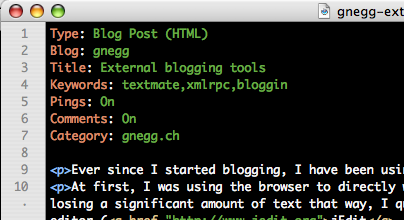
The blogging bundle for TextMate allows me to keep writing my blog entries in the tool of choice, while being able to post the finished entries direct from within TextMate.

Basically, you configure some basic settings for your blogs and then you write a colon-separated list of values at the beginning of the document which TextMate uses to post your entry.

It can fetch categories, configure pings and comments, set tags – whatever you want. Directly from your editor where you are doing your writing. Of course you can also fetch older postings and edit them.

So this provides me with the best of both worlds: Direct posting to the blog with one key press (Ctrl-Command-P) while writing in the editor of my choice that is very stable and provides me with the maximum flexibility at laying out my articles.

I love it.

PT-AE1000 HDMI woes

Today was the day when I got the crown jewel of my home entertainment system: A Panasonic PT-AE1000

The device is capable of displaying the 1920×1080 resolution which means that it’s capable of showing 1080p content (at 50,60 and even 24 Hertz). It’s the thing that was needed to complete my home entertainment setup.

The projector is quite large but not that heavy. I also like the motorized lens controls for zoom and focus and I love the incredible lens shift range: You can basically move the picture the whole size of it in any direction. This allowed me not to tilt the device even though it’s mounted quite high up on the ceiling. No tilt means no keystone distortion.

Even though all projectors provide you with some means to correct the keystone effect, but you’ll automatically lose picture quality and content when using it, so it’s best to leave it off.

Unfortunately, the device has one flaw: It reports totally wrong screen resolutions via DCC when you connect the projector via DVI (or HDMI, but that’s the same thing).

It tells windows (strangely enough, it works on Mac OS X) that it supports the resolution of 1920×540 at some strange refresh rate of around 54 Hz.

The intel chipset of my Mac Mini can’t output this resolution so it falls back to 480p and there’s no possiblity of changing this.

With the help of PowerStrip (which you won’t even need when you are reading this), I created a corrected Monitor .INF-File that has the correct resolution and acceptable refresh rates in it (taken from the projectors manual).

Once you tell windows to update the driver of your monitor and point it to this file specifically, it will allow you to set the correct resolution.

*phew* – problem solved.

Aside of this glitch, so far, I love the projector. Very silent, very nice picture quality, perfect colors and it even looks quite acceptable with its black casing. This is the projector I’m going to keep for many years as there’s no increase of resolution in sight for a very long time.

Vista preloaded

Today I had the dubious “pleasure” of setting up a Lenovo Thinkpad R60 with Vista Business Edition preloaded.

We just needed to have a clean Vista machine to test components of our PopScan solution on and I just didn’t have the disk space needed for yet another virtual machine.

I must say that I didn’t look forward to the process. Mainly because I hated the OEM installation process under XP. Basically, you got an installation cluttered with “free” “feature enhancments” which usually were really bad-looking if provided from the hardware manufacturer or nagged the hell out of you if it were trial releases of some anti virus program or something else.

Ever since I’m setting up windows machines for personal use, my policy has been to wipe the things clean and install a clean windows copy on them.

With this background and the knowledge that just for testing purposes the out-of-the-box installation would do the trick, I turned on that R60 machine.

The whole initial setup process was very pleasant: It was just the usual Windows Setup minus the whole copying of files process – the installation started with asking me what language and what regional settings to use and it actually guessed the keyboard settings right after setting the location (a first! Not even apple can do that *sigh*).

Then came the performance testing process as we know it from non-oem-preinstalled installations.

Then it asked me for username and provided a selection of background images.

I really, really liked that because usually the vendor provided images are just crap.

The selection list even contained some Vista-native images and some Lenovo images – clearly separated.

The last question was a small list of “additional value-add products” with “No thank you” preselected.

You can’t imagine how pleased I was.

up until what came after.

The system rebooted and presented me with a login screen to which I gave the credentials I provided during the setup process.

Then the screen turned black and a DOS command prompt opened. And a second, though minimized.

The first two lines in that DOS prompt were

echo "Please wait"
Please wait

I can understand that Lenovo wanted to get their machines out and that they may be willing to sacrifice a bit of Vista’s shinyness. But they obviously even lack the basic batch-knowledge of using “@echo off” as the first command in their setup script thus ruining the unpleasantness of the installation even more.

But wait… it’s getting worse…

The script ran and due to echo being on displayed the horrors to me: ZIP-File after ZIP-File was unpacked into the Application Data folder of the new user. MSI-File after MSI-File was installed. All without meaningful progress report (to a non-techie that is).

Then some Lenovo registration assistant popped up asking me all kinds of personal questions with no way to skip it, but the worst thing about it was the font it used: MS Sans Serif – without any font smoothing. This looked like Windows 98, removing the last bit of WOW from Vista ( :-) ).

Then it nagged me about buying Norton Internet Security.

And finally it let me to the desktop.

And… oh the horror:

  • My earlier choice of background image was ignored. I was seeing a Lenovo-Logo all over the place.
  • On the screen was a Vista-Builtin-Assistant telling me to update the Windows Defender signatures. It looked awful. Jaggyness all over the place: Clear Type was clearly off and the default font of windows looks aful without ClearType.
  • It’s impossible for a non-techie to fix that ClearType thing as it’s buried deep in the Control Panel – it’s supposed to be on and never to be touched by normal users.
  • On the Notification Area were three icons telling me about WLAN connectivity: Windows’ own, the Think Pad driver’s and the one of the ThinkVantage Network Access tool (the last one has a bug, btw, it constantly keeps popping up a balloon telling me that it’s connected. If I close it, it reopens 30 seconds later).

I didn’t do anything to fix this, but quickly joined the machine to the domain in the hope that logging in to that would give me the Vista default profile.

But no: Another MSI-installer and still no ClearType

It’s a shame to see how the OEMs completely destroy everything Microsoft puts into making their OSes look and feel “polished”. Whatever they do, the OEMs succeed at screwing up the installations.

This is precisely where Apple outshines Windows by far. If you buy a computer by apple, you will have software on it that was put there by Apple, made by Apple, running on an OS made by Apple. Everything is shiny and works out of the box.

Microsoft will never be able to provide that experience to their users as long as OEMs think they can just throw in some crappy made installation tools that destroy all the good experience a new user could have with the system. From scary DOS prompts over crappy (and no longer needed) third party applications to completely crappy preconfiguration (I could *maybe* let that ClearType thingie pass IF they’d chosen a system font that was actually readable with ClearType off – this looked worse than a Linux distribution with an unpatched Freetype).

PC OEMs put no love at all into their products.

Just sticking a Windows Vista sticker on it isn’t brining that “WOW” to the customers at all.

Microsoft should go after the OEMs and force them to provide clean installations with only a minimal amount of customization done.

HD-DVD unlocked

Earlier, it was possible to work around the AACS copy protection scheme in use for HD-DVD and Blueray on a disc-to-disc basis.

Now it’s possible to work around it for every disk.

So once more we are in the situation where the illegal media pirate is getting a superior user experience than the legal user: The “pirate” can download the movie to watch on-demand. He can store it on any storage medium he pleases (like home servers, NASes or optical discs). He can reformat the content to another format a particular output medium requires (like an iPod) without having to buy another copy. And finally, he is capable to watch the stolen media on whatever platform he chooses to watch it with.

The original media on contrast is very much limited:

The source of the content is always the disc the user bought. It’s not possible to store legally acquired HD-content on a different medium than the source disc. It’s not possible to watch it on any personal computer but the ones running operating systems from Microsoft. The disc may even force the legal user to watch advertisements or trailer in advance to the main content. There is no guarantee that a purchased disc will work with any player – despite player and disc both bearing the same compatibility label (HD-DVD or Blueray logos). It’s not possible to legally acquire the content on-demand and it’s impossible to reformat the content to different devices.

Back in the old days, the copy usually was inferior to the original.

In the digital age of DRM and user-money-milking, this has changed. Now the copy clearly provides many advantages the original currently can’t provide or the industry does not want it to provide.

I salute the incredibly smart hackers that worked around yet another “unbreakable” copy protection scheme allowing me to create my personal backup copy of any medium I buy so that I can store the content on my NAS and I have the assurance that I’m able to play it when I want and where I want.

I assure you: My happyness is not based on the fact that I can now downloaded pirated movies over bittorrent. It’s based on the fact that I can store legally purchased HD content on the harddrive of my home server and watch it on-demand without having to switch media.

Piracy, for me, is a pure usability problem.

Strange ideas gone wrong

Screenshot of three buttons: OK - Cancel - Apply

The apply button Windows brought to us with its windows 95 release is a strange beast.

Nearly all people I know (myself included) misuse the button.

Ask yourself: When you see the three buttons as shown on the screenshot and you want the changes you made in the dialog to take effect, what button(s) do you hit?

Chances are that you press “Apply” and then “OK”.

Which obviously is wrong.

The meaning of the buttons is as follows: “Apply” applies the changes you made, but leaves the dialog open. “Cancel” throws the changes away and closes the dialog. “OK” applies the changes and closes the dialog.

So in a situation like the above, hitting OK would suffice.

I see no real reason why the apply button is there and personally, I don’t understand why people insist on hitting it. Mind you, this also affects “educated” people: I perfectly well know how the buttons work and I’m still pressing Apply when it’s not needed.

Actually, Apply is a dangerous option set out to defeat the purpose of the Cancel-Button: Many times, I catch myself making changes and hitting “Apply” after every modification I made in the dialog, thus rendering the cancel button useless because I’m constantly applying the changes so Cancel usually will do nothing.

Why is the Apply button there then?

It’s to provide the user with feedback of her changes without forcing her to reopen the dialog.

Say you want to reconfigure the looks of your desktop. At first you change the font. Then you hit apply and you watch if you like the changes. If yes, you can now change the background and hit apply again. If not, you can manually change the font back.

Problem is that nobody uses the buttons that way and I personally have no idea why. Is it an emotional thing? Do you feel that you have to hit Apply and OK to really make it stick? I have no idea.

Personally, I prefer the Mac way of doing things: Changes you make are immediately applied, but there’s (often) a way to reset all the changes you made when you initially opened the dialog. This combines the feature of immediate response with a clean, safe way to go back to square one.

My question to you is: Do you catch yourself too doing that pointless Apply-OK-sequence? Or is it just me, many people in screencasts, my parents and many customers doing it wrongly?

MediaFork 0.8-beta1

A few months ago, I was looking for a nice usable solution to rip DVDs. I was trying out a lot of different things, but the only application that had acceptable usability and speed was HandBrake

Unfortunately, the main developer of that tool has run out of time to continue to develop HandBrake which made the project stall for some time.

Capable fans of the tool have now created a form, aptly named MediaFork and they have just released Version 0.8-beta1 with some fixes.

But that’s not all. Aside from the new release, they also created a blog, set up a trac environement.

Generally, I’d say the project moved back to be totally alive and kicking.

The new release provides a linux command line utility. Maybe I should go ahead and try it out on a machine even more powerful than my Mac Pro (which is running linux without X) – let’s see how many FPS I’m going to get.

Anyways: Congratulations to the MediaFork developers for their great release! You’re doing for video what iTunes did for audio: You make ripping DVDs doable.

The return of Expect: 100-continue

Yesterday I had to work with a PHP-application using the CURL library to send a HTTP POST request to a lighttpd server.

Strangely enough I seemed unable to get anything back from the server when using PHP and I got the correct answer when I was using wget as a reference.

This made me check the lightpd log and I once more (I recommend you to read that entry as this is very much dependent on it) came across the friendly error 417

A quick check with Wireshark confirmed: curl was sending the Expect: 100-continue header.

Personally, I think that 100-continue thing is a good thing and it even seems to me that the curl library is intelligent about it and only does that thing when the size of the data to send is larger than a certain threshold.

Also, even though people are complaining about it, I think lighttpd does the right thing. The expect-header is mandatory and if lighttpd doesn’t support this particular header, the error 417 is the only viable option.

What I think though is that the libraries should detect that automatically.

This is because they are creating a behavior that’s not consistent to the other types of request: GET, DELETE and HEAD requests all follow a fire-and-forget paradigm and the libraries employ a 1:1 mapping: Set up the request. Send it. Return the received data.

With POST (and maybe PUT), the library changes that paradigm and in fact sends two request to the wire while actually pretending in the interface that it’s only sending one request.

If it does that, then it should at least be capable enough to handle the cases where their scheme of transparently changing semantics breaks.

Anyways: The fix for the curl-library in PHP is:

curl_setopt($ch, CURLOPT_HTTPHEADER, array('Expect:'));

Though I’m not sure how pure this solution is.

Knives, Fingers and washing dishes

About two or three weeks ago, I discovered a new passion of mine: cooking.

Don’t laugh. Cooking is like programming: Doing it is a lot of fun and its rewards – when done right – are worth so much more than any work you could have put into it – especially if you value a good meal as much as I do.

With cooking, there comes cleaning of dishes and various tools you need while doing your job

Last Saturday, after preparing a nice and very tasty tomato soup, I put a knife like the one you are seeing to the right (thanks Wikipedia) into the dish water – together with other dirty things, ready to clean them up.

Then I grabbed into the foam-covered dish to take out one of the things in to to rinse it clean.

I’m sparing you the picture of how my finger looked once I finished pushing it into the blade of the mincing knife.

Seeing how the finger looks right now, I’m pretty sure I should have gone to a doctor to have it sewn, but I didn’t have time for it back then and now it’s healed enough that sewing won’t do any good without reopening the wound which I certainly don’t want anybody to do right now (it stopped hurting this morning).

On the upside, I will have a nice scar to show around :-)

Conclusions:

  1. Don’t put knives into foam covered dish water
  2. Typing with nine fingers is quite hard if one of the disabled fingers is your middle-finger
  3. Cooking can be a painful experience.
  4. We never stop learning.
  5. Blogs really are pointless sometimes

Two speed runs

You know I’m very much into speed runnning through games.

You probably aren’t.

So, in the last few weeks, two runs where posted that may help you get going as they show perfectly how much fun watching these videos can be. Both show an immense ammount of precision and sheer speed:

  1. Xaphan did an emulated run on Mega Man Zero 2 on the GBA. Note that this game isn’t played like how a real person could be able to play it. During the creation, technical means like slowdown (or even frame-advance for frame-by-frame precision) and save states were used. Still: Enjoy the precision and speed in this one.
  2. Josh Mangini did a single segment run of Ninja Gaiden on a real XBox. This is not emulated. What ever you see is the skill of a real player playing through the game. I didn’t know Ninja Gaiden before seeing this run, but have a look at the speed and effects you are seeing when watching this run. Isn’t this just cool?

Congratulations to both players. While both runs may not be perfect and both games may not be that famous, both runs are very impressive to watch due to sheer speed.

I for one had lots of fun watching them on my home cinema setup.