Strange ideas gone wrong

Screenshot of three buttons: OK - Cancel - Apply

The apply button Windows brought to us with its windows 95 release is a strange beast.

Nearly all people I know (myself included) misuse the button.

Ask yourself: When you see the three buttons as shown on the screenshot and you want the changes you made in the dialog to take effect, what button(s) do you hit?

Chances are that you press “Apply” and then “OK”.

Which obviously is wrong.

The meaning of the buttons is as follows: “Apply” applies the changes you made, but leaves the dialog open. “Cancel” throws the changes away and closes the dialog. “OK” applies the changes and closes the dialog.

So in a situation like the above, hitting OK would suffice.

I see no real reason why the apply button is there and personally, I don’t understand why people insist on hitting it. Mind you, this also affects “educated” people: I perfectly well know how the buttons work and I’m still pressing Apply when it’s not needed.

Actually, Apply is a dangerous option set out to defeat the purpose of the Cancel-Button: Many times, I catch myself making changes and hitting “Apply” after every modification I made in the dialog, thus rendering the cancel button useless because I’m constantly applying the changes so Cancel usually will do nothing.

Why is the Apply button there then?

It’s to provide the user with feedback of her changes without forcing her to reopen the dialog.

Say you want to reconfigure the looks of your desktop. At first you change the font. Then you hit apply and you watch if you like the changes. If yes, you can now change the background and hit apply again. If not, you can manually change the font back.

Problem is that nobody uses the buttons that way and I personally have no idea why. Is it an emotional thing? Do you feel that you have to hit Apply and OK to really make it stick? I have no idea.

Personally, I prefer the Mac way of doing things: Changes you make are immediately applied, but there’s (often) a way to reset all the changes you made when you initially opened the dialog. This combines the feature of immediate response with a clean, safe way to go back to square one.

My question to you is: Do you catch yourself too doing that pointless Apply-OK-sequence? Or is it just me, many people in screencasts, my parents and many customers doing it wrongly?

MediaFork 0.8-beta1

A few months ago, I was looking for a nice usable solution to rip DVDs. I was trying out a lot of different things, but the only application that had acceptable usability and speed was HandBrake

Unfortunately, the main developer of that tool has run out of time to continue to develop HandBrake which made the project stall for some time.

Capable fans of the tool have now created a form, aptly named MediaFork and they have just released Version 0.8-beta1 with some fixes.

But that’s not all. Aside from the new release, they also created a blog, set up a trac environement.

Generally, I’d say the project moved back to be totally alive and kicking.

The new release provides a linux command line utility. Maybe I should go ahead and try it out on a machine even more powerful than my Mac Pro (which is running linux without X) – let’s see how many FPS I’m going to get.

Anyways: Congratulations to the MediaFork developers for their great release! You’re doing for video what iTunes did for audio: You make ripping DVDs doable.

The return of Expect: 100-continue

Yesterday I had to work with a PHP-application using the CURL library to send a HTTP POST request to a lighttpd server.

Strangely enough I seemed unable to get anything back from the server when using PHP and I got the correct answer when I was using wget as a reference.

This made me check the lightpd log and I once more (I recommend you to read that entry as this is very much dependent on it) came across the friendly error 417

A quick check with Wireshark confirmed: curl was sending the Expect: 100-continue header.

Personally, I think that 100-continue thing is a good thing and it even seems to me that the curl library is intelligent about it and only does that thing when the size of the data to send is larger than a certain threshold.

Also, even though people are complaining about it, I think lighttpd does the right thing. The expect-header is mandatory and if lighttpd doesn’t support this particular header, the error 417 is the only viable option.

What I think though is that the libraries should detect that automatically.

This is because they are creating a behavior that’s not consistent to the other types of request: GET, DELETE and HEAD requests all follow a fire-and-forget paradigm and the libraries employ a 1:1 mapping: Set up the request. Send it. Return the received data.

With POST (and maybe PUT), the library changes that paradigm and in fact sends two request to the wire while actually pretending in the interface that it’s only sending one request.

If it does that, then it should at least be capable enough to handle the cases where their scheme of transparently changing semantics breaks.

Anyways: The fix for the curl-library in PHP is:

curl_setopt($ch, CURLOPT_HTTPHEADER, array('Expect:'));

Though I’m not sure how pure this solution is.

Knives, Fingers and washing dishes

About two or three weeks ago, I discovered a new passion of mine: cooking.

Don’t laugh. Cooking is like programming: Doing it is a lot of fun and its rewards – when done right – are worth so much more than any work you could have put into it – especially if you value a good meal as much as I do.

With cooking, there comes cleaning of dishes and various tools you need while doing your job

Last Saturday, after preparing a nice and very tasty tomato soup, I put a knife like the one you are seeing to the right (thanks Wikipedia) into the dish water – together with other dirty things, ready to clean them up.

Then I grabbed into the foam-covered dish to take out one of the things in to to rinse it clean.

I’m sparing you the picture of how my finger looked once I finished pushing it into the blade of the mincing knife.

Seeing how the finger looks right now, I’m pretty sure I should have gone to a doctor to have it sewn, but I didn’t have time for it back then and now it’s healed enough that sewing won’t do any good without reopening the wound which I certainly don’t want anybody to do right now (it stopped hurting this morning).

On the upside, I will have a nice scar to show around :-)

Conclusions:

  1. Don’t put knives into foam covered dish water
  2. Typing with nine fingers is quite hard if one of the disabled fingers is your middle-finger
  3. Cooking can be a painful experience.
  4. We never stop learning.
  5. Blogs really are pointless sometimes

Two speed runs

You know I’m very much into speed runnning through games.

You probably aren’t.

So, in the last few weeks, two runs where posted that may help you get going as they show perfectly how much fun watching these videos can be. Both show an immense ammount of precision and sheer speed:

  1. Xaphan did an emulated run on Mega Man Zero 2 on the GBA. Note that this game isn’t played like how a real person could be able to play it. During the creation, technical means like slowdown (or even frame-advance for frame-by-frame precision) and save states were used. Still: Enjoy the precision and speed in this one.
  2. Josh Mangini did a single segment run of Ninja Gaiden on a real XBox. This is not emulated. What ever you see is the skill of a real player playing through the game. I didn’t know Ninja Gaiden before seeing this run, but have a look at the speed and effects you are seeing when watching this run. Isn’t this just cool?

Congratulations to both players. While both runs may not be perfect and both games may not be that famous, both runs are very impressive to watch due to sheer speed.

I for one had lots of fun watching them on my home cinema setup.

10 Mbit/s

Yesterday, my provider announced an upgrade to their bandwith offerings to up to 10 Mbit/s.

Of course I went ahead and updated my 6Mbit subscription to the new speed.

And look: The change has already been applied.

This means that I now have 10 Mbit/s downstream and – which is becoming more and more important to me – the decent upstream of 1Mbit/s.

Vista, AC3, S/PDIF

Since around December 31th last year, my home cinema is up and running. That day was the day when I finally had all the equipment needed to mount the screen that has arrived on December 29th.

It was a lot of work, but the installation just rocks. And I’ve already blogged about the main components of the thing: The Gefen HDMI extender and the Denon AVR-4306.

The heart of the system consists of shion serving content (thankfully, the TB harddrive was announced last week – it’s about time) and a brand new 1.8Ghz Mac Mini running Windows Vista (RC2) in BootCamp which is actually displaying the content.

I’ve connected a windows media center remote receiver which Microsoft sells to OEMs to use the old IR remote of my Shuttle MCE machine.

The mac mini is connected to the Denon receiver via a DVI to HDMI adaptor and optical digital cable for the audio.

And that last thing is what I’m talking about now.

The problem is that Microsoft changed a lot about how audio works in Vista and I had to learn it the hard way.

At first, I couldn’t not hear any sound at all. That’s because Vista treats all outputs of your sound card as separate entities and you can configure over which connector you want to hear which sounds.

The fix there was to set the S/PDIF connector as system default (in the sound applet of control panel) which fixed the standard windows sounds and stereo sound for me.

Actually, the properties screen of the S/PDIF connector already contains options for AC3 and DTS, complete with a nice testing feature allowing you to check your receiver’s support for the different formats by actually playing some multichannel test sound.

The problem is that this new framework is mostly unsupported by the various video codecs out there.

This means that even if you get that control panel applet to play the test sound (which is easy enough), you won’t get AC3 sound when you are playing a movie file. You still need to get a codec for that.

But most codecs don’t work right any more in vista as the S/PDIF connector now is a separate entity and seems to be accessed differently than in XP.

Usually, the only thing I install on a new windows machine I need to play video with is ffmpeg which actually has some limited support for Vista’s way of handing S/PDIF: In the audio settings dialog, you can select “Output” and then in the formats list for S/PDIF, you can check AC/3. Unfortunately, this unchecks the PCM formats.

This means that you will get sound in movies with an AC3 track, but no sound at all in every other movie – ffmpeg seems (emphasis on seems – I may just not have found a way yet) unable to either encode stereo to AC3 or output both PCM and AC3 without changing settings (not at the same time of course).

AC3filter works better in that regard.

Depending on hour of the day (…), it’s even able to work with the S/PDIF output without forcing it to encode stereo to AC3 (which AC3filter is capable to do).

So for me the solution to the whole mess was this:

  1. Install the latest build of ffmpeg, but don’t let it handle audio
  2. Install AC3filter
  3. Open the configuration tool and on the first page enable S/PDIF.
  4. On the system tab, enable passthrough for AC3 and DTS.

This did the trick for me.

As time progresses, I’m certain that the various projects will work better and better with the new functionality in Vista which will make hassles like this go away.

Until then, I’m glad I found a workable solution.

VMWare Server, chrony and slow clocks

We have quite many virtual machines running under VMWare server. Some for testing purposes, some for quite real systems serving real webpages.

It’s wonderful. Need a new server? Just cp -r the template I created. Need more RAM in your server? No problem. Just add it via the virtual machine configuration file. Move to another machine? No problem at all. Power down the virtual machine and move the file where you want it to be.

Today I noticed something strange: The clocks on the virtual machines were way slow.

One virtual second was about ten real seconds.

This was so slow that chrony which I used on the virtual machines thought that the data sent from the time servers was incorrect, so chrony was of no use.

After a bit of digging around, I learned that VMware server needs access to /dev/rtc to provide the virtual machines with an usable time signal (usable as in “not too slow”).

The host’s /var/log/messages was full of lines like this (you’ll notice that I found yet another girl from a console RPG to name that host):

Dec 15 16:12:58 rikku /dev/vmmon[6307]: /dev/rtc open failed: -16
Dec 15 16:13:08 rikku /dev/vmmon[6307]: host clock rate change request 501 -> 500

-16 means “device busy”

The fix was to stop chrony from running on the host machine so VMWare could open /dev/rtc. This made the error messages vanish and additionally it allowed the clocks of the virtual machines to work correctly.

Problem solved. Maybe it’s useful for you too.

Button placement

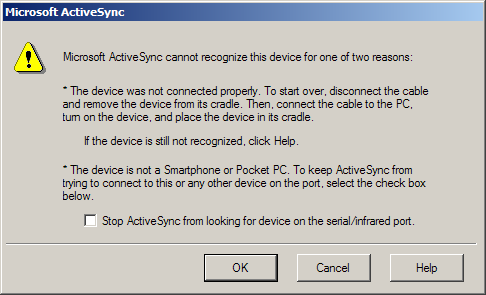
Besides the fact that this message is lying to me (the device in question certainly is a Windows Mobile device and there can’t be any cradle problem because it’s an emulated image ActiveSync is trying to connect to), I have one question: What exactly do the OK and the Cancel button do?

And this newly created dialog is in ActiveSync 4.2 – way after the MS guys are said to have seen the light and are trying to optimize usability.

Oh and I could list some other “fishy” things about this dialog:

  • It has no indication of what the real problem is (a soft reset of the emulator image helped, by the way).
  • It has way too much text on it
  • Trying to format a list using * and improper indentation looks very unprofessional. Judging from the bottom part of the dialog where the buttons are, this is no plain MessageBox anyways, so it would have been doable to fix that.
  • The spacing between the buttons is not exactly consistend with the Windows-Standard

Dialogs like these is precisely why I doubt that Windows Mobile really is the right OS to run on a barcode scanner – at least if it’s a scanner that will be distributed among end-users with no clue of PCs. It’s such a good thing that the scanners finally have GPRS included.

Debugging PocketPCs

Currently I’m working with Windows Mobile based barcode scanning devices. With .NET 2.0, actually developing real-world applications for the mobile devices using .NET has become a viable alternative.

.NET 2.0 combines sufficient speed at runtime (though you have to often test for possible performance regressions) with a very powerful development library (really usable – as compared to .NET 1.0 on smart devices) and unbeatable development time.

All in all, I’m quite happy with this.

There’s one problem though: The debugger.

When debugging, I have two alternatives and both suck:

  1. Use the debugger to connect to the real hardware. This is actually quite fast and works flawlessly, but whenever I need to forcibly terminate the application (for example when an exception happened or when I’m pressing the Stop-Button in the debugger), the hardware crashes somewhere in the driver for the barcode scanner.

    Parts of the application stay in memory and are completely unkillable. The screen freezes

    To get out of this, I have to soft-reset the machine and wait half a century for it to boot up again.

  2. Use the emulator. This has the advantage of not crashing, but it’s so slow.

    From the moment of starting the application in VS until the screen of the application is loaded in the emulator, nearly three minutes pass. That slow.

So programming for mobile devices mainly contains of waiting. Waiting for reboots or waiting for the emulator. This is wearing me down.

Usually, I change some 10 lines or so and then run the application to test what I’ve just written. That’s how I work and it works very well because I get immediate feedback and it helps me to write code what’s working in the first place.

Unfortunately, with these prohibitive long startup times, I’m forced to write more and more code in one batch which means even more time wasted with debugging.

*sigh*