Tunnel munin nodes over HTTP

Last time I’ve talked about Munin, the one system monitoring tool I feel working well enough for me to actually bother to work with. Harsh words, I know, but the key to every solution is simplicity. And simple Munin is. Simple, but still powerful enough to do everything I would want it to do.

The one problem I had with it is that the querying of remote nodes works over a custom TCP port (4949) which doesn’t work behind firewalls.

There are some SSH tunneling solutions around, but what do you do if even SSH is no option because the remote access method provided to you relies on some kind of VPN technology or access token.

Even if you could keep a long-running VPN connection, it’s a very performance intensive solution as it requires resources on the VPN gateway. But this point is moot anyways because nearly all VPNs terminate long running connections. If re-establishing the connection requires physical interaction, then you are basically done here.

This is why I have created a neat little solution which tunnels the munin traffic over HTTP. It works with a local proxy server your munin monitoring process will connect to and a little CGI-script on the remote end.

This will cause multiple HTTP connections per query interval (the proxy uses Keep-Alive though so it’s not TCP connections we are talking about – it’s just hits in the access.log you’ll have to filter out somehow) because it’s impossible for a CGI script to keep the connection open and send data both ways – at least not if your server-side is running plain PHP which is the case in the setup I was designing this for.

Aynways – the solution works flawlessly and helps me to monitor a server behind one hell of a firewall and behind a reverse proxy.

You’ll find the code here (on GitHub as usual) and some explanation on how to use it is here.

Licensed under the MIT license as usual.
Windows Media Encoder: File not found

Today I have come across an installation of a Windows Media Encoder that refused to actually encode media. Whenever I started the encoding process, the encoder quit with the error 0x80070002 and gave the very helpful unformation that “the system cannot find the file specified”.

The problem appeared quite suddenly after working perfectly fine for the last three months. As the system is behind a very air-tight firewall and is the only machine in the network segment (aside of some IP cameras), the system hasn’t even been updated via Windows Update. So I have to conclude, that the problem appeared out of the blue. One day it worked, the next it stopped working.

I’ve tried everything to fix this (the encoder in question was encoding a live stream for a client of ours): From reinstalling the Axis capture driver to reinstalling Windows Media Encoder – nothing worked – the error message stayed the same.

Even googling proved all but helpful: There are quite many pages apparently mirroring all and the same MSDN forum on which someone actually posted the same problem but never got an answer. How annoying is that? You find 10 or more hits, everyone having your problem right in the title and everyone on a different page, but in the end, it’s all the same posting mirrored by different sites and plastered with advertisements.

On a hunch though, I have deleted “%Localappdata%MicrosoftWindows Media” and “%Localappdata%MicrosoftWindows Media Player” seeing that these folders stayed intact after a reinstallation while also being somewhat Windows media related.

Of course that helped!

So if you ever are in the same problem and Media Encoder suddenly stops encoding, it’s maybe caused by a corrupted cache of sorts. In that case, remove the cache and be encoding again, but note though, that if you are on a client machine with all your media on, removing these folders may be unwise as they could contain some meta information about your media.

In my case that didn’t matter though.

Listen to your home music from the office

My MP3 collection is safely stored on shion, on a drobo mounted as /nas. Naturally, I want to listen to said music from the office – especially considering my fully routed VPN access between the office and my home infrastructure and the upstream which suffices for at least 10 concurrent 128bit streams (boy – technology has changed in the last few years – I remember the times where you couldn’t reliably stream 128 bit streams – let alone my 160/320 mp3s).

I’ve tried many things so far to make this happen:

  • serve the files with a tool like jinzora. This works, but I don’t really like jinzora’s web interface and I was never able to get it to work correctly on my Ubuntu box. I was able to trace it down to null bytes read from their tag parser, but the code is very convoluted and practically unreadable without putting quite some effort into that. Considering that I didn’t much like the interface in the first place, I didn’t want to invest time into that.
  • Use a SlimServer (now Squeezecenter) with a softsqueeze player. Even though I don’t use my squeezebox (an original model with the original slimdevices brand, not the newer Logitech one) any more because the integrated amplifier in the Sonos players works much better for my current setup. This solution worked quite ok, but the audio tends to stutter a bit at the beginning of tracks, indicating some buffering issues.
  • Use iTune’s integrated library sharing feature. This seemed both undoable and unpractical. Unpractical because it would force me to keep my main mac running all the time and undoable because iTunes sharing can’t pass subnet boundaries. Aside of that, it’s a wonderful solution as audio doesn’t stutter, I already know the interface and access is very quick and convenient.

But then I found out how to make the iTunes thing both very much doable and practical.

The network boundary problem can be solved using Network Beacon, a ZeroConf proxy. Start the application, create a new beacon. Chose any service name, use «_daap._tcp.» as service type, set the port number to 3689, enable the host proxy, keep the host name clear and enter the IP address of the system running iTunes (or firefly – see below).

Oh, and the target iTunes refuses to serve out data to machines in different subnets, so to be able to directly access a remote iTunes, you’d also have to set up an SSH tunnel.

Using Network Beacon, ZeroConf quickly begins working across any subnet boundaries.

The next problem was about the fact that I was forced to keep my main workstation running at home. I fixed that with Firefly Media Server for which even a pretty recent prebuilt package exists for Ubuntu (apt-get install mt-daapd).

I’ve installed that, configured iptables to drop packets for port 3689 on the external interface, configured Firefly to use the music share (which basically is a current backup of the itunes library of my main workstation – rsync for the win).

Firefly in this case even detects the existing iTunes playlists (as the music share is just a backup copy of my iTunes library – including the iTunes Library.xml), though smart playists don’t work, but can easily be recreated in the firefly web interface.

This means that I can access my complete home mp3 library from the office, stutter free, using an interface I’m well used to, without being forced to keep my main machine running all the time.

And it isn’t even that much of a hack and thus easy to rebuild should the need arise.

I’d love to not be forced to do the Network Beacon thing, but avahi doesn’t relay ZeroConf information across VPN interfaces.

Mozilla Weave 0.2

I have quite many computers I use regularely, on all of which runs Firefox. Of course I’ve accumulated quite a lot of bookmarks, passwords and “keep me logged in”-cookies.

During my use of FF2, I’ve come across Google Browser Sync which was incredibly useful, albeit a bit unstable here and then, so last Christmas, I was very happy to see the prototype of Mozilla Weave to be released. It promised the same feature set as Google Browser Sync, but build from the makers of the browser on an open architecture.

I have been a user of Weave ever since and it was even more inconsistent in availability than what Google Browser Sync ever provided, but at least it was just the server not working, not affecting the client which GBS did here and then, which made me lose parts or all of my bookmarks.

Over time though, Weave got better and better and with todays 0.2 release, the installation and setup process actually got streamlined enough so that I can recommend the tool to anybody using more than one PC at any time.

Especially with the improved bookmarking functionality we got in Firefox 3, synchroniuzing bookmarks has become really important. I’m very happy to see a solution for this problem and I’m overjoyed that the solution is as open as weave is.

Congratulations, Mozilla Team!

VMware shared folders and Visual Studio

ver since I’ve seen the light, I’m using git for every possible situation. Subversion is ok, but git is fun. It changed the way how I do developement. It allowed me to create ever so many fun-features for our product. Even in spare-time – without the fear of never completing and thus wasting them.

I have so many branches of all our projects – every one of them containing useful, but just not ready for prime-time feature. But when the time is right, I will be able to use that work. No more wasting it away because a bugfix touches the same file.

The day I dared to use git was the day that changed how I work.

Now naturally, I wanted to use all that freedom for my windows work aswell, but as you know, git just isn’t quite there yet. In fact, I had an awful lot of trouble with it, mainly because of it’s integrated SSH client that doesn’t work with my putty pageant-setup and stuff.

So I resorted to storing my windows development stuff on my mac file system and using VMware Fusion’s shared folder feature to access the source files.

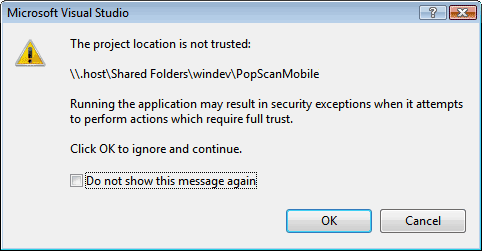
Unfortunately, it didn’t work very well at first as this is what I got:

Error message saying that the 'Project location is not trusted'

I didn’t even try to find out what happens when I compile and run the project from there, so I pressed F1 and followed the instructions given there to get rid of the message that the “Project location is not trusted”.

I followed them, but it didn’t help.

I tried adding various UNC paths to the intranet zone, but neither worked.

Then I tried sharing the folder via Mac OS X’s built in SMB server. This time, the path I’ve set up using mscorcfg.msc actually seemed to do something. Visual Studio stopped complaining. And then I found out:

Windows treats host names containing a dot (.) as internet resources. Hostnames without dots are considered to be intranet resouces.

celeswindev worked in mscorcfg.msc because celes, not containing a dot, was counted as an intranet resource.

.host contains a dot and this is counted to be an internet resource.

This means that to make the .NET framework trust your VMWare shared folder, you have to add the path to the “Internet_Zone”. Not the “LocalIntranet_Zone”, because the framework loader doesn’t even look there.

Once I’ve changed that configuration, Visual Studio complained that it was unable to parse the host name – it seems to assume them not starting with a dot.

This was fixed by mapping the path to a drive letter like we did centuries ago.

Now VS is happy and I can have the best of all worlds:

  • I can keep my windows development work in a git repository
  • I have a useful (and working) shell and ssh-agent to actually “git svn dcommit” my work
  • I don’t have to export any folders of my mac via SMB
  • Time Machine now also backs up my Windows Work which I had to do manually until now.

Very nice indeed, but now back to work (with git :-) ).

git branch in ZSH prompt

Screenshot of the terminal showing the current git branch

Today, I came across a little trick on how to output the current git branch on your bash prompt. This is very useful, but not as much for me as I’m using ZSH. Of course, I wanted to adapt the method (and to use fewer backslashes :-) ).

Also, in my setup, I’m making use of ZSH’s prompt themes feature of which I’ve chosen the theme “adam1”. So let’s use that as a starting point.

  1. First, create a copy of the prompt theme into a directory of your control where you intend to store private ZSH functions (~/zshfuncs in my case).
    cp /usr/share/zsh/4.3.4/functions/prompt_adam1_setup ~/zshfuncs/prompt_pilif_setup
  2. Tweak the file. I’ve adapted the prompt from the original article, but I’ve managed to get rid of all the backslashes (to actually make the regex readable) and to place it nicely in the adam1 prompt framework.
  3. Advise ZSH about the new ZSH function directory (if you haven’t already done so).
    fpath=(~/zshfunc $fpath)
  4. Load your new prompt theme.
    prompt pilif

And here’s the adapted adam1 prompt theme:

# pilif prompt theme

prompt_pilif_help () {
  cat <<'EOF'
This prompt is color-scheme-able.  You can invoke it thus:

  prompt pilif [<color1> [<color2> [<color3>]]]

This is heavily based on adam1 which is distributed with ZSH. In fact,
the only change from adam1 is support for displaying the current branch
of your git repository (if you are in one)
EOF
}

prompt_pilif_setup () {
  prompt_adam1_color1=${1:-'blue'}
  prompt_adam1_color2=${2:-'cyan'}
  prompt_adam1_color3=${3:-'green'}

  base_prompt="%{$bg_no_bold[$prompt_adam1_color1]%}%n@%m%{$reset_color%} "
  post_prompt="%{$reset_color%}"

  base_prompt_no_color=$(echo "$base_prompt" | perl -pe "s/%{.*?%}//g")
  post_prompt_no_color=$(echo "$post_prompt" | perl -pe "s/%{.*?%}//g")

  precmd  () { prompt_pilif_precmd }
  preexec () { }
}

prompt_pilif_precmd () {
  setopt noxtrace localoptions
  local base_prompt_expanded_no_color base_prompt_etc
  local prompt_length space_left
  local git_branch

  git_branch=`git branch 2>/dev/null | grep -e '^*' | sed -E 's/^* (.+)$/(1) /'`
  base_prompt_expanded_no_color=$(print -P "$base_prompt_no_color")
  base_prompt_etc=$(print -P "$base_prompt%(4~|...|)%3~")
  prompt_length=${#base_prompt_etc}
  if [[ $prompt_length -lt 40 ]]; then
    path_prompt="%{$fg_bold[$prompt_adam1_color2]%}%(4~|...|)%3~%{$fg_bold[white]%}$git_branch"
  else
    space_left=$(( $COLUMNS - $#base_prompt_expanded_no_color - 2 ))
    path_prompt="%{$fg_bold[$prompt_adam1_color3]%}%${space_left}<...<%~ %{$reset_color%}$git_branch%{$fg_bold[$prompt_adam1_color3]%} $prompt_newline%{$fg_bold_white%}"
  fi

  PS1="$base_prompt$path_prompt %# $post_prompt"
  PS2="$base_prompt$path_prompt %_&gt; $post_prompt"
  PS3="$base_prompt$path_prompt ?# $post_prompt"
}

prompt_pilif_setup "$@"

The theme file can be downloaded here

Converting Java keytool-certificates

To be able to read barcodes from connected barcode-scanners into the webbased version of PopScan, we have to use a signed applet – there is no other way for getting the needed level of hardware access without signing your applet.

The signature, by the way, doesn’t at all prevent any developer from doing bad stuff – it just puts their signature below it (literally), so it kind of raises the bar to distribute malware that way – after all, the checks when applying for a certificate usually are very rigid, so there is no way anybody could forge their application, so the origin of any piece of code is very tracable.

But there is no validation done of the actual code to be signed and I doubt that the certificate authorities out there actually revoke certificates used to certify malware, thought that remains to be seen.

Anyways. Back to the topic.

In addition to the Java Applet, we also develop the windows client frontend to the PopScan server. And we have a small frontend to run on Windows CE (or Windows Mobile) based barcode capable devices. Traditionally, both of these were never signed.

But lately with Vista and Windows Mobile 6, signing becomes more and more important: Both systems complain in variable loudness about unsigned code, so I naturally prefer the code to be signed – we DO have a code signing certificate after all – for our Applet.

Now the thing is that keytool, Java’s way of handling code signing keys doesn’t allow a private key to be exported. This means that there was no obvious way for me to ever use the certificate we got for our applet to sign Windows EXEs.

Going back to the CA and ask them to send over an additional certificate was no option for me: Aside of the fact that it would certainly have cost another two years fee, this would have ment to prove our identity all over again – one year too early as our current certificate is valid till 2009.

But then, I found a solution. Here’s how you convert a java keystore certificate to something you can use with Microsoft’s Authenticode:

  1. Start KeyTool GUI
  2. In the Treeview, click “Export”, “Private Key”
  3. Select your java keystore-file
  4. Enter two trarget file names for your key and the certificate chain (and select PEM format)
  5. Click OK

Now you will have two more files. One is your private key (I’ve named it key.pem), the other is the certificate chain (named cert.pem in my case). Now, use OpenSSL to covert this into something Microsoft likes to see:

% openssl pkcs12 -inkey key.pem -in cert.pem -out keypair.pfx -export

openssl will ask for a password to encrypt the pfx file with and you’ll be done. Now you can use the pfx-file like any other pfx file you recived from your certificate authority (double click it to install it or use it with signcode.exe to directly sign your code).

Remember to delete key.pem as it’s the unencrypted private key!

Old URLs fixed

I have just added two rewrite rules to automatically translate most of the old s9y-URLs to something WordPress understands.

The first one was easy and could be done in WP’s .htaccess-file:

RewriteRule ^archives/([0-9]+)/([0-9]+).html$ /$1/$2 [R=permanent,L]

This handles the s9y-style archive URLs for monthly archives – something that got quite the amount of hits apparently – at least that’s one of the 404 errors I’ve encountered the most in my logfiles.

The second one is the direct link to old posts. While this could be done in a PHP/.htaccess-only solution, I took the opportunity and learned how to do custom url maps for mod_rewrite which, of course, only work in the httpd.conf, so this isn’t probably something everyone can do on their hosting plan:

RewriteEngine On
RewriteMap s9yconv prg:/home/pilif/url-s9y2wp.php

After defining this, I could use the map in WP’s .htaccess:

RewriteRule ^archives/([0-9]+)-(.*).html$ /${s9yconv:$2} [R=permanent,L]

The script is very simple as you can see here:

#!/usr/bin/php
<?php
include('wp/wp-includes/formatting.php');
while (($line = fgets(STDIN)) !== false){
    $line = preg_replace('#.html$#', '', $line);
    $line = sanitize_title_with_dashes(preg_replace('#^[0-9]+-#', '', $line));
    echo "$linen";
}
?>

While WP is configured to create permalinks containing the date, you can usually just feed it the URL-ized title and it’ll find out the correct entry to use. This has the advantage that the script, which is long-running per the specification of prg-rewrite maps, is kept as simple as possible, which is needed as PHP doesn’t always free all allocated memory – something you don’t want to have in long-running processes like this one. This is why I redirect to something WP still has to do some work on: It spares me to do all the database-handling and stuff.

If I had to do this without the ability to change httpd.conf, I would use a rule like this:

RewriteRule ^archives/([0-9]+)-(.*).html$ /s9y-convert.php/$2 [L]

and then do above logic in that script.

Both approaches work the same, but I wanted to try out how to do a dynamic rewrite map.

PostgreSQL on Ubuntu

Today, it was time to provision another virtual machine. While I’m a large fan of Gentoo, there were some reasons that made me decide to gradually start switching over to Ubuntu Linux for our servers:

  • One of the large advantages of Gentoo is that it’s possible to get bleeding edge packages. Or at least you are supposed to. Lately, it’s taking longer and longer for an ebuild of an updated version to finally become available. Take PostgreSQL for example: It took about 8 months for 8.2 to become available and it looks like history is repeating itself for 8.3
  • It seems like there are more flamewars than real development going on in Gentoo-Land lately (which in the end leads to above problems)
  • Sometimes, init-scripts and stuff changes over time and there is not always a clear upgrade-path. emerge -u world once, then forget to etc-update and on next reboot, hell will break loose.
  • Installing a new system takes ages due to the manual installation process. I’m not saying it’s hard. It’s just time-intensive

Earlier, the advantage of having current packages greatly outweighted the issues coming with Gentoo, but lately, due to the current state of the project, it’s taking longer and longer for packages to become available. So that advantage fades away, leaving me with only the disadvantages.

So at least for now, I’m sorry to say, Gentoo has outlived it’s usefulness on my productive servers and has been replaced by Ubuntu, which albeit not being bleeding-edge with packages, at least provides a very clean update-path and is installed quickly.

But back to the topic which is the installation of PostgreSQL on Ubuntu.

(it’s ironic, btw, that Postgres 8.3 actually is in the current hardy beta, together with a framework to concurrently use multiple versions whereas it’s still nowhere to be seen for Gentoo. Granted: An experimental overlay exists, but that’s mainly untested and I had some headaches installing it on a dev machine)

After installing the packages, you may wonder how to get it running. At least I wondered.

/etc/init.d/postgresql-8.3 start

did nothing (not very nice a thing to do, btw). initdb wasn’t in the path. This was a real WTF moment for me and I assumed some problem in the package installation.

But in the end, it turned out to be an (underdocumented) feature: Ubuntu comes with a really nice framework to keep multiple versions of PostgreSQL running at the same time. And it comes with scripts helping to set up that configuration.

So what I had to do was to create a cluster with

pg_createcluster --lc-collate=de_CH --lc-ctype=de_CH -e utf-8 8.3 main

(your settings my vary – especially the locale settings)

Then it worked flawlessly.

I do have some issues with this process though:

  • it’s underdocumented. Good thing I speak perl and bash, so I could use the source to figure this out.
  • in contrast to about every other package in Ubuntu, the default installation does not come with a working installation. You have to manually create the cluster after installing the packages
  • pg_createcluster –help bails out with an error
  • I had /var/lib/postgresql on its own partition and forgot to remount it after a reboot which caused the init-script to fail with a couple of uninitialized value errors in perl itself. This should be handeled cleaner.

Still. It’s a nice configuration scheme and a real progress from gentoo. The only thing left for me now is to report these issues to the bugtracker and hope to see this fixed eventually. And it it isn’t, there is this post here to remind me and my visitors.

Impressed by git

The company I’m working with is a Subversion shop. It has been for a long time – since fall of 2004 actually where I finally decided that the time for CVS is over and that I was going to move to subversion. As I was the only developer back then and as the whole infrastructure mainly consisted of CVS and ViewVC (cvsweb back then), this move was an easy one.

Now, we are a team of three developers, heavy trac users and truly dependant on Subversion which is – mainly due to the amount of infrastructure that we built around it – not going away anytime soon.

But none the less: We (mainly I) were feeling the shortcomings of subversion:

  • Branching is not something you do easily. I tried working with branches before, but merging them really hurt, thus making it somewhat prohibitive to branch often.
  • Sometimes, half-finished stuff ends up in the repository. This is unavoidable considering the option of having a bucket load of uncommitted changes in the working copy.
  • Code review is difficult as actually trying out patches is a real pain to do due to the process of sending, applying and reverting patches being a manual kind of work.
  • A pet-peeve of mine though is untested, experimental features developed out of sheer interest. Stuff like that lies in the working copy, waiting to be reviewed or even just having its real-life use discussed. Sooner or later, a needed change must go in and you have the two options of either sneaking in the change (bad), manually diffing out the change (hard to do sometimes) or just forget it and svn revert it (a real shame).

Ever since the Linux kernel first began using Bitkeeper to track development, I knew that there is no technical reason for these problems. I knew that a solution for all this existed and that I just wasn’t ready to try it.

Last weekend, I finally had a look at the different distributed revision control systems out there. Due to the insane amount of infrastructure built around Subversion and not to scare off my team members, I wanted something that integrated into subversion, using that repository as the official place where official code ends up while still giving us the freedom to fix all the problems listed above.

I had a closer look at both Mercurial and git, though in the end, the nicely working SVN integration of git was what made me have a closer look at that.

Contrary to what everyone is saying, I have no problem with the interface of the tool – once you learn the terminology of stuff, it’s quite easy to get used to the system. So far, I did a lot of testing with both live repositories and test repositories – everything working out very nicely. I’ve already seen the impressive branch merging abilities of git (to think that in subversion you actually have to a) find out at which revision a branch was created and to b) remember every patch you cherry-picked…. crazy) and I’m getting into the details more and more.

On our trac installation, I’ve written a tutorial on how we could use git in conjunction with the central Subversion server which allowed me to learn quite a lot about how git works and what it can do for us.

So for me it’s git-all-the-way now and I’m already looking forward to being able to create many little branches containing many little experimental features.

If you have the time and you are interested in gaining many unexpected freedoms in matters of source code management, you too should have a look at git. Also consider that on the side of the subversion backend, no change is needed at all, meaning that even if you are forced to use subversion, you can privately use git to help you manage your work. Nobody would ever have to know.

Very, very nice.