Dynamic object creation in Delphi

In a quite well-known pattern, you have a certain amount of classes, all inheriting from a common base and you have a factory that creates instances of these classes. Now let’s go further ahead and assume that the factory will have no knowledge of what classes will be available at run-time.

Each of this classes registers itself at run-time depending on a certain condition and then the factory will create instances depending on that registration.

This post is about how to do this in Delphi. Remember that this sample is very much abstracted and the real-world application is quite a bit more complex, but this sample should be enough to demonstrate the point.

Let’s say, we have these classes:

type
  TJob = class(TObject)
    public
      constructor Create;
  end;

  TJobA = class(TJob)
    public
      constructor Create;
  end;

  TJobB = class(TJob)
    public
      constructor Create;
  end;

  TJobAA = class(TJobA)
    public
      constructor Create;
  end;

Each of these constructors does something to initialize the instance and thus calls its parent using ‘inherited’.

Now, let’s further assume that we have a Job-Repository that stores a list of available jobs:

type
  TJobRepository = class(TObject)
    private
      FAvailableJobs: TList;
    public
      procedure registerJob(cls: TClass);
      function getJob(Index: Integer): TClass;
   end;

Now we can register our jobs

   rep = TJobRepository.Create;
   if condition then
     rep.RegisterJob(TJobAA);
   if condition2 then
     rep.RegisterJob(TJobB);

and so on. Now at runtime, depending on some condition, we will instantiate any of these registered jobs. This is how we’d do that:

  job = rep.getJob(0).Create; 

Sounds easy. But this doesn’t work.

job in this example will be of type TJobAA (good), but its constructor will not be called (bad). The solution is to

  1. Declare the constructor of TJob as being virtual.
  2. Create a Meta-Class for TJob, because the Constructor of TObject is NOT virtual, to when you dynamically instantiate an object from a TClass only the constructor of TObject will be called.
  3. Override the inherited virtual constructor.

So in code, it looks like this:

type
  TJobClass = class of TJob;
  TJob = class(TObject)
   public
    constructor Create; virtual;
  end;

  TJobA = class(TJob)
    public
      constructor Create; override;
    end;

TJobAA = class(TJobA)
    public
      constructor Create; override;
    end;

TJobRepository = class(TObject)
    private
      FAvailableJobs: TList;
    public
      procedure registerJob(cls: TClass);
      function getJob(Index: Integer): TJobClass;
   end

This way, Delphi knows that when you call

  job = rep.getJob(0).Create; 

that you are creating an instance of a TJobAA object which has a constructor that overrides the virtual Constructor of TJob by the virtue that the Class of TJobAA is a class of TJob.

Personally, I would have assumed that this just works without the need of declaring the Meta-Class and the trickery with the need to explicitly declare the constructor as virtual. But seeing that Delphi is a compiled static language, actually, I’m happy that this works at all.

Food for thought


  1. When you open a restaurant, you know the risk of people going to the supermarket and cook their own meal, not paying you as the restaurant owner.
  2. When you publish a book, you know there are going to be libraries where people can share one copy of your work.
  3. When you build a house and sell it, you know the people living there will be going in and out of your house for year without ever paying you anything more.
  4. When you live in a family and clean the parents car for one Euro, you know about the risk of your sister doing it for 50 cents next time around.

But

  1. The music industry claims to have a monopoly on their work, managing to get laws created that allow them to control distribution and disallow anybody to create a lookalike without paying them.
  2. The game industry is hard at work making it impossible for honest customers to even use the game they bought on multiple devices. And now they even begin to go after the used games market (think about that SNES pearl you just saw in your small games store. The one you wanted so badly ever since you’ve been young. Wouldn’t it be a shame it was illegal for them to sell it?)
  3. The entertainment industry is hard at work to make you pay for every device you want to play the same content on.
  4. Two words. “SMS pricing”.

Why do things applying to “small people” not apply to the big shots? Why does the government create laws to turn around well-known facts we have grown up with just so that the wealthy companies (the ones not paying nearly enough taxes) can get even wealthier?

I just don’t get it.

iTunes 8 visualization

Up until now I have not been a very big fan of iTunes’ visualization engine, probably because I’ve been spoiled with MilkDrop in my Winamp days (which still owns the old iTunes display on so many levels).

But with the release of iTunes 8 and their new visualization, I have to admit that, when you chose the right music (in this case it’s Liberi Fatali from Final Fantasy 8), you can really get something out of this.

The still picture really doesn’t do it justice, so I have created this video (it may be a bit small, but you’ll see what I’m getting at)  to visualize my point. Unfortunately, near the end it gets worse and worse, but the beginning is something of the more impressive shows I have ever seen generated out of this particular piece of music.

This may even beat MilkDrop and I could actually see myself assembling a playlist of some sort and put this thing on full screen.

Nice eyecandy!

OAuth signature methods

I’m currently looking into web services and different methods of request authentication, especially as what I’m aiming to end up with is something inherently RESTful as this method will provide me with the best flexibility when designing a frontend to the service and generally, the arguments of the REST crowd seem to convince me (works like the human readable web, inherently scalable, enforces clean structure of resources and finally: easy to program against due to “obvious” API).

As different services are going to communicate with themselves, sometimes acting as users of their respective platforms and because I’m not really inclined to pass credentials around (or make the user do one half of the tasks on one site and the other half on another site), I was looking into different methods of authentication and authorization which work in a RESTful enviroment and work without passing around user credentials.

The first thing I did was to note the requirements and subsequently, I quickly designed something using public key cryptography which would have worked quite nicely (possibly – I’m no expert in this field – yet).

Then I learned about OAuth which was designed precisely to solve my issues.

Eager, I read through the specification, but I was put off by one single fact: The default method for signing requests, the method that is most widely used, the method that is most widely supported, relies on a shared secret.

Even worse: The shared secret must be known in clear on both the client and the server (using the common terminology here; OAuth speaks of consumers and providers, but I’m (still) more used to the traditional naming).

This is bad on multiple levels:

  • As the secret is stored on two places (client and server), it’s twice as probable to leak out than if it’s only stored on one place (the client).
  • If the token is compromised, the attacker can act in the name of the client with no way of detection.
  • Frankly, it’s responsibility I, as a server designer, would not want to take on. If the secret is on the client and the client screws up and lets it leak, it’s their problem, if the secret is stored on the server and the server screws up, it’s my problem and I have to take responsibility.
    Personally, I’m quite confident that I would not leak secret tokens, but can I be sure? Maybe. Do I even want to think about this? Certainly not if there is another option.
  • If, god forbid, the whole table containing all the shared secrets is compromised, I’m really, utterly screwed as the attacker can use all services, impersonating any user at will.
  • As the server needs to know all shared secrets, the risk of losing all of them is only even created. If only the client knows the secret, an attacker has to compromise each client individually. If the server knows the secret, it suffices to compromise the server to get all clients.
  • As per the point above, the server gets to be a really interesting target for attacks and thus needs to be extra secured and even needs to take measures against all kinds of more-or-less intelligent attacks (usually ending up DoSing the server or worse).

In the end, HMAC-SHA1 is just repeating history. At first, we stored passwords in the clear, then we’ve learned to hash them, then we even salted them and now we’re exchanging them for tokens stored in the clear.

No.

What I need is something that keeps the secret on the client.

The secret should never ever need to be transmitted to the server. The server should have no knowledge at all of the secret.

Thankfully, OAuth contains a solution for this problem: RSA-SHA1 as defined in section 9.3 of the specification. Unfortunately, it leaves a lot to be desired though. Whereas the rest of the specification is a pleasure to read and very, well, specific, 9.3 contains the following phrase:

It is assumed that the Consumer has provided its RSA public key in a verified way to the Service Provider, in a manner which is beyond the scope of this specification.

Sure. Just specify the (IMHO) useless way using shared secrets and leave out the interesting and IMHO only functional method.

Sure. Transmitting a Public Key is a piece of cake (it’s public after all), but this puts another burden on the writer of the provider documentation and as it’s unspecified, implementors will be forced to amend the existing libraries with custom code to transmit the key.

Also I’m unclear on header size limitations. As the server needs to know what public key was used for signature (oauth_consumer_key), it must be sent on each requests. While manually generated public token can be small, a public key certainly isn’t. Is there a size-limit for HTTP-headers? I’ll have to check that.

I could just transmit the key ID (the key is known on the server) or the key fingerprint as the consumer key, but is that following the standard? I didn’t see this documented anywhere and examples in the wild are very scarcely implemented.

Well… as usual, the better solution just requires more work and I can live with that, especially considering as, for now, I’ll be the person to write both server and client, but I feel the upcoming pain, should third party consumers decide to hook up with that provider.

If you ask me what I would have done in the footsteps of the OAuth guys, I would only have specified RSA-SHA1 (and maybe PLAINTEXT) and not even bothered with HMAC-SHA1. And I would have specified a standard way for public key exchange between consumer and provider.

Now the train has left and everyone interested in creating a really secure (and convenient – at least for the provider) solution will be left with more work and not standardized methods.

… and back to Thunderbird

It has been a while since I’ve last posted about email – still a topic very close to my heart, be it on the server side or on the client side (though the server side generally works very well here, which is why I don’t post about it).

Waybackwhen, I’ve written about Becky! which is also where I’ve declared the points I deemed important in a mail client. A bit later, I’ve talked about The Bat!, but in the end, I’ve settled with Thunderbird, just to switch to Mac Mail when I’ve switched to the Mac.

After that came my excursion to Gmail, but now I’m back to Thunderbird again.

Why? After all, my Gmail review sounded very nice, didn’t it?

Well…

  • Gmail is blazingly fast once it’s loaded, but starting the browser and then gmail (it loads so slow that “starting (the) gmail (application)” is a valid term to use) is always slower than just keeping a mail client open on the desktop.
  • Google Calendar Sync sucks and we’re using Exchange/Outlook here (and are actually quite happy with it – for calendaring and address books – it sucks for mail, but it provides decent IMAP support), so there was no way for the other folks here to have a look at my calendar.
  • Gmail always posts a “Sender:”-Header when using a custom sender domain which technically is the right thing to do, but Outlook on the receiving end screws up by showing the mail as being “From xxx@gmail.com on behalf of xxx@domain.com” which isn’t really what I’d want.
  • Google’s contact management offering is sub par compared even to Exchange.
  • iPhone works better with Exchange than it does with Google (yes. iPhone, but that’s another story).
  • The cool Gmail MIDP client doesn’t work/isn’t needed on the iPhone, but originally was one of the main reasons for me to switch to Gmail.

The one thing I really loved about Gmail though was the option of having a clean inbox by providing means for archiving messages with just a single keyboard shortcut. Using a desktop mail client without that funcationality wouldn’t have been possible for me any more.

This is why I’ve installed Nostalgy, a Thunderbird extension allowing me to assign a “Move to Folder xxx” action to a single keystroke (y in my case – just like gmail).

Using Thunderbird over Mac Mail has its reasons in the performance and in the crazy idea of Mac Mail to always download all the messages. Thunderbird is no race horse, but Mail.app isn’t even a slug.

Lately, more and more interesting posts regarding the development of Thunderbird have appeared on Planet Mozilla, so I’m looking forward to see Thunderbird 3 taking shape in its revitalized form.

I’m all but conservative in my choice of applications and gadgets, but Mail  – also because of its importance for me – must work exactly as I want it. None of the solutions out there are doing that to the full extent, but TB certainly comes closest. Even after years of testing and trying out different solutions, TB is the thing that solves most of my requirements without adding new issues.

Gmail is splendid too, but it presents some shortcomings TB doesn’t come with.

Internet at home

I’m a usually very happy customer of Cablecom. They provide internet-over-tv-cable and as here in Switzerland, basically everyone has tv cable and because they provide nice pure ip addresses (no PPPoE stuff) and because when you are not trapped in the administrative trap, then it just works. Cablecom internet is never down, very speedy and usually I’m envied for my pings in online matches of whatever game.

All these are very good reasons to become a customer of Cablecom and depite of what you are going to read here shortly, I would probably still recommend them to other users – at least those with some technical background because, quite frankly, of all the ways to get broadband here in Switzerland, this one is the one that works the easiest and the most consistent.

But once you fall into the administrative trap, all hell breaks lose.

Here’s what happened to me (also, read my other post about Cablecom’s service):

Somewhere around the end of May I got a letter telling me that I would get sent a new cable modem. Once I’ve got that, I should give them a call so they can deactivate my old one. Also, if I don’t call, they’d automatically disable the old modem after a couple of weeks.

Unfortunately, I never got that modem. I don’t know who’s to blame and I don’t care. Also, I could not have anticipated the story as it’s now unfolding because the letter clearly said that I’d get the modem at an unknown later date, so I wasn’t worried at the time.

At the beginning of June, I’ve noticed the network going down. Not used to that, especially not as it was down for a whole day, I called the hotline and told them that I suspected them of shutting of my service despite me not reciving the modem.

They’ve confirmed that and promised me to resend the modem. Re-enabling the old one was not possible they’ve told me futher on.

One week later – not having recived the modem – I’ve called again and they told me that the order was delayed due to some CRM software change at their end, but they’ve promised me to send it that week.

Another week passes. No modem. I call again and they tell me that the reporcessing of orders was delayed, but that I will get the modem that week for sure. Knowing that this probably won’t be the case, I’ve told them that I will be on vacation and that they should send it to my office address.

Another week passes and I go to vacation.

Another week passes and I call the office to ask if the modem (that was supposed to arrive two weeks ago the latest) has arrived. Of course it didn’t. What made me actually make the call was the fact that I’ve received a press release from Cablecom announcing more customers than ever – the irony of that bringing my memory back to the non-existing internet at my home.

So I called support again. They did notice that my order was late, but they had no idea why it was taking so long, there was no way of speeding it up and they had no idea when I would get the modem (keep in mind that I’m paying CHF 79/mt for not working internet access).

At this point I’ve had enough and I’ve called someone higher up I know working at Cablecom.

In the end, I was able to get internet access using that route, but it’s not entirely official and I still have not the slightest idea of when/if the problem with my actual account will ever be fixed.

Pathetic.

Still: If everything goes well, then you have nothing to fear. From a technical standpoint, Cablecom owns all other currently widely available methods for broadband internet access, so this is what I will be sticking with. Just be prepared for longer service intermissions once you fall into the administrative trap.

Beautifying commits with git

When you look at our Subversion log, you’d often see revisions containing multiple topics, which is something I don’t particularly like. The main problem is merging patches. The moment you cramp up multiple things into a single commit, you are doomed should you ever decide to merge one of the things into another branch.

Because it’s such an easy thing to do, I began committing really, really often in git, but whenever I was writing the changes back to subversion, I’ve used merge –squash as to not clutter the main revision history with abandoned attempts at fixing a problem or implementing a feature.

So in essence, this meant that by using git, I was working against my usual goals: The actual commits to SVN were larger than before which is the exact opposite thing of how I’d want the repository to look.

I’ve lived with that, until I learned about the interactive mode of git add.

Beginners with git (at least those coming from subversion and friends) always struggle to really get the concept of the index and usually just git commit –a when committing changes.

This does exactly the same thing as a svn commit would do: It takes all changes you made to your working copy and commits them to the repository. This also means that the smallest unit of change you can track is the state of the working copy itself.

To do finer grained commits, you can git add a file and commit that, which is the same as svn status followed by some grep and awk magic.

But even a file is too large a unit for a commit if you ask me. When you implement feature X, it’s possible if not very probable, that you fix bugs a and b and extend the interface I to make the feature Y work – a feature on which X depends.

Bugfixes, interface changes, subfeatures. A git commit –a will mash them all together. A git add per file will mash some of them together. Unless you are really really careful and cleanly only do one thing at a time, but in the end that’s now how reality works.

It may very well be that you discover bug b after having written a good amount of code for feature Y and that both Y and b are in the same file. Now you have to either back out b again, commit Y and reapply b or you just commit Y and b in one go, making it very hard to later just merge b into a maintenance branch because you’d also get Y which you would not want to.

But backing out already written code to make a commit? This is not a productive workflow. I could never make myself do something like that, let alone my coworkers. Aside of that, it’s yet another cause to create errors.

This is where the git index shines. Git tracks content. The index is a stage area where you store content you whish to later commit to the repository. Content isn’t bound to a file. It’s just content. By help of the index, you can incrementally collect single changes in different files, assemble them to a complete package and commit that to the repository.

As the index is tracking content and not files, you can add parts of files to it. This solves the problems outlined above.

So once I have completed Feature X, and assuming I could do it in one quick go, then I run git add with the –i argument. Now I see a list of changed files in my working copy. Using the patch-command, I can decide, hunk per hunk, whether it should be included in the index or not. Once I’m done, I exit the tool using 7. Then I run git commit1) to commit all the changes I’ve put into the index.

Remember: This is not done per file, but per line in the file. This way I can separate all the changes in my working copy, bug a and b, feature Y and X into single commits and commit them separately.

With a clean history like that, I can consequently merge the feature branch without —squash, thus keeping the history when dcommiting to subversion, finally producing something that can easily be merged around and tracked.

This is yet another feature of git that, after you get used to it, makes this VCS shine even more than everything else I’ve seen so far.

Git is fun indeed.

1) and not git commit -a which would destroy all the fine-grained plucking of lines you just did – trust me: I know. Now.

Epic SSL fail

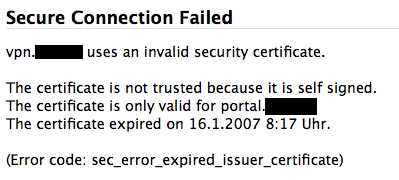
Today when I tried to use the fancy SSL VPN access a customer provided me with, I came across this epic fail:

Of all the things that can be wrong in a SSL certificate, this certificate manages to get them wrong. The self-signed(1) certificate was issued for the wrong host name(2) and it has expired(3) quite some time ago.

Granted: In this case the issue of trust is more or less constrained to the server to know who I am (I wasn’t intending on transferring any amount of sensitive data), but still – when you self-sign your certificate, the cost of issuing one for the correct host or issuing one with a very long validity becomes a non-issue.

Anyways – I had a laugh. And now you can have one too.

What sucks about the Touch Diamond

Contrary to all thinking and common-sense I’ve displayed in my «Which phone for me?»-post, I went and bought the Touch Diamond. The perspective of having a hackable device with high resolution, GPS and voip capability and flawlessly working Exchange-Synchronization finally pushed me over – oh and of course I just like new gadgets to try out.

In my dream world, the Touch would even replace my iPod Touch as a video player and bathtub browser, so I could go back to my old Nano for podcasts.

Unfortunately, the Touch is not much more than any other Windows Mobile phone with all the suckage and half-working features they usually come with. Here’s the list:

  • VoIP is a no-go. The firmware of the Touch is crippled and does not provide Windows Mobile 6+ SIP support, Skype doesn’t run on Windows Mobile 6.1, but all that doesn’t matter anway because none of the Voip-Solutions actually use the speakerphone. You can only get VoIP sound on the amplified speaker on the back of the phone – or you use a headset at which time, the thing isn’t better than any other VoIP solution at my disposal.
  • GPS is a no go as the Diamond takes *ages* to find a signal and it’s really fiddly to get it to work – even just in the integrated Google maps application.
  • Typing anything is really hard despite HTC really trying. Whichever input method you chose, you lose: The Windows Mobile native solutions only work with the pen and the HTC keypads are too large for the applications to remain really usable. Writing SMSes takes me so much longer than every other smart phone I’ve tried before.
  • T9 is a nice idea, but here and then, you need to enter some special chars. Like dots. Too bad that they are hidden behind another menu – especially the dot.
  • This TouchFLO 3D-thingie sounds nice on the web and in all the demonstrations, but it sucks anway, mainly because it’s slow as hell. The iPhone interface doesn’t just look good, it’s also responsive, which is where HTC fails. Writing an SMS message takes *minutes* when you combine the embarrassingly slow loading time of the SMS app with the incredibly fiddly text input system.
  • You only get a German T9 with the German version of the Firmware which has probably been translated using Google Translation or Babelfish.
  • The worst idea ever from a consumer perspective was that stupid ExtUSB connector. Aside of the fact that you’d practically have to buy an extra cable to sync from home and the office, you also need another extra cable if you want to plug in decent headphones. The ones coming with the device are unusable and it’s impossible to plug better ones. Also, the needed adapter cable is currently not available to buy anywhere I looked.
  • The screen, while having a nice DPI count is too small to be usable for earnest web browsing. Why does windows mobile have to paint everything four times as large when there are four times as many pixels available?
  • Finger gestures just don’t work on a touch sensitive display, no matter how much they try. At least they don’t work once you are used to the responsiveness and accuracy of an iPhone (or iPod touch).
  • The built-in opera browser, while looking nice and providing a much better page zoom feature than the iPod Touch also is unusable because it’s much too slow.

So instead of having a possible iPhone killer in my pocket, I have a phone that provides around zero more actually usable functionality than my previous W880i and yet is much slower, crashier, larger and heavier than the old solution.

Here’s the old feature comparison table listing the features I tought the touch would have as opposed to the features the touch actually has:

assumed actually
Phone usage
Quick dialing of arbitrary numbers (the phone application takes around 20 seconds to load, the buttons are totally unresponsive)
Acceptable battery life (more than two days) ? yes. Actually yes. 4 days is not bad.
usable as modem yes yes
usable while not looking at the device limited not at all mainly because of the laggyness of the interface
quick writing of SMS messages it’s much, much worse than anticipated.
Sending and receiving of MMS messages yes not really. Sending pictures is annoying as hell and everything is terribly slow.
PIM usage
synchronizes with google calendar/contacts
synchronizes with Outlook yes yes
usable calendar yes very, very slow
usable todo list yes slow
media player usage
integrates into current iTunes based podcast workflow
straight forward audio playing interface
straight forward video playing interface
acceptable video player yes no. No sound due to no way to plug my own headphones.
hackability
ssh client yes not really. putty doesn’t quite work right on VGA Winmob 6.1
skype client yes no. a) it doesn’t work and b) it would require headset usage as skype is unable to use the speakerphone.
OperaMini (browser usable on GSM) yes limited. No softkeys and touch-buttons too small to reliably hit.
WLAN-Browser yes no. Too slow, Screen real estate too limited.

Now tell me how this could be called progress.

I’m giving this thing until the end of the week. Maybe I get used to its deficiencies in the matters of interface speed. If not, it’s gone. As is the prospective of me buying any other Windows Mobile phone. Ever.

Sorry for the rant, but it had to be.

Mozilla Weave 0.2

I have quite many computers I use regularely, on all of which runs Firefox. Of course I’ve accumulated quite a lot of bookmarks, passwords and “keep me logged in”-cookies.

During my use of FF2, I’ve come across Google Browser Sync which was incredibly useful, albeit a bit unstable here and then, so last Christmas, I was very happy to see the prototype of Mozilla Weave to be released. It promised the same feature set as Google Browser Sync, but build from the makers of the browser on an open architecture.

I have been a user of Weave ever since and it was even more inconsistent in availability than what Google Browser Sync ever provided, but at least it was just the server not working, not affecting the client which GBS did here and then, which made me lose parts or all of my bookmarks.

Over time though, Weave got better and better and with todays 0.2 release, the installation and setup process actually got streamlined enough so that I can recommend the tool to anybody using more than one PC at any time.

Especially with the improved bookmarking functionality we got in Firefox 3, synchroniuzing bookmarks has become really important. I’m very happy to see a solution for this problem and I’m overjoyed that the solution is as open as weave is.

Congratulations, Mozilla Team!