A look at my IRC configuration

It has been a while since I’ve last talked about my irc setup. Last time was when I initially started to get my feet wet in IRC. In the three years (three years already? How time passes!), I have been active in IRC to various degrees (with some large wow-related holes, but that’s a different story).

Currently, my rate of IRC usage is back to quite high levels, mostly due to #git which is a place where I actually feel competent enough to help out here and then. Also #nesvideos is fun to be in as ever.

What has changed since 2005 is my setup:

  • Whereas back then, I was mainly working on Windows, I have by now switched over to OSX, so the question of clients is raised again, but see more on that later on.
  • By IRC proxy changed from ctrlproxy to ZNC. It’s easier to configure and I’ve had much better success with that than with any other bouncer I tried. It’s the only bouncer I know so far that does the thing I need bouncers for out-of-the box: Log the channel while I’m away and replay the log when I reconnect.
  • The client has radically changed. While I stayed true to X-Chat after my switch to OSX (using X-Chat Aqua), recently, I have tried other clients as Colloquy (no light-on-dark-theme with colored nicks) and Linkinus (not offering any features making up for the commercial nature), but honestly, Mibbit works best. And it works when I’m on my girlfriend’s computer. And it even (somewhat) works on my iPod Touch. And it looks good. And it provides all the features I need. I’m of course still connecting to my bouncer, but that’s easily configured once you create an account there.

IRC is still a very techie world, but it’s such a nice way to spend time on.
First mail, then office, now IRC. What’s next?

I know that I may be really late with this, but I recently came across Mibbit, a web based IRC client. This is another instance of the recent rush of applications being transported over to the web platform.

In the early days, there were webbased email services. Like Hotmail (or the third CGI script I’ve ever written – the firewall/proxy in my school only supported traffic on port 80 and I didn’t know about tunnels, nor did I have the infrastructure to create a fitting one).

Then came office applications like Google’s offering. And of course games. Many games.

Of course there were webbased chats in the earlier days. But they either required a plugin like java or flash or they worked by constantly reloading the page where the chat is appearing on. Neither of the solution provided what I’d call a full IRC-client. And many of the better solutions required a plugin to work.

mibbit is though. It provides many of the features a not-too-advanced IRC user would want to have. Sure. Scripting is (currently) absent, but everything else is here. In a pleasant interface.

What’s interesting is the fact that so many applications can nowadays be perfectly represented on the web. In fact, XHTML/CSS is perfectly fitted to present a whole lot of data to the user. For IRC for example, there is among the desktop clients to use HTML for their chat rendering aswell.

So in case of IRC clients, both types of applications sooner or later reach the same state: Representing chat messages in good-looking HTML while providing a myriad of features to put off everyone but the most interested and tech-savy user :-)

Still. The trend is an interesting thing to note. As more and more applications hop over to the web, we get more and more independant of infrastructure and OSes. Sometime in the future, maybe we’ll have the paradise of just having a browser to access all our data and applications from wherever we are.

No more software installations. No more viruses and spyware. No more software inexplicably stopping to work. And for the developer: Easy deployment of fixes, shorter turnaround times.

Interesting times ahead indeed.

Why is nobody using SSL client certificates?

Did you know that ever since the days of Netscape Navigator 3.0, there is a technology that allows you to

  • securely sign on without using passwords
  • allow for non-annoying two-factor authentication
  • uniquely identify yourself to third-party websites without giving the second party any account information

All of this can be done using SSL client certificates.

You know: Whenever you visit an SSL protected page, what usually happens is that your browser checks the identity of the remote site by checking their certificate. But what also could happen is that the remote site could check your identity using a previously issued certificate.

This is called SSL client side certificate.

Sites can make the browser generate a keypair for you. Then they’ll sign your public key using their private key and they’ll be able to securely identify you from then on.

The certificate is stored in the browser itself and your browser will send it to any (SSL protected) site requesting it. The site in turn could then identify you as the owner of the private key associated to the presented certificate (provided the key wasn’t generated on a pre-patch Debian installation *sigh*).

The keypair is bound to the machine it was generated on, though it can be exported and re-imported on a different machine.

It solves our introductory three problems like this:

  • by presenting the certificate, the origin server can identify you. No need to enter a user name or a password.
  • By asking for a password (something you know) and comparing the SSL certificate (something you have), you get cheap and easy two factor authentication that’s a lot more secure than asking for your mothers maiden name.
  • If the requesting party in a three-site scenario knows your public key and uses that to request information from a requested party, you, can revoke access by this key at any time without any of the parties knowing your username and password.

Looks very nice, doesn’t it?

So why isn’t it used more often (read: at all)?

This is why:

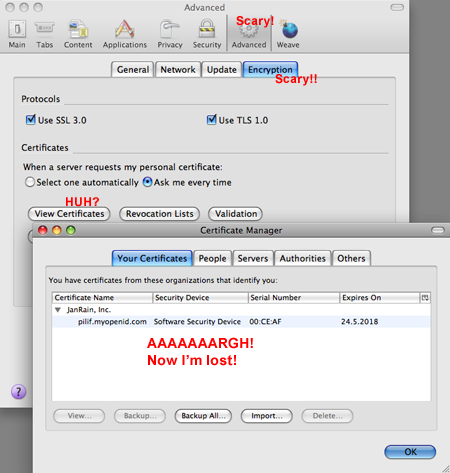
Picture underlining the

The screenshot shows what’s needed to actually have a look at the client side certificates installed in your browser, which currently is the only way of accessing them. Let’s say you want to copy a keypair from one machine to another. You’ll have to:

  1. Open the preferences (many people are afraid of even that)
  2. Select Advanced (scary)
  3. Click Encryption (encry… what?)
  4. Click “View Certificates” (what do the other buttons do? oops! Another dialog?)
  5. Select your certificate (which one?) and click “Export” (huh?)

Even generation of the key is done in-browser without feedback by the site requesting the key.

This is like basic authentication (nobody uses this one) vs. forms based authentication (which is what everybody uses): It’s non-themeable, scary, modal and complicated.

What we need for client side certificates to become useful is a way for sites to get more access to the functionality than they currently do: They need information on the key generation process. They should allow the user to export the key and to re-import it (just spawning two file dialogs should suffice – of course the key must not be transmitted to the site in the process). They need a way to list the keys installed in a browser. They need to be able to add and remove keys (on the user’s request).

In the current state, this excellent idea is rendered completely useless by the awful usability and the completely detached nature: This is a browser feature. It’s browser dependent without a way for the sites to control it – to guide users through steps.

For this to work, sites need more control.

Without giving them access to your keys.

<divpInteresting problem. Isn’t it?</p>

Dependent on working infrastructure

If you create and later deploy and run a web application, then you are dependent on a working infrastructure: You need a working web server, you need a working application server and in most cases, you’ll need a working database server.

Also, you’d want a solution that always and consistently works.

We’ve been using lighttpd/FastCGI/PHP for our deployment needs lately. I’ve preferred this to apache due to the easier configuration possible with lighty (out of the box automated virtual hosting for example), the potentially higher performance (due to long-running FastCGI processes) and the smaller amount of memory consumed by lighttpd.

But last week, I had to learn the price of walking off the beaten path (Apache, mod_php).

In one particular constellation, the lighty, fastcgi, php combination, running on a Gentoo box sometimes (read: 50% of the time) a certain script didn’t output all the data it should have. Instead, lighty randomly sent out RST packets. This without any indication of what could be wrong in any of the involved log files.

Naturally, I looked everywhere.

I read the source code of PHP. I’ve created reduced test cases. I’ve tried workarounds.

The problem didn’t go away until I tested the same script with Apache.

This is where I’m getting pragmatic: I depend on a working infrastructure. I need it to work. Our customers need it to work. I don’t care who is to blame. Is it PHP? Is it lighty? Is it Gentoo? Is it the ISP (though it would have to be on the senders end as I’ve seen the described failure with different ISPs)?

I don’t care.

My interest is in developing a web application. Not in deploying one. Not really, anyways.

I’m willing (and able) to fix bugs in my development environment. I may even be able to fix bugs in my deployment platform. But I’m certainly not willing to. Not if there is a competing platform that works.

So after quite some time with lighty and fastcgi, it’s back to Apache. The prospect of having a consistently working backed largely outweighs the theoretical benefits of memory savings, I’m afraid.

Ubuntu 8.04

I’m sure that you have heard the news: Ubuntu 8.04 is out.

Congratulations to Canonical and their community for another fine release of a really nice Linux distribution.

What prompted me to write this entry though is the fact that I have updated shion from 7.10 to 8.04 this afternoon. Over a SSH connection.

The whole process took about 10 minutes (including the download time) and was completely flawless. Everything kept working as it was before. After the reboot (which also went flawlessly), even OpenVPN came back up and connected to the office so I could have a look at how the update went.

This is very, very impressive. Updates are tricky. Especially considering that it’s not one application that’s updated, not even one OS. It’s a seemingly random collection of various applications with their interdependencies, making it virtually impossible to test each and every configuration.

This shows that with a good foundation, everything is possible – even when you don’t have the opportunity to test for each and every case.

Congratulations agin, Ubuntu team!

Web service authentication

When reading an article about how to make google reader work with authenticated feeds, one big flaw behind all those web 2.0 services sprang to my mind: Authentication.

I know that there are efforts underway to standardise on a common method of service authentication, but we are nowhere near there yet.

Take facebook: They offer you to enter your email account data into some form to send an invitation to all your friends. Or the article I was referring to: They want your account data for a authenticated feed to make them available in google reader.

But think of what you are giving away…

For your service provider to be able to interact with that other service, they need to store your passwort. Be it short term (facebook, hopefully) or long term (any online feed reader with authentication support). They can (and do) assure you that they will store the data in encrypted form, but to be able to access the service in the end, they need the unencrypted password, thus requiring them to not only use reversible encryption, but to also keep the encryption key around.

Do you want a company in a country whose laws you are not familiar with to have access to all your account data? Do you want to give them the password to your personal email account? Or to everything else in case you share passwords?

People don’t seem to get this problem as account data is freely given all over the place.

Efforts like OAuth are clearly needed, but as webbased technology, they clearly can’t solve all the problems (what about Email accounts for example).

But is this the right way? We can’t even trust desktop applications. Personally, I think the good old username/password combination is at the end of its usefulness (was it ever really useful?). We need new, better, ways for proving our identity. Something that is easily passed around and yet cannot be copied.

SSL client certificates feel like an underused but very interesting option. Let’s make two examples. The first one is your authenticated feed. The second one is your SSL-enabled email server. Let’s say that you want to give a web service revokable access to both services without ever giving away personal information.

For the authenticated feed, the external service will present the feed server with its client side certificate which you have signed. By checking your signature, the authenticated feed knows your identity and by checking your CRL it knows whether you authorized the access or not. The service doesn’t know your password and can’t use your signature for anything but accessing that feed.

The same goes for the email server: The third party service logs in with your username and the signed client certificate (signed by you), but without password. The service doesn’t need to know your password and in case they do something wrong, you revoke your signature and be done with it (I’m not sure whether mail servers support client certificates, but I gather they do as it’s part of the SSL spec).

Client side certificates already provide a standard means for secure authentication without ever passing a known secret around. Why isn’t it used way more often these days?

VMware shared folders and Visual Studio

ver since I’ve seen the light, I’m using git for every possible situation. Subversion is ok, but git is fun. It changed the way how I do developement. It allowed me to create ever so many fun-features for our product. Even in spare-time – without the fear of never completing and thus wasting them.

I have so many branches of all our projects – every one of them containing useful, but just not ready for prime-time feature. But when the time is right, I will be able to use that work. No more wasting it away because a bugfix touches the same file.

The day I dared to use git was the day that changed how I work.

Now naturally, I wanted to use all that freedom for my windows work aswell, but as you know, git just isn’t quite there yet. In fact, I had an awful lot of trouble with it, mainly because of it’s integrated SSH client that doesn’t work with my putty pageant-setup and stuff.

So I resorted to storing my windows development stuff on my mac file system and using VMware Fusion’s shared folder feature to access the source files.

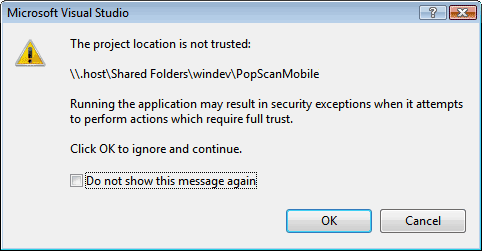
Unfortunately, it didn’t work very well at first as this is what I got:

Error message saying that the 'Project location is not trusted'

I didn’t even try to find out what happens when I compile and run the project from there, so I pressed F1 and followed the instructions given there to get rid of the message that the “Project location is not trusted”.

I followed them, but it didn’t help.

I tried adding various UNC paths to the intranet zone, but neither worked.

Then I tried sharing the folder via Mac OS X’s built in SMB server. This time, the path I’ve set up using mscorcfg.msc actually seemed to do something. Visual Studio stopped complaining. And then I found out:

Windows treats host names containing a dot (.) as internet resources. Hostnames without dots are considered to be intranet resouces.

celeswindev worked in mscorcfg.msc because celes, not containing a dot, was counted as an intranet resource.

.host contains a dot and this is counted to be an internet resource.

This means that to make the .NET framework trust your VMWare shared folder, you have to add the path to the “Internet_Zone”. Not the “LocalIntranet_Zone”, because the framework loader doesn’t even look there.

Once I’ve changed that configuration, Visual Studio complained that it was unable to parse the host name – it seems to assume them not starting with a dot.

This was fixed by mapping the path to a drive letter like we did centuries ago.

Now VS is happy and I can have the best of all worlds:

  • I can keep my windows development work in a git repository
  • I have a useful (and working) shell and ssh-agent to actually “git svn dcommit” my work
  • I don’t have to export any folders of my mac via SMB
  • Time Machine now also backs up my Windows Work which I had to do manually until now.

Very nice indeed, but now back to work (with git :-) ).

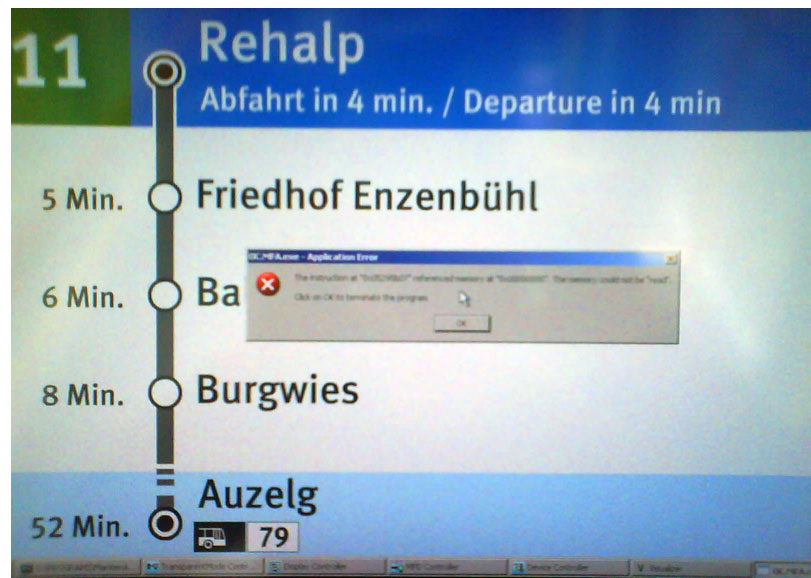
This tram runs Microsoft® Windows® XP™

Image of the new station information system in some of Zurich's tramways with a Windows GPF on top of the display

The trams here in Zürich recently were upgraded with a really useful system providing an overview over the next couple of stations and the times when they will be reached.

Today, I managed to grab this picture which once again shows clearly why windows maybe isn’t the right platform for something like this. Also, have a look at the amount of applications in the taskbar (I know, the picture is bad, but that’s all I can get out of my mobile phone)…

If I was tasked with implementing something like this, I’d probably use Linux in the backend and a webbrowser as s frontend. That way it’s easier to debug, more robust and less embarassing if it blows up.

Another new look

It has been a while since the last redesign of gnegg.ch, but is a new look after just a little more than one year of usage really needed?

The point is that I have changed blogging engines yet again. This time it’s from Serendipity to Word Press.

What motivated the change?

Interestingly enough, if you ask me, s9y is clearly the better product than WordPress. If WordPress is Mac OS, then s9y is Linux: It has more features it’s based on cleaner code, it doesn’t have any commercial backing at all. So the question remains: Why switch?

Because that OSX/Linux-analogy also works the other way around: s9y is an ugly duckling compared to WP. External tools won’t work (well) with s9y due to it not being known well enough. The amount of knobs to tweak is sometimes overwhelming and the available plugins are not nearly as polished as the WP ones.

All these are reasons to make me switch. I’ve used a s9y to wp converter, but some heavy tweaking was needed to make it actually transfer category assignements and tags (the former didn’t work, the latter wasn’t even implemented). Unfortunately, the changes were too hackish to actually publish them here, but it’s quite easily done.

Aside of that, most of the site has survived the switch quite nicely (the permalinks are broken once again though), so let’s see how this goes :-)

Impressed by git

The company I’m working with is a Subversion shop. It has been for a long time – since fall of 2004 actually where I finally decided that the time for CVS is over and that I was going to move to subversion. As I was the only developer back then and as the whole infrastructure mainly consisted of CVS and ViewVC (cvsweb back then), this move was an easy one.

Now, we are a team of three developers, heavy trac users and truly dependant on Subversion which is – mainly due to the amount of infrastructure that we built around it – not going away anytime soon.

But none the less: We (mainly I) were feeling the shortcomings of subversion:

  • Branching is not something you do easily. I tried working with branches before, but merging them really hurt, thus making it somewhat prohibitive to branch often.
  • Sometimes, half-finished stuff ends up in the repository. This is unavoidable considering the option of having a bucket load of uncommitted changes in the working copy.
  • Code review is difficult as actually trying out patches is a real pain to do due to the process of sending, applying and reverting patches being a manual kind of work.
  • A pet-peeve of mine though is untested, experimental features developed out of sheer interest. Stuff like that lies in the working copy, waiting to be reviewed or even just having its real-life use discussed. Sooner or later, a needed change must go in and you have the two options of either sneaking in the change (bad), manually diffing out the change (hard to do sometimes) or just forget it and svn revert it (a real shame).

Ever since the Linux kernel first began using Bitkeeper to track development, I knew that there is no technical reason for these problems. I knew that a solution for all this existed and that I just wasn’t ready to try it.

Last weekend, I finally had a look at the different distributed revision control systems out there. Due to the insane amount of infrastructure built around Subversion and not to scare off my team members, I wanted something that integrated into subversion, using that repository as the official place where official code ends up while still giving us the freedom to fix all the problems listed above.

I had a closer look at both Mercurial and git, though in the end, the nicely working SVN integration of git was what made me have a closer look at that.

Contrary to what everyone is saying, I have no problem with the interface of the tool – once you learn the terminology of stuff, it’s quite easy to get used to the system. So far, I did a lot of testing with both live repositories and test repositories – everything working out very nicely. I’ve already seen the impressive branch merging abilities of git (to think that in subversion you actually have to a) find out at which revision a branch was created and to b) remember every patch you cherry-picked…. crazy) and I’m getting into the details more and more.

On our trac installation, I’ve written a tutorial on how we could use git in conjunction with the central Subversion server which allowed me to learn quite a lot about how git works and what it can do for us.

So for me it’s git-all-the-way now and I’m already looking forward to being able to create many little branches containing many little experimental features.

If you have the time and you are interested in gaining many unexpected freedoms in matters of source code management, you too should have a look at git. Also consider that on the side of the subversion backend, no change is needed at all, meaning that even if you are forced to use subversion, you can privately use git to help you manage your work. Nobody would ever have to know.

Very, very nice.